Deployment Options
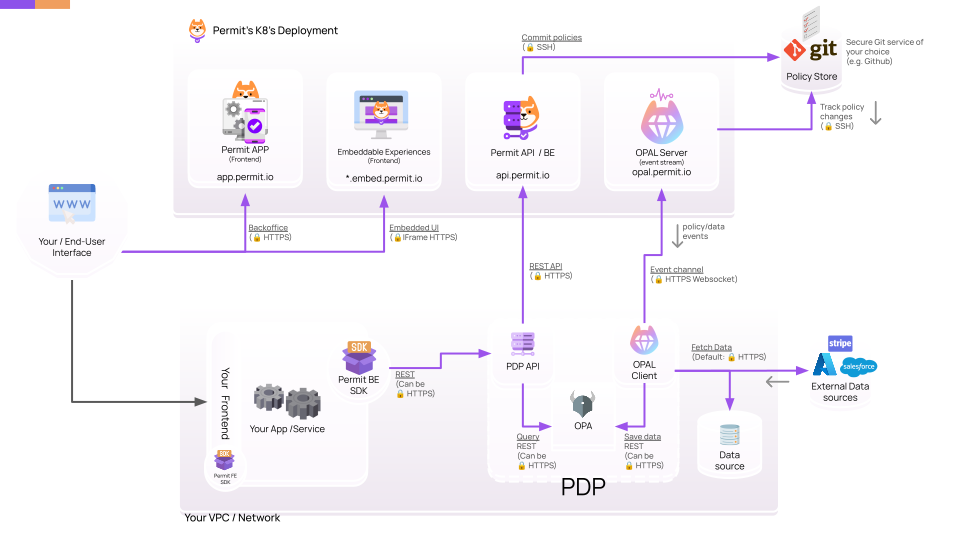
Choose how to deploy Permit.io: the default hybrid model, a full on-premise deployment, or a light on-premise deployment. This page is for teams that have completed the Quickstart, connected an application to Permit, and need to decide whether the hybrid model meets their network and compliance requirements.
Compare the deployment options
| Option | Control plane | Policy decision points (PDPs) | Choose it when | Operational work |
|---|---|---|---|---|
| Hybrid (default) | Permit's cloud | Your network | Your PDPs can reach Permit's cloud | Least: you run PDPs only |
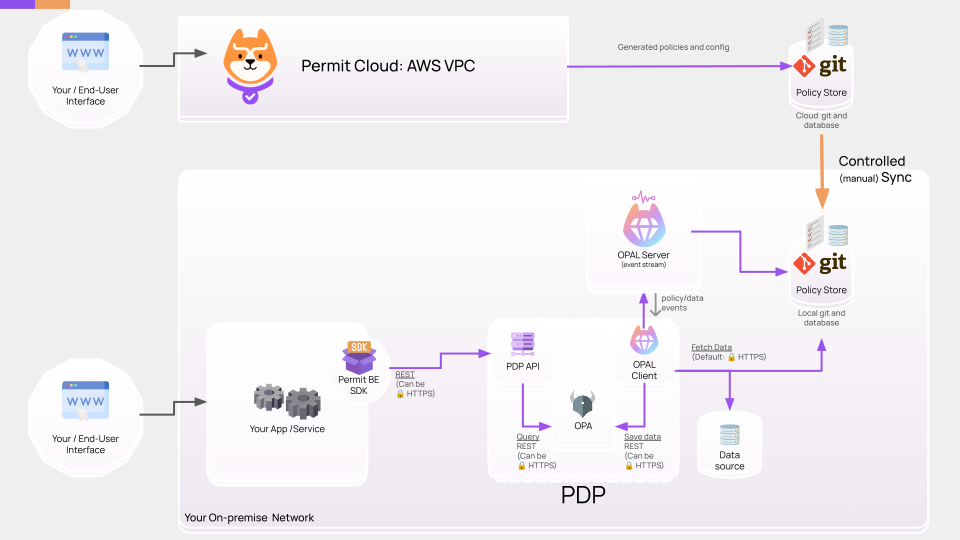
| Light on-premise | Permit's cloud management interfaces, with policy administration (the OPAL server) in your network | Your network | You want to review and test every policy change before it reaches your PDPs | Medium |
| Full on-premise | Your network | Your network | Your network is air-gapped, or your security policy requires every component on-premise | Most: you run the entire Permit stack |
Why you might need an on-premise deployment
Most teams don't need one. In the default hybrid deployment, PDPs run in your network and your data can stay there, while Permit runs the control plane.
You need an on-premise deployment in these cases:
- Your network is air-gapped, with no internet connection.
- Your security or compliance policy requires every component to run on-premise.
On-premise deployment types
Permit supports two on-premise deployment types.
Full on-premise
In a full on-premise deployment, you run the entire Permit.io stack in your own Kubernetes cluster, delivered as Helm charts. Full on-premise takes the most DevOps and IT work of the three options.
Light on-premise
In a light (partial) on-premise deployment, you keep using the Permit management interfaces in the cloud. You run the policy administration components, primarily the Open Policy Administration Layer (OPAL) server, in your network:
- Permit writes policy state to a cloud Git repository that you own.
- You sync that repository to a local Git repository.
- The local OPAL server tracks the local repository and pushes policy to your on-premise PDPs.
Every change passes through your own repository, so you can filter, test, benchmark, and review configuration and policy before it reaches your PDPs. Light on-premise takes less work than full on-premise and more work than hybrid.
Get started with an on-premise deployment
- Full on-premise: follow the on-premise deployment guide, available to Enterprise customers.
- Light on-premise and licensing questions: email support@permit.io or talk to an engineer.
Related pages
- Control & Data planes: how the hybrid model separates policy management from decisions.
- Run and connect a PDP: PDP types and production deployment models.
- Sync policy with GitOps: connect a Git repository to your Permit environment.