Deploy the PDP to production
Run the Permit.io policy decision point (PDP) as a container inside your own network, and point your application's SDK at it. This page is for operators and backend developers who move a Permit integration from the Cloud PDP to a production deployment.
A self-hosted PDP (an Edge PDP) evaluates permission checks next to your services, so checks don't make a network round trip to Permit. The PDP keeps working from its local copy of the policy when the connection to Permit drops. The Permit PDP is open source.
Prerequisites
- A Permit.io environment with a policy. See Quickstart.
- The environment API key. See Get your API key.
- Docker, or a container platform. See Get Docker.
Architecture
Your application calls the PDP. The PDP keeps an outgoing connection to Permit's control plane and receives policy and data updates over it.
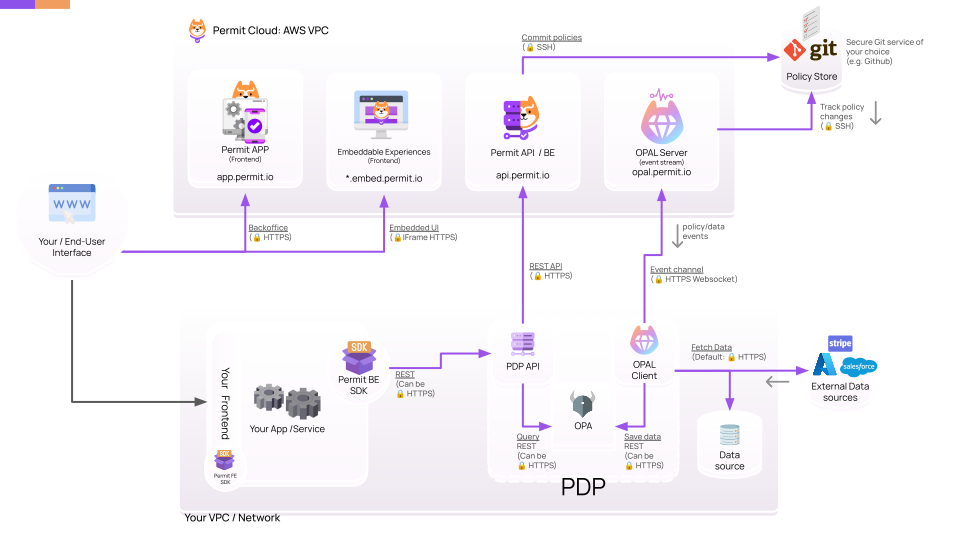
For a comparison of sidecar, cluster, serverless, and single-PDP layouts, see PDP deployment models.
Run the PDP container
Pull the PDP image from Docker Hub:
docker pull permitio/pdp-v2:latest
Run the container. Replace <YOUR_API_KEY> with your environment API key.
docker run -it \
  -p 7766:7000 \
  --env PDP_API_KEY=<YOUR_API_KEY> \
  --env PDP_DEBUG=True \
  permitio/pdp-v2:latest
The PDP API listens on port 7000 inside the container. The -p 7766:7000 flag maps it to port 7766 on the host, which is the port the SDK examples in these docs use.
| Environment variable | Purpose |
|---|---|
PDP_API_KEY | The environment API key. The PDP uses it to fetch its configuration and policy from Permit. |
PDP_DEBUG | True turns on decision debug logging. Set it to False in production. |
Verify the PDP is healthy
Send a GET request to http://localhost:7766/health, for example with curl or a browser. A healthy PDP returns HTTP 200 with "status": "ok" at the top level. When the PDP's internal API service (Horizon) or its policy engine (OPA) is not healthy, the endpoint returns HTTP 503 with "status": "error" and the failing component under components.
The PDP serves the same health check on three paths. Use whichever path your platform expects.
| Path | Port inside the container | Common use |
|---|---|---|
/health | 7000 | Liveness probe |
/healthy | 7000 | Readiness probe, Docker healthcheck |
/ready | 7000 | Startup probe |
All three paths return the same response. They don't require an API key. From the host, use the mapped port (7766 in the examples on this page). Inside a container, pod, or task, use 7000.
Connect your SDK to the PDP
Set the SDK's PDP URL to the address of your PDP. For a container that maps port 7766 on the same host, the URL is http://localhost:7766.
For example, in Node.js:
const permit = new Permit({
  pdp: "http://localhost:7766",
  token: "<YOUR_API_KEY>",
});
Permit is imported from the permitio package. For the full setup in each language, see Check permissions.
Run the PDP with an organization or project API key
An organization API key or a project API key lets one secret serve several environments. The PDP still serves one environment at a time, so you tell it which one to load.
| API key type | Set instead of PDP_API_KEY | Also set |
|---|---|---|
| Organization | PDP_ORG_API_KEY | PDP_ACTIVE_PROJECT and PDP_ACTIVE_ENV (ID or key) |
| Project | PDP_PROJECT_API_KEY | PDP_ACTIVE_ENV (ID or key) |
Run the PDP with an organization API key:
docker run -it \
  -p 7766:7000 \
  --env PDP_ORG_API_KEY=<YOUR_ORG_API_KEY> \
  --env PDP_ACTIVE_PROJECT=<YOUR_PROJECT_ID_OR_KEY> \
  --env PDP_ACTIVE_ENV=<YOUR_ENVIRONMENT_ID_OR_KEY> \
  --env PDP_DEBUG=True \
  permitio/pdp-v2:latest
Run the PDP with a project API key:
docker run -it \
  -p 7766:7000 \
  --env PDP_PROJECT_API_KEY=<YOUR_PROJECT_API_KEY> \
  --env PDP_ACTIVE_ENV=<YOUR_ENVIRONMENT_ID_OR_KEY> \
  --env PDP_DEBUG=True \
  permitio/pdp-v2:latest
Expose OPA from the PDP container
The PDP bundles Open Policy Agent (OPA), which listens on port 8181 inside the container. To call the OPA API directly, add the -p 8181:8181 port mapping:
docker run -it \
  -p 7766:7000 \
  -p 8181:8181 \
  --env PDP_API_KEY=<YOUR_API_KEY> \
  --env PDP_DEBUG=True \
  permitio/pdp-v2:latest
For the endpoints OPA exposes, see the OPA REST API reference.
System requirements and performance
CPU and memory needs depend on your request volume, policy complexity, and the amount of data in the environment.
Starting resources for a PDP
- CPU: request about 200 millicores. Allow a limit of at least 1000 millicores so the PDP stays responsive during short CPU spikes.
- Memory: about 512 MiB.
Scale the PDP for CPU
CPU use grows with the number of requests and the complexity of the policies they query. When CPU is the bottleneck, scale the PDP horizontally: run more PDP instances behind a load balancer, for example by increasing the replicas of a Kubernetes deployment.
Scale the PDP for memory
Memory use grows with the volume of data in the environment. The PDP evaluates policy in OPA, and OPA keeps all of the environment's policy data in process memory, together with indexes and caches. Adding PDP instances doesn't reduce the memory each one needs. Give each PDP more memory instead.
To estimate memory, multiply the number of policy objects (users, resource instances, and tenants) by 6 KB. For example, an environment with 100,000 users, 500,000 resource instances, and 100 tenants needs about 3.5 GB. Attributes on objects and relationships between objects in relationship-based access control (ReBAC) change the real figure.
Performance settings
- Run the PDP close to your application. Deploy the PDP in the same VPC, and preferably on the same node, as the services that query it.
- Turn off decision debug information. Set
--env PDP_DEBUG=False. Debug logging adds work to every decision. - Tune the base policy. For example, turning off ReBAC checks in an environment that doesn't use ReBAC shortens policy evaluation. Contact Permit support at support@permit.io to change the base policy.
With these settings, a PDP handles several thousand requests per second at under 10 ms per request.
Keep serving decisions when Permit is unreachable
Offline mode makes the PDP persist its configuration and policy to a local backup. When the PDP can't reach Permit at startup, it loads from that backup. Offline mode also lets the PDP start disconnected from the control plane and reconnect at runtime (PDP version 0.9.11 or later). See PDP offline mode.