Get Support on Slack
Join the Permit.io Slack community to ask questions about Permit, get answers from the AI support agent and the Permit team, and track your support tickets. This page is for developers and admins who build with Permit and need help.
Get help in the Permit Slack community
-
Open the Permit.io Slack community invite and join the workspace.
-
Optional: introduce yourself in
#general. -
Post your question in the channel that matches your topic. See Slack channels.
-
Read the reply from the AI support agent in the thread of your message. A Permit team member or another developer can also reply in the same thread.
Your question is answered when a reply appears in the thread. If the answer doesn't solve your problem, reply in the thread with more detail, or use the Slack commands to track or escalate a ticket.
AI support agent
The Permit Slack workspace has an AI support agent that answers questions from the Permit documentation. When you post a question in a channel, the AI support agent replies in the thread. To ask the AI support agent again, tag @Permit.io AI Agent in your message.
Ask the AI support agent about:
- Code examples and SDK usage
- Policy configuration
- Troubleshooting common issues
- Short technical questions
To search the documentation with AI without leaving the docs site, see Get AI support.
Slack channels
Post in the channel that matches your question:
| Channel | Use the channel for |
|---|---|
#permit-saas | Support for the Permit.io platform: account and workspace setup, API and SDK questions, policy modeling and enforcement, integration help |
#opal | Open Policy Administration Layer (OPAL), the open-source project Permit maintains to keep policy engines in sync with policy and data: OPAL architecture, deployment, and troubleshooting |
#general | Authorization and access control best practices and patterns, community discussion, feature requests and feedback, non-technical questions |
#announcements | Product updates, release notes, version announcements, and community updates from the Permit team |
Slack commands
The Permit Support Automation app in the Permit Slack workspace adds two commands for support tickets.
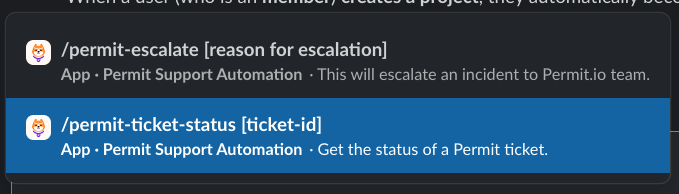
Check a support ticket with /permit-ticket-status
/permit-ticket-status shows your support tickets from Slack:
- Type
/permit-ticket-statusto list your open tickets. - Type
/permit-ticket-status [ticket-id]to see the status and progress of one ticket. Replace[ticket-id]with the ID of your ticket.
Escalate an issue with /permit-escalate (Pro and Enterprise plans)
/permit-escalate escalates an issue to the Permit support team. The command is available to workspaces on the Pro and Enterprise plans, which include a dedicated Slack channel. See the Permit.io pricing page for the support channels of each plan.
The command:
- Creates a support ticket from your Slack message
- Routes the ticket to a Permit support engineer
- Works in private channels and direct messages. The command doesn't work in public channels.
To escalate, type /permit-escalate followed by a description of your issue. To follow the ticket, use /permit-ticket-status.