Policy Guards
A Policy Guard applies the same permission rules to several projects in your Permit.io workspace and locks those permissions so project members can't change them. This page is for workspace administrators who need one baseline policy across projects, and explains what a Policy Guard contains, how Permit applies it, and when to use it. To create one, see the Policy Guard API guide.
What is a Policy Guard?
A Policy Guard is an organization-level set of permission rules, attached to a list of projects. You manage Policy Guards with the Permit API. The API groups the endpoints under the Policy Guards (EAP) tag.
A Policy Guard has two parts:
| Part | What it holds |
|---|---|
| Scope | A unique key and the list of projects the Policy Guard applies to. |
| Rules | Permission rules. Each rule names a resource and an action, plus a role, a user set, a resource set, or a supported combination, and whether the permission is allowed. |
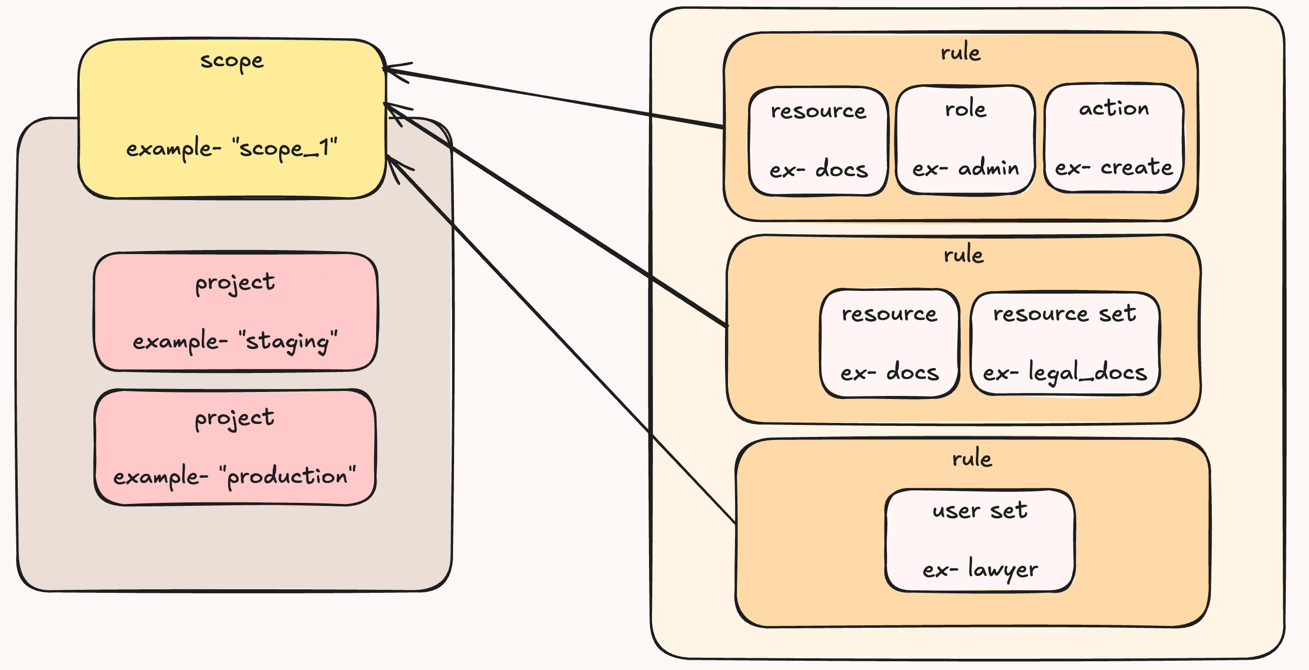
How Permit applies a Policy Guard
- Every environment in the scope. When you add a project to a scope, Permit marks each environment of that project as guarded and applies the scope's rules to each environment. When you add a rule, Permit applies it to every environment of every project in the scope.
- Missing objects are created. If an environment has no resource, action, or role with the key a rule uses, Permit creates it. Rules reference objects by key, not by ID, because IDs are unique to each environment.
- Guarded permissions are locked. In a guarded environment, a change to a permission that a Policy Guard rule covers fails with a
403 Forbiddenerror. The permission stays as the rule sets it until you remove the rule or remove the project from the scope.
Rule types
A rule always includes resource_key and action_key. The rest of the rule decides who it applies to:
| Rule applies to | Fields to set |
|---|---|
| A role | role_key |
| A user set (attribute-based access control, ABAC) | user_set |
| A resource set with a role | resource_set and role_key |
| A resource set with a user set | resource_set and user_set |
Permit rejects a rule that sets both role_key and user_set without a resource_set.
Roles in Policy Guard rules are environment-level roles, as in role-based access control (RBAC). Rules have no field for relationship-based access control (ReBAC) resource roles or relationships.
Who can manage Policy Guards
The Policy Guard endpoints accept an organization API key, or a signed-in member with the Workspace Owner role. Any other caller gets a 403 Forbidden error that asks for an organization API key or workspace admin permissions. See API key types for the difference between organization, project, and environment API keys.
When to use a Policy Guard
- One rule for many projects. For example, only the
adminrole can create documents in every project of the workspace. - Protect a baseline from project-level edits. Project members can edit the rest of the policy, but not the permissions a Policy Guard locks.
- Review the enforced baseline in one place. List a scope's rules with the API to see which permissions every project in the scope enforces.