What is ABAC?
Learn what attribute-based access control (ABAC) is and how Permit.io models it. This page is for developers deciding whether their access rules need attributes before they build an ABAC policy.
What is ABAC?
Attribute-based access control (ABAC) is an authorization model that evaluates attributes (characteristics) of the user, the resource, and the context of a request, instead of only the user's role. An ABAC rule allows an action when the attribute values match the rule's conditions. When an attribute value changes, access changes with it, without reassigning roles.
Use ABAC when a role alone can't express a rule, for example when access depends on location, time, subscription plan, or data sensitivity.
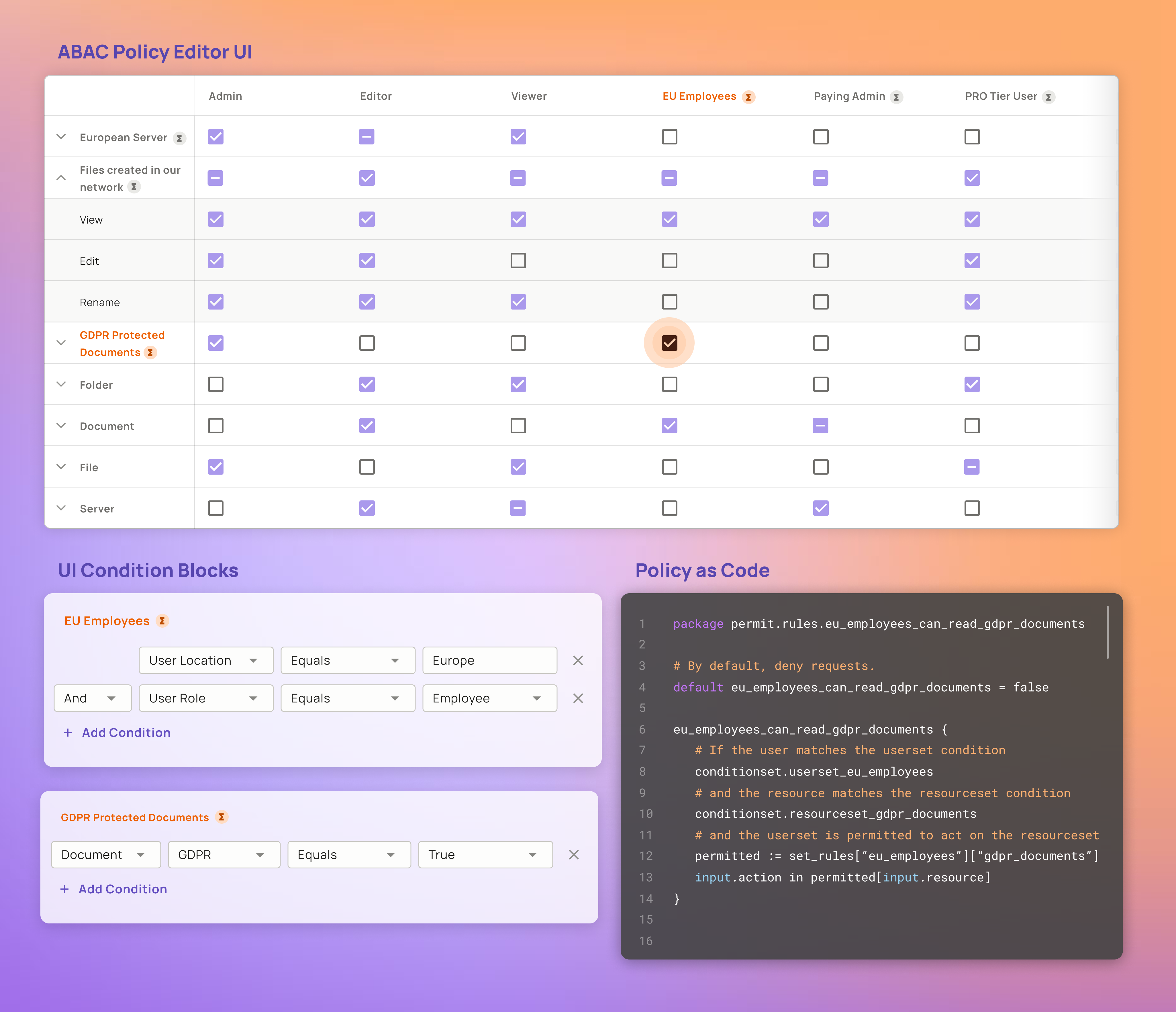
Employees based in the European Union can perform any action on GDPR-protected documents.
ABAC in Permit
You build ABAC policies in Permit with three parts:
| Part | What it is | Where you create it |
|---|---|---|
| Attributes | Key-value data on users, tenants, and resources, such as location or is_paying | User and tenant attributes in the settings of the Directory screen. Resource attributes in the resource's ABAC Options on the Resources tab. See Defining attributes. |
| User sets (dynamic roles) | A group of users whose attributes match a set of conditions, such as EU Employees | ABAC Rules tab of the Policy screen |
| Resource sets (dynamic resources) | A group of resources whose attributes match a set of conditions, such as GDPR Protected Documents | ABAC Rules tab of the Policy screen |
In the Policy Editor, user sets appear next to roles, and resource sets appear next to resources. You select the actions a user set can perform on a resource set, as you do for roles and resources.
NIST formalized ABAC's terminology and design considerations in Special Publication 800-162, "Guide to Attribute Based Access Control (ABAC) Definition and Considerations," first published in January 2014. Read the NIST SP 800-162 publication page.
More reading about ABAC
- ABAC components: the subject, resource, action, and environment attributes of an access request.
- Building your first ABAC policy: create attributes, a user set, a resource set, and permissions in the Permit dashboard.
- Defining attributes: set user, tenant, resource, and role attributes in the dashboard or through the API.
- ABAC design patterns: implement ownership and group membership with attributes, and add custom Rego attributes.
- Time-based role example: grant a role that expires at a set time.
- Mix and Match Policies: combine ABAC with role-based and relationship-based rules.