What is ReBAC?
Learn what relationship-based access control (ReBAC) is and the terms Permit.io uses to model it: resource roles, role assignments, role derivations, and relationship tuples. This page is for developers deciding whether their application needs ReBAC before they build a ReBAC policy.
ReBAC is a policy model that grants access based on how users and resources are connected, such as a user who owns a folder, or a file that sits in that folder.
Policy as a graph
ReBAC extends role-based access control (RBAC). RBAC grants a role on a whole resource type. ReBAC also considers the relationships between users and specific resource instances, so you can write policies for hierarchical structures such as folders and files.
You can draw a ReBAC model as a graph. Each node is a user or a resource instance, and each edge is a relationship. Graphs map hierarchies and nested relationships, such as nested folders, organizations, and teams.
A shared file system such as Google Drive is a common ReBAC use case.
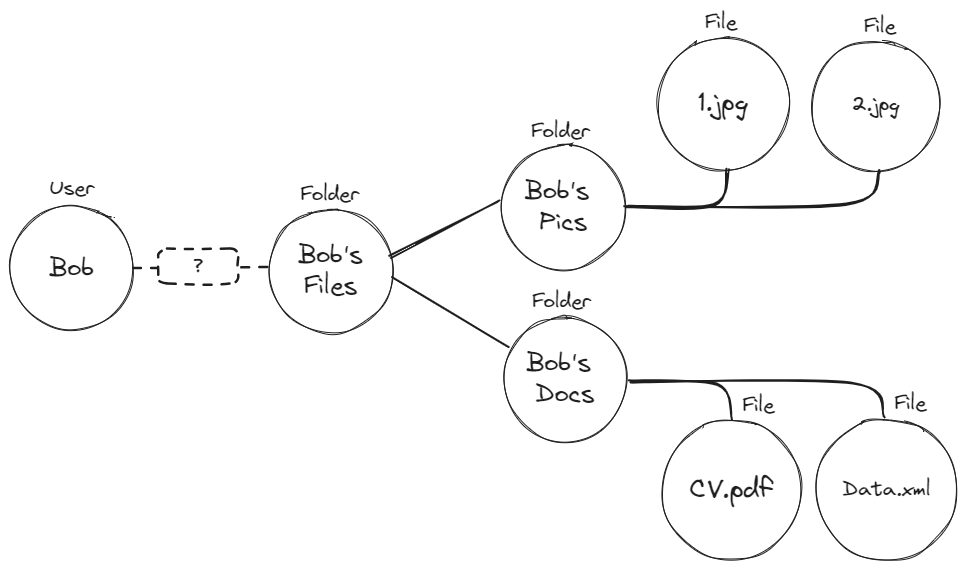 The graph shows a folder named
 Bob's Files. The folder contains two folders, Bob's Docs and Bob's Pics, and each of those folders contains files.
The following sections define the terms you use to control access to these files.
Resource roles
A resource role is a role that applies to a specific resource type. The role and its permissions apply only to instances of that resource.
Permit writes resource roles, instances, and roles on instances with the keys of the objects, in these three forms:
| Form | Means | Example |
|---|---|---|
resource:instance | One instance of a resource type | folder:bobs_files |
resource#role | A role on a resource type | folder#owner |
resource:instance#role | A role on one instance | folder:bobs_files#owner |
The dashboard shows the display names you entered, such as Folder#Owner for the role owner on the resource folder. This page uses the keys.
Resource roles combined with role derivations let a role on one instance grant roles on related instances in a hierarchy.
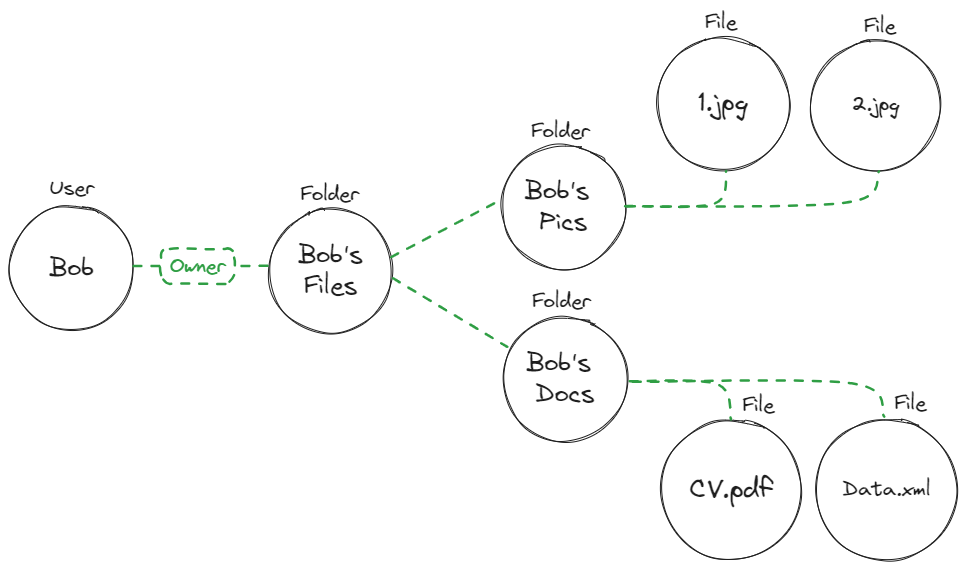
In the file system example, a user assigned the owner role on the folder bobs_files holds folder:bobs_files#owner.
Role assignment
A role assignment grants a user a role, and with it all the permissions of that role. You manage the permissions of a role once, instead of granting each permission to each user.
A ReBAC role assignment differs from an RBAC role assignment in scope. An RBAC role assignment applies across the tenant, to every instance of the resource types the role has permissions on. A ReBAC role assignment applies to one resource instance, such as folder:bobs_files#owner.
Role derivation
A role derivation grants a user a role on a resource instance without a direct role assignment on that instance. The user gets the role from a role they hold on a related instance.
A role derivation needs two parts:
-
A derivation rule between two resource roles.
ExampleA rule that derives
file#editorfromfolder#admin: a user with theadminrole on a folder also gets theeditorrole on every file related to that folder. -
A relationship tuple between two resource instances. When the tuple exists, a user with a role on one instance gets the derived role on the related instance.
ExampleA user who holds
folder:documents#admingetsfile:finance_doc#editoronce a relationship tuple connectsfolder:documentsandfile:finance_doc.
Role derivations use the relationship data you sync to Permit, so you don't write a condition for every object.
Relationship tuples
A relationship tuple records a relationship between two specific resource instances. A tuple has three parts: a subject instance, a relation, and an object instance. The policy decision point (PDP) evaluates relationship tuples to decide whether a derived role applies.
In a healthcare application, a relationship tuple could look like this:
subject:  department:cardiology
relation: parent
object:   medical_record:john_smith
The tuple states that the cardiology instance of the department resource is the parent of the john_smith instance of the medical_record resource. With a role derivation from department#doctor to medical_record#viewer, every user who holds department:cardiology#doctor can view medical_record:john_smith, without an assignment on the record itself. When a doctor requests the record, the PDP reads the tuple and the derivation to decide.
Common relationship types
Parent-child hierarchies
A parent-child hierarchy nests resources under other resources, as files sit in folders in a file system. A hierarchy can have any number of levels.
A parent-child relationship lets you derive roles between a folder and its files:
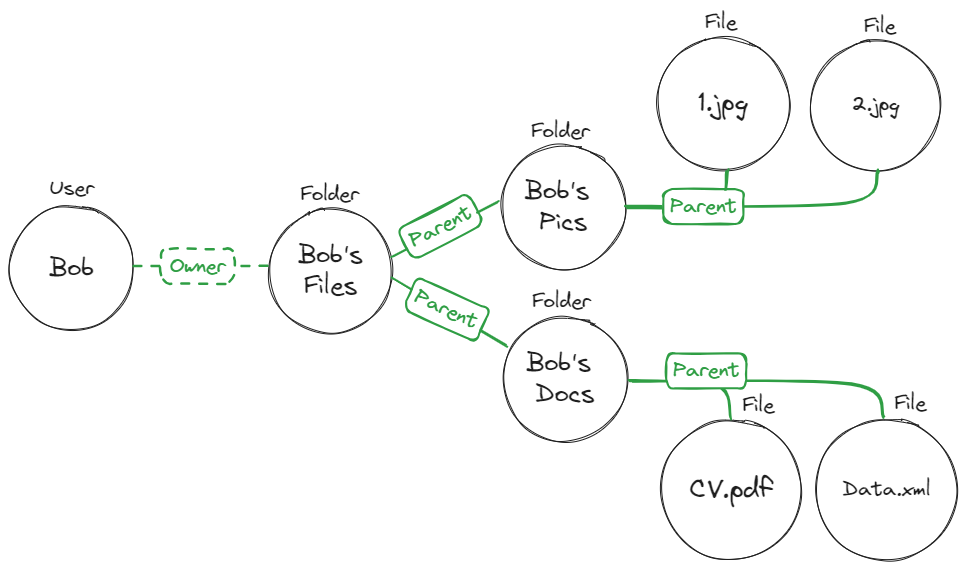 The ReBAC policy for this graph is:
A user with the folder#owner role on a folder instance gets the file#owner role on a file instance when the relationship tuple folder:<folder_key> parent file:<file_key> exists.
A user who holds folder:<folder_key>#owner holds file#owner on every file whose parent is that folder, including the files you add to the folder later. You don't create a relationship between the user and each file.
Organizations
An organization relationship grants permissions based on group membership. You add users to a group, and derive their permissions from the group instead of granting permissions to each user.
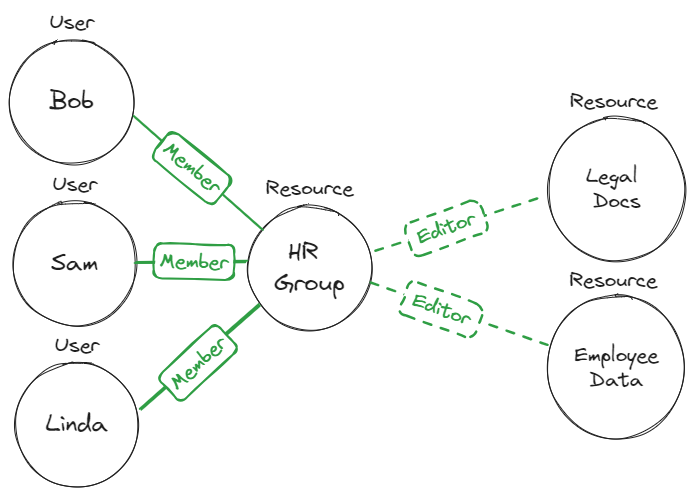
Bob, Sam, and Linda are members of the HR Group. To give all three edit access to the legal documents, you don't assign each of them an editor role on each document. You make them members of the HR Group, and use this policy:
A user with the group#member role on the group:hr instance gets the document#editor role on a document instance when the relationship tuple group:hr parent document:<document_key> exists.
Every member of group:hr holds document#editor on every document whose parent is group:hr. The policy stays the same when you add members to the group, or documents under the group.
Implementing ReBAC
In Permit, you define ReBAC policies on the Policy screen and sync relationship data with the Permit API or SDKs. For a working example, see the healthcare demo application in the Galactic Health Corporation GitHub repository.
Draw your resources as nodes and the relationships between them as edges on a graph. The graph shows which relations, resource roles, and role derivations your policy needs.
To define the policy in Permit, follow Building ReBAC policies.
Google's Zanzibar system, which models permissions as a graph of relationships, was described in the paper "Zanzibar: Google's Consistent, Global Authorization System" at the 2019 USENIX Annual Technical Conference. Read the paper on USENIX's site.
Next steps
- Building ReBAC policies: define resources, relations, role derivations, and instance relationships.
- Model ownership: compare ABAC and ReBAC approaches to resource ownership.
- Google Drive (Zanzibar): model a file-sharing permission system with ReBAC.
- Mix and Match Policies: combine ReBAC with RBAC and ABAC.