Use an external data source
Load data from your own data source into the policy decision points (PDPs) of an environment, and use the data as attributes in your policies. This page is for developers who build attribute-based access control (ABAC) policies with data that stays in their own systems. The Open Policy Administration Layer (OPAL) in each PDP fetches the data directly from your source, so the data isn't sent to the Permit control plane.
The example on this page loads country data from the REST Countries API and adds a region attribute to each user, based on the user's country attribute.
Prerequisites
- An environment API key (Get your API key), and the project ID or key and environment ID or key (Get the project ID and environment ID)
- GitOps connected to your project, so you can add custom Rego code to the policy repository
- A user attribute named
countryon your users (Define attributes) - A PDP container that runs with the
OPAL_SPLIT_ROOT_DATAflag, as described in the next section
Run the PDP with OPAL_SPLIT_ROOT_DATA
Pull the latest PDP image:
docker pull permitio/pdp-v2:latest
Run the container with OPAL_SPLIT_ROOT_DATA=1. Replace <YOUR-PERMIT-API-KEY> with your environment API key:
docker run -it \
  -p 7766:7000 \
  -p 8181:8181 \
  --env PDP_API_KEY=<YOUR-PERMIT-API-KEY> \
  --env OPAL_SPLIT_ROOT_DATA=1 \
  permitio/pdp-v2:latest
The two port mappings do different jobs. -p 7766:7000 publishes the PDP API, which your application queries for permission checks. -p 8181:8181 publishes the bundled Open Policy Agent (OPA) API, which Verify the data in the PDP reads at http://localhost:8181. Without -p 8181:8181, OPA listens only inside the container and that verification request fails to connect. For the other OPA settings, see Expose OPA from the PDP container.
How external attributes merge with Permit attributes
The Rego policies that Permit generates read custom attributes from rules in the permit.custom package. Define any of these rules in the custom directory of your policy repository:
| Rule | Merged with |
|---|---|
custom_user_attributes | Stored user attributes and input user attributes |
custom_tenant_attributes | Stored tenant attributes and input tenant attributes |
custom_resource_attributes | Stored resource attributes and input resource attributes |
custom_context_attributes | Input context attributes |
When the same attribute comes from more than one source, the check input takes precedence over the custom rule, and the custom rule takes precedence over the attributes stored in Permit.
1. Add the data source to the OPAL scope
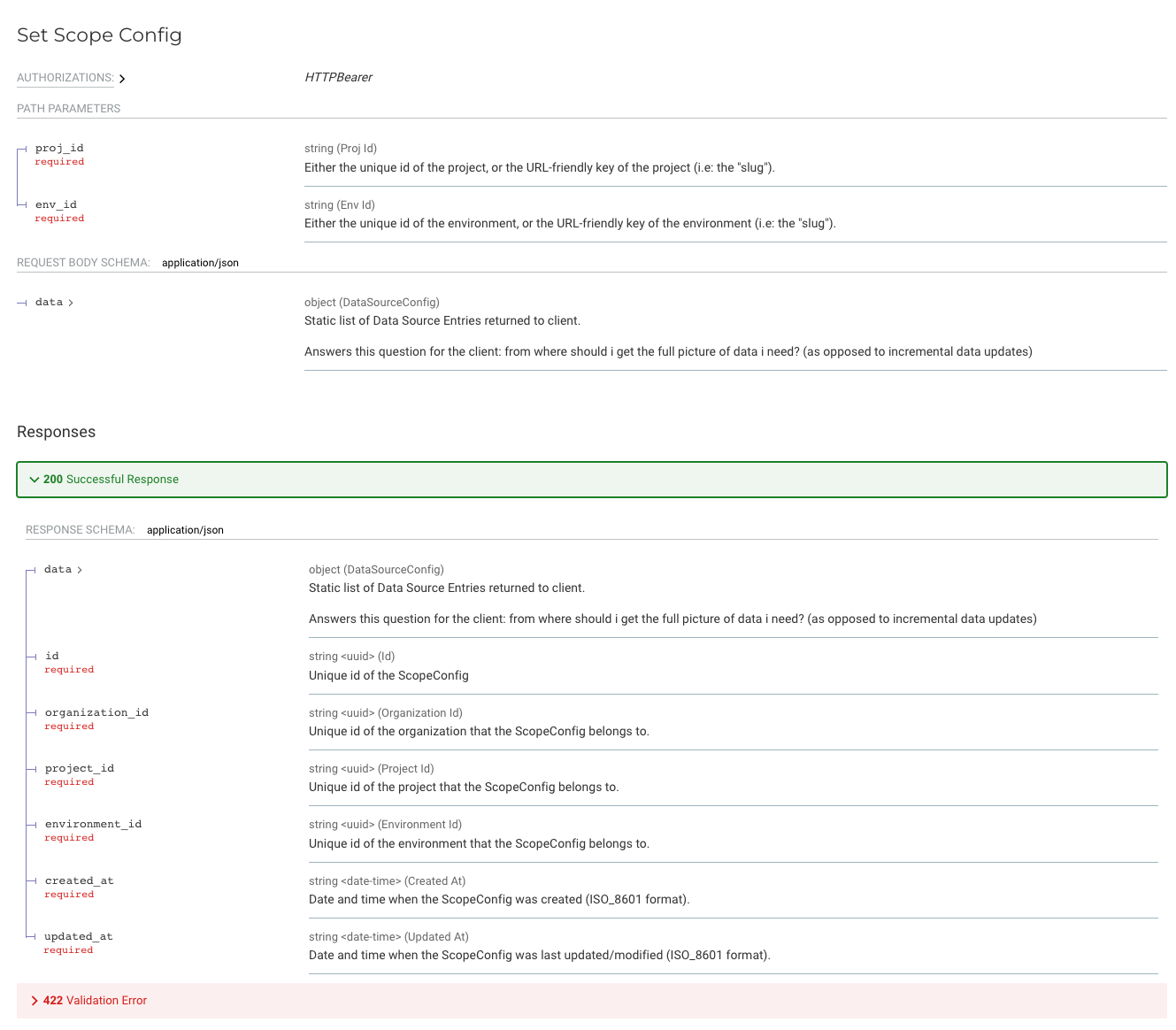
Send a PUT request to the Set Scope Config API at https://api.permit.io/v2/projects/{project_id}/{env_id}/opal_scope. Each entry in data.entries is a data source:
| Field | Description |
|---|---|
url | The URL OPAL fetches the data from |
dst_path | The path in the policy engine data where OPAL stores the fetched data |
config | Fetch options, such as request headers |
The following request stores the name and region of every country under /countries. Replace {project_id}, {env_id}, and permit_key_*** with your values:
curl --location --request PUT 'https://api.permit.io/v2/projects/{project_id}/{env_id}/opal_scope' \
--header 'Content-Type: application/json' \
--header 'Accept: application/json' \
--header 'Authorization: Bearer permit_key_***' \
--data '{
  "data": {
    "entries": [
      {
        "url": "https://restcountries.com/v3.1/all?fields=name,region",
        "dst_path": "/countries",
        "config": {
          "headers": {
            "Accept": "application/json"
          }
        }
      }
    ]
  }
}'
For all the options of a data source entry, see OPAL data sources.
To see the scope configuration of the environment, send a GET request to the same URL (Get Scope Config API).
Verify the data in the PDP
Read the data stored in OPA. The request needs the -p 8181:8181 mapping from Run the PDP with OPAL_SPLIT_ROOT_DATA. OPA in the PDP requires a bearer token, so replace <YOUR_API_KEY> with the same environment API key you passed as PDP_API_KEY:
 curl --location --request GET 'http://localhost:8181/v1/data' \
 --header 'Authorization: Bearer <YOUR_API_KEY>'
The response contains a countries key with the fetched data.
2. Define a custom attribute in Rego
Add Rego code to the custom directory of your GitOps policy repository. The following code builds a map from country name to region, and sets the region user attribute from the country attribute stored on the user:
package permit.custom
import future.keywords.in

region_by_common_name[name] := region {
 some _,country in data.countries
 name := country.name.common
 region := country.region
}

custom_user_attributes["region"] := region_by_common_name[data.users[input.user.key].attributes.country]
Push the change to the branch of your environment. You can load other data the same way, for example billing data from your payment provider, and turn the data into attributes.
To use the data directly in a custom Rego rule, reference the data.countries path. For example:
data.countries[0].region == "Americas"
3. Use the custom attribute in ABAC conditions
Define a user set with a condition on the region attribute. See Define a dynamic role (user set).
Verify the policy
Run permit.check() for a user whose country maps to the region in your condition. The check returns true when the user set grants the action. For a user in another region with no other role that allows the action, the check returns false. See Check permissions with permit.check().
Scope Configurations API reference
The Scope Configurations API has GET, PUT, and DELETE operations on /v2/projects/{proj_id}/{env_id}/opal_scope. The PUT request body has a data object with the data source entries: