Sync Users
Add your application's users to Permit.io so the policy decision point (PDP) can check their permissions. This page is for developers who connect their sign-up or sign-in flow to Permit. You can add users in the Permit dashboard, with the users.sync SDK function, or with the Permit API.
Prerequisites
- A Permit.io project and environment (Quickstart)
- For the SDK or API: your environment API key (Get your API key)
- Optional: roles defined in the Policy Editor, so you can assign one to the user (Policy basics)
When to sync users
Sync a user during sign-up or sign-in, right after your authentication provider verifies the user's identity. At that point, translate the user's organizational role (for example Head of Marketing, Customer, Consultant, or Patient) and other JSON Web Token (JWT) claims into application-level roles, attributes, and relationships.
The user key you sync is the identifier you later pass to permit.check(). Use the same identifier your authentication provider gives the user, for example the JWT sub claim.
Choose a sync method
| Method | Use it when |
|---|---|
| Permit dashboard | You add a few users by hand, for example for testing. |
| SDK | Your backend syncs users in code, for example in the sign-in callback. |
| API | You call Permit over HTTP from a language or tool without an SDK. |
Add a user in the Permit dashboard
-
In Permit, open the Directory screen from the navigation bar.
-
Select the tenant the user belongs to. Permit creates the user in the selected tenant. Each tenant has its own users, data, and permissions.
-
In the top right corner, click Add user.
-
Fill out the Create a new user form.
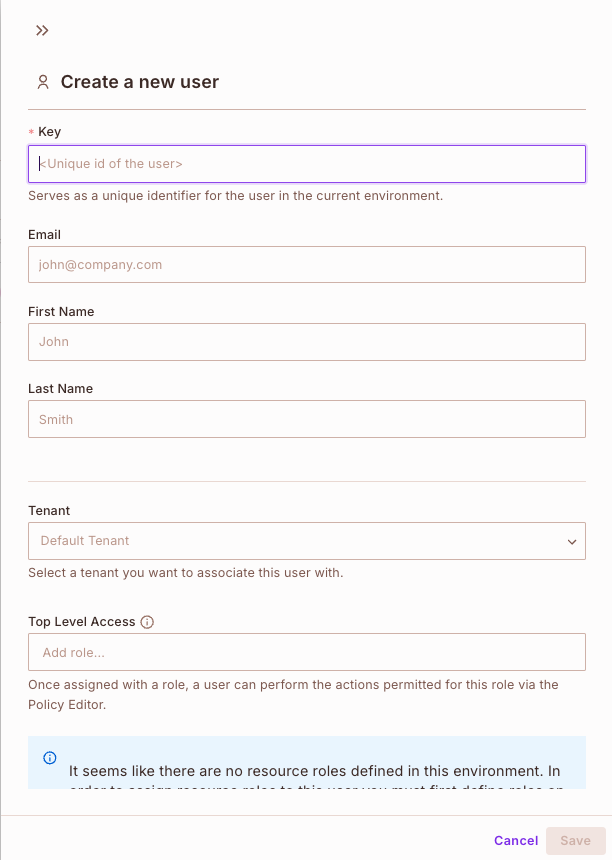
Field Description Key Required. The unique identifier of the user in the environment. When you use an authentication provider, this is usually the user's ID in that provider. Email, First Name, Last Name Optional. Identify the user in the Permit dashboard. Tenant The tenant to associate the user with. Top Level Access Optional. The roles to assign to the user in that tenant. Define roles first in the Policy Editor. Instance roles Optional. Roles on specific resource instances, for relationship-based access control (ReBAC) policies. See Build ReBAC policies. -
Click Save. The user appears in the Directory list for that tenant.
Sync a user with the SDK
Call users.sync from your backend when a user signs up or signs in. The function creates the user if the key doesn't exist, and updates the user if it does. In the Node.js SDK, the call is permit.api.users.sync(user). In the Python SDK, it is await permit.api.users.sync(user). See the per-language reference, for example syncUser for Node.js, and the SDKs overview for other languages.
User object fields
users.sync takes one argument: a user object with these fields.
| Field | Required | Description |
|---|---|---|
key | Yes | The unique ID Permit uses to identify the user in permission checks. You pass the same value to permit.check(). Use any value that is unique in your system, such as an email or a UUID. Allowed characters: letters, digits, and |, @, +, -, ., _. |
email | No | The user's email. A synced email is unique in the environment. |
first_name | No | The user's first name. |
last_name | No | The user's last name. |
attributes | No | Key-value data for attribute-based access control (ABAC) policies. See Defining attributes. |
role_assignments | No | A list of role and tenant pairs to assign to the user. |
Example user object
This Node.js example initializes the SDK from the PERMIT_API_KEY environment variable and passes a user object to permit.api.users.sync(), which returns the user and a created flag:
import { Permit } from "permitio";

const permit = new Permit({
  token: process.env.PERMIT_API_KEY,
  pdp: "https://cloudpdp.api.permit.io",
});

const { user, created } = await permit.api.users.sync({
  key: "user|892179821739812389327",
  email: "john@permit.io",
  first_name: "John",
  last_name: "Smith",
  attributes: { department: "marketing" },
  role_assignments: [{ role: "admin", tenant: "default" }],
});

console.log("User synced:", user.key, "created:", created);
The first run prints User synced: user|892179821739812389327 created: true. Later runs print created: false, because the user already exists and users.sync replaces it. The role_assignments entry needs an admin role in the default tenant to exist in your environment; drop the field if it doesn't.
The field names are the same in every SDK. The call syntax depends on the SDK language.
Change roles after the first sync
Use users.sync to create the user and keep the profile fields current. To change the roles of a user that already exists, call permit.api.users.assignRole() and permit.api.users.unassignRole() in the Node.js SDK (assign_role and unassign_role in Python). See assignRole for Node.js.
users.create creates a user and fails if the key already exists. users.sync creates or updates the user. A user without a role assignment can't perform any action, so assign a role in the same flow, either with role_assignments or with assignRole.
Create a user with the API
Send a request to the Create User endpoint:
POST https://api.permit.io/v2/facts/{proj_id}/{env_id}/users
Authenticate with your environment API key as a bearer token.
| Path parameter | Description |
|---|---|
proj_id | The ID or the URL-friendly key (slug) of the project. |
env_id | The ID or the URL-friendly key (slug) of the environment. |
The request body takes the same fields as the SDK user object: key (required, matching ^[A-Za-z0-9|@+\-\._]+$), email, first_name, last_name, attributes (default {}), and role_assignments.
The following request creates one user. Replace {proj_id} and {env_id} with your project and environment keys or IDs, and YOUR_API_KEY with your environment API key:
curl 'https://api.permit.io/v2/facts/{proj_id}/{env_id}/users' \
  --request POST \
  --header 'Authorization: Bearer YOUR_API_KEY' \
  --header 'Content-Type: application/json' \
  --data '{
  "key": "user|892179821739812389327",
  "email": "john@permit.io",
  "first_name": "John",
  "last_name": "Smith",
  "attributes": {
    "department": "marketing",
    "age": 30,
    "subscription": {
      "tier": "pro",
      "expired": false
    }
  }
}'
The API returns HTTP 200 with the created user as JSON, including its key and attributes, or 409 when a user with the same key already exists. To create or update in one call, use PUT https://api.permit.io/v2/facts/{proj_id}/{env_id}/users/{user_id}, which is the endpoint users.sync calls.
A Create User request without role_assignments creates a user with no roles. Assign roles in the same request with role_assignments, or afterwards with the Assign Role To User endpoint. The Users section of the API reference lists every user endpoint.
Verify the user was synced
Open the Directory screen and select All Tenants. The user appears in the list with its key, and with any roles you assigned under Top Level Access. Then run a permit.check() with the user key to confirm the user's permissions.
Users compared with members
The identities you sync with this page are users: the people and automated identities whose access to your application you control. They are not the same as members, who are your own team in the Permit dashboard. For the difference, see Users and members.
To let your end users manage access from inside your application, instead of syncing every role assignment from your backend, embed the User Management element. Users with the right role can then invite other users and assign roles, within the limits you set.