Authorization components across the development life cycle
Plan an authorization implementation by grouping the components of Permit into four planes: application, configuration, data, and enforcement. This page is for architects and technical leads who decide how their team models, manages, and enforces authorization across the software development life cycle (SDLC). For each plane, the page lists the components and the ways you manage them.
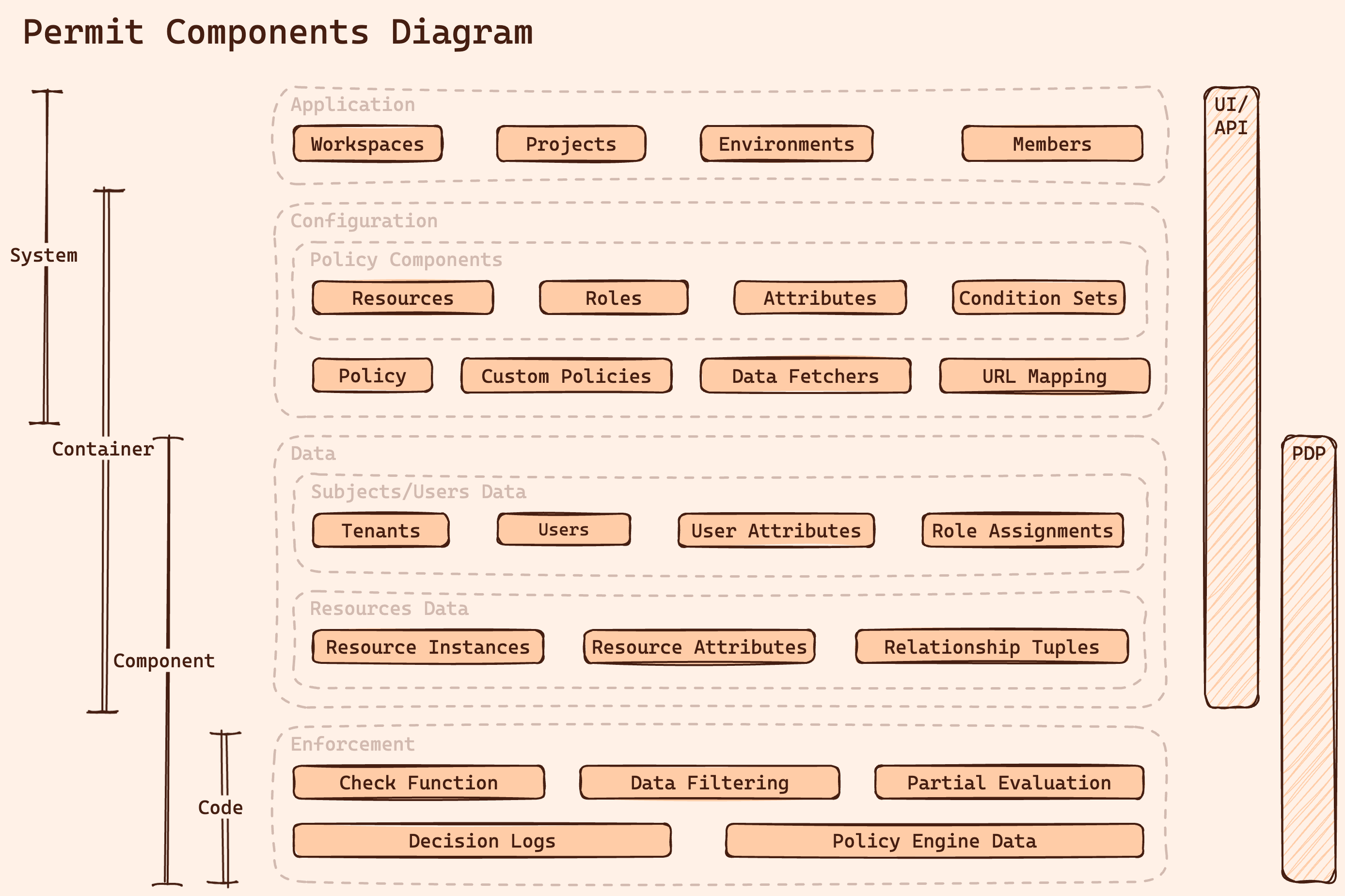
| Plane | Holds | Changes | Managed with |
|---|---|---|---|
| Application | Workspaces, projects, environments, members | Rarely | Dashboard, API, GitOps |
| Configuration | Resources, roles, attributes, condition sets, policies | With product requirements | Dashboard, Terraform, policy as code |
| Data | Users, tenants, role assignments, resource instances, relationship tuples | Continuously, with your application data | SDK and API, dashboard, external data sources |
| Enforcement | Permission checks, data filtering, decision logs | On every request | SDK calls to the policy decision point (PDP) |
On this page, the data plane is the plane of authorization data, such as users and role assignments. Elsewhere in the Permit docs, "data plane" means the PDPs that run in your network. See Permit's hybrid architecture: control plane and data plane.
The application plane
The application plane is the administrative structure of your authorization setup. The application plane maps to the structure of your development organization:
- Workspaces (organizations): the top-level namespace of your account. Most companies need one workspace.
- Projects: each project maps to a product, like a code repository. Each project holds its own policy configuration.
- Environments: each environment maps to a stage of a project, like a branch of a repository, such as development or production.
- Members: the people who manage the authorization setup, such as developers, security engineers, and product managers. Members are different from users, the identities you check permissions for.
Permit creates a policy-as-code repository for each project, and each environment is a branch in that repository. To manage the repository in your own Git provider, see GitOps.
Manage the application plane
The application plane changes rarely, but the application plane decides how policies move between stages. Manage it with:
- The Permit dashboard: team members without deep technical knowledge, such as product managers, create and navigate projects and environments. See Projects and environments.
- GitOps: policy changes go through version control, review, and rollback in Git. See GitOps.
- The Permit API: your pipeline creates and copies environments, for example a preview environment for each feature branch. See Manage the policy life cycle with CI/CD.
The configuration plane
The configuration plane defines the policy: which roles and conditions allow which actions on which resources. Policy configuration is stateless. It describes rules, not the users or objects the rules apply to.
- Resources: the types of objects in your application that need permissions. Each resource type lists its actions.
- Resource relationships: possible relations between resource types, used to derive permissions.
- Roles: roles of users, at the top level of a tenant or on a resource. See RBAC components.
- Role derivations: rules that grant a role on one resource from a role on a related resource.
- Attributes: properties of users and resources that conditions can use.
- Condition sets: sets of users or resources that match conditions on attributes.
- Policy: the rules that allow or deny actions based on roles, resources, and condition sets.
- Custom policies: policy code in a policy language, such as Rego, for rules the dashboard can't express. See Write custom Rego policies.
- Data fetchers: configuration that loads data from external sources into the PDP. See Use an external data source.
- URL mapping: rules that map API endpoints to resources and actions. See URL mapping checks.
Manage the configuration plane
- The Permit dashboard: configure role-based and attribute-based access control visually in the Policy Editor. Product managers and other team members without deep technical knowledge can make changes.
- Infrastructure as code: manage the configuration in code with the Permit Terraform provider.
- Policy as code: write custom policy files in the policy repository when a rule goes beyond what the dashboard supports. See GitOps.
You can combine the methods: configure standard role-based access control (RBAC) and attribute-based access control (ABAC) in the dashboard, and add custom policy code for the rules that need it.
The data plane
The data plane holds the authorization data that policy decisions depend on. The configuration plane defines the rules, and the data plane holds the facts the rules apply to at decision time.
- Users: the identities you check permissions for. User data often comes from your identity provider.
- User attributes: properties of users that ABAC conditions evaluate.
- Tenants: groups of users, such as customer organizations. Role assignments apply per tenant. See Multi-tenant authorization.
- Role assignments: grants of a role to a user in a tenant, or on a resource instance.
- Resource instances: individual objects of a resource type, identified by a key.
- Relationship tuples: relations between resource instances, which derive permissions in relationship-based access control (ReBAC).
Manage the data plane
Authorization data changes with your application data, so sync it continuously:
- SDK and API: sync users, role assignments, and resource instances from your application code when your application data changes. See Sync users.
- The Permit dashboard: view and edit data, for example to set up test data. Edit production data in the dashboard with care, because permission checks use the changed data.
- External data sources: load data that stays out of the Permit control plane directly into the PDP with the Open Policy Administration Layer (OPAL). See Use an external data source.
The enforcement plane
The enforcement plane applies the policy to each request in your application. Your application calls the PDP, and the PDP evaluates the configuration and data of its environment.
-
Check function (
permit.check()): decides whether a user can perform an action on a resource. The check takes:- User: the user key and, optionally, user attributes.
- Action: the action the user performs.
- Resource: the resource type or instance and, optionally, resource attributes.
- Context: additional data for the decision.
-
Data filtering: returns only the records a user can access. The SDKs provide bulk checks and
filterObjects, and the PDP returns the permissions and authorized users to pre-filter queries. Source-level filtering uses partial evaluation. See Filter data by permission. -
Local PDP APIs: PDP endpoints that return authorization data to your application, such as all the permissions of a user. See Get all permissions of a user.
-
Decision logs: the PDP logs each decision to the Permit audit log. See Audit logs.
Integrate the enforcement plane
Enforcement code is part of your application code, and it ships with each release of your application. Add permission checks and data filtering with the Permit SDKs or with direct calls to the PDP.