Model Google Drive permissions with ReBAC
Build a simplified Google Drive-style permission model in Permit.io with relationship-based access control (ReBAC): accounts, folders, and files, where access on a folder or account flows down to the files inside it. This tutorial is for developers who model hierarchical resources and want to learn ReBAC by building a working example with the API or an SDK.
What you build
Google Drive stores, shares, and organizes files and folders. Its full permission model is described in the Google Drive roles reference. This tutorial implements a subset of that model.
Requirements
- Object hierarchy. An account contains folders and files. Folders contain files and other folders.
- Direct file access. A user can be a viewer of a file, a commenter (view and comment), or an editor (view, comment, and edit).
- Folder-level access. A user's access level on a folder grants the same access level on every file in the folder.
- Account admin access. A user with admin access to an account gets the highest access level on every folder and file in the account.
- General access for everyone in the account. A file can be shared with every member of the account that contains the file.
Test objects
At the end of the tutorial, you check permissions against these test objects.
The resource instances:
- a `2023_report` file
- a `finance` folder
- an `acme` account
The hierarchy:
- the `2023_report` file is located within the `finance` folder
- both `file:2023_report` and `folder:finance` belong to the `acme` account.
The users:
- John who has `viewer` access to file:2023_report // direct file access
- Jane who has `editor` access to folder:finance // folder level access
Model overview
| Part | Items |
|---|---|
| Resources and actions | account: invite-member, list-members, remove-member. folder: list-files, create-file, rename. file: read, comment, update, delete. |
| Resource roles | account#admin, account#member. folder#editor, folder#commenter, folder#viewer. file#editor, file#commenter, file#viewer. |
| Relations | folder.parent to folder, file.parent to folder, folder.account to account, file.account to account, file.account_global to account |
| Role derivations | folder#<role> grants file#<role> through parent. folder#editor grants folder#editor on child folders through parent. account#admin grants folder#editor and file#editor through account. account#member grants file#editor through account_global. |
| Attributes | None. Every decision in this model comes from roles and relationships. |
Prerequisites
- A Permit.io account. See Create a Permit account.
- Your environment API key. See Get your API key.
- Docker, to run a policy decision point (PDP) container in Check permissions.
Set up your client
Use an SDK, or call the API directly with cURL or any other HTTP client.
- Python
- Node.js
- Java
- cURL
Install the Node.js SDK:
npm install permitio
To initialize the client, follow the Node.js quickstart.
Install the Java SDK. The Maven and Gradle snippets pin version 2.0.0. Check the Java quickstart for the current version.
For Maven projects, use:
<dependency>
  <groupId>io.permit</groupId>
  <artifactId>permit-sdk-java</artifactId>
  <version>2.0.0</version>
</dependency>
For Gradle projects, configure permit-sdk-java as a dependency in your build.gradle file:
dependencies {
    // ...

    implementation 'io.permit:permit-sdk-java:2.0.0'
}
This tutorial has no Java samples. To follow it in Java, call the matching methods of the Java SDK API client, as shown in the Java quickstart.
To call the API with cURL or Postman, set these environment variables:
export permit_project="<your-project-key>" # for example: the `default` project
export permit_env="<your-environment-key>" # for example: the `dev` environment
export permit_sdk_api_key="<your-api-key>" # for example: `permit_key_...`
Use an environment API key. See Get your API key.
Run the await calls inside an async function.
Model the resource graph
Define resources and roles
Resources
A resource in Permit is a type of object you enforce permissions on. Each resource has a set of actions that a user can perform on it.
Permit ReBAC models resources as a graph. Each resource type is a node, and relations are the edges between resource types.
This tutorial defines three resources:
- Account
- Folder
- File
Resource roles
Each resource type defines its own roles. A resource role is an access level (a set of permissions) that you grant on instances of one resource type.
The notation Folder#editor means the resource role with key editor on the resource type with key Folder.
This tutorial defines these resource roles:
- Account#admin
- Account#member

- Folder#editor
- Folder#commenter
- Folder#viewer

- File#editor
- File#commenter
- File#viewer
Create the Account resource
The account resource type represents an organization's Google Drive account. Later in the tutorial, you create an instance of this type for the fictional company ACME, Inc. The request creates the resource, its actions, and its roles in one call.
- cURL
- Python
- Node.js
curl https://api.permit.io/v2/schema/$permit_project/$permit_env/resources \
  -X POST \
  -H "Authorization: Bearer $permit_sdk_api_key" \
  -H "Content-Type: application/json" \
  -d '{
    "key": "account",
    "name": "Account",
    "actions": {
        "invite-member": {},
        "list-members": {},
        "remove-member": {}
    },
    "roles": {
        "admin": {
            "name": "Admin",
            "permissions": [
				"invite-member",
				"list-members",
				"remove-member"
			]
        },
        "member": {
            "name": "Member",
            "permissions": [
				"list-members"
			]
        }
    }
  }'
from permit import Permit

permit = Permit(token="<YOUR_API_KEY>", pdp="http://localhost:7766")

await permit.api.resources.create(
    {
        "key": "account",
        "name": "Account",
        "actions": {
            "invite-member": {},
            "list-members": {},
            "remove-member": {}
        },
        "roles": {
            "admin": {
                "name": "Admin",
                "permissions": [
                    "invite-member",
                    "list-members",
                    "remove-member"
                ]
            },
            "member": {
                "name": "Member",
                "permissions": [
                    "list-members"
                ]
            }
        }
    }
)
const { Permit } = require("permitio");

const permit = new Permit({ token: "<YOUR_API_KEY>", pdp: "http://localhost:7766" });

await permit.api.resources.create(
    {
        "key": "account",
        "name": "Account",
        "actions": {
            "invite-member": {},
            "list-members": {},
            "remove-member": {}
        },
        "roles": {
            "admin": {
                "name": "Admin",
                "permissions": [
                    "invite-member",
                    "list-members",
                    "remove-member"
                ]
            },
            "member": {
                "name": "Member",
                "permissions": [
                    "list-members"
                ]
            }
        }
    }
)
The account resource has three actions: invite-member, list-members, and remove-member. The admin role has all three actions. The member role has only list-members.
Create the Folder resource
The folder resource has the actions list-files, create-file, and rename, and the roles editor, commenter, and viewer.
- cURL
- Python
- Node.js
curl https://api.permit.io/v2/schema/$permit_project/$permit_env/resources \
  -X POST \
  -H "Authorization: Bearer $permit_sdk_api_key" \
  -H "Content-Type: application/json" \
  -d '{
    "key": "folder",
    "name": "Folder",
    "actions": {
        "list-files": {},
        "create-file": {},
        "rename": {}
    },
    "roles": {
        "editor": {
            "name": "Editor",
            "permissions": [
				"list-files",
				"create-file",
				"rename"
			]
        },
        "commenter": {
            "name": "Commenter",
            "permissions": [
				"list-files"
			]
        },
        "viewer": {
            "name": "Viewer",
            "permissions": [
				"list-files"
			]
        }
    }
  }'
from permit import Permit

permit = Permit(token="<YOUR_API_KEY>", pdp="http://localhost:7766")

await permit.api.resources.create(
    {
        "key": "folder",
        "name": "Folder",
        "actions": {
            "list-files": {},
            "create-file": {},
            "rename": {},
        },
        "roles": {
            "editor": {
                "name": "Editor",
                "permissions": [
                    "list-files",
                    "create-file",
                    "rename",
                ],
            },
            "commenter": {
                "name": "Commenter",
                "permissions": [
                    "list-files",
                ],
            },
            "viewer": {
                "name": "Viewer",
                "permissions": [
                    "list-files",
                ],
            },
        },
    }
)
const { Permit } = require("permitio");

const permit = new Permit({ token: "<YOUR_API_KEY>", pdp: "http://localhost:7766" });

await permit.api.resources.create(
    {
        "key": "folder",
        "name": "Folder",
        "actions": {
            "list-files": {},
            "create-file": {},
            "rename": {},
        },
        "roles": {
            "editor": {
                "name": "Editor",
                "permissions": [
                    "list-files",
                    "create-file",
                    "rename",
                ],
            },
            "commenter": {
                "name": "Commenter",
                "permissions": [
                    "list-files",
                ],
            },
            "viewer": {
                "name": "Viewer",
                "permissions": [
                    "list-files",
                ],
            },
        },
    }
)
The folder#commenter and folder#viewer roles have the same permissions. They differ after you add role derivations in Propagate folder permissions to files, where each one grants a different role on files.
Create the File resource
The file resource has the actions read, comment, update, and delete. The editor role has all four, commenter has read and comment, and viewer has read.
- cURL
- Python
- Node.js
curl https://api.permit.io/v2/schema/$permit_project/$permit_env/resources \
  -X POST \
  -H "Authorization: Bearer $permit_sdk_api_key" \
  -H "Content-Type: application/json" \
  -d '{
    "key": "file",
    "name": "File",
    "actions": {
        "read": {},
        "comment": {},
        "update": {},
        "delete": {}
    },
    "roles": {
        "editor": {
            "name": "Editor",
            "permissions": [
				"read",
				"comment",
				"update",
				"delete"
			]
        },
        "commenter": {
            "name": "Commenter",
            "permissions": [
				"read",
				"comment"
			]
        },
        "viewer": {
            "name": "Viewer",
            "permissions": [
				"read"
			]
        }
    }
  }'
from permit import Permit

permit = Permit(token="<YOUR_API_KEY>", pdp="http://localhost:7766")

await permit.api.resources.create(
    {
        "key": "file",
        "name": "File",
        "actions": {
            "read": {},
            "comment": {},
            "update": {},
            "delete": {},
        },
        "roles": {
            "editor": {
                "name": "Editor",
                "permissions": [
                    "read",
                    "comment",
                    "update",
                    "delete",
                ],
            },
            "commenter": {
                "name": "Commenter",
                "permissions": [
                    "read",
                    "comment",
                ],
            },
            "viewer": {
                "name": "Viewer",
                "permissions": [
                    "read",
                ],
            },
        },
    }
)
const { Permit } = require("permitio");

const permit = new Permit({ token: "<YOUR_API_KEY>", pdp: "http://localhost:7766" });

await permit.api.resources.create(
    {
        "key": "file",
        "name": "File",
        "actions": {
            "read": {},
            "comment": {},
            "update": {},
            "delete": {},
        },
        "roles": {
            "editor": {
                "name": "Editor",
                "permissions": [
                    "read",
                    "comment",
                    "update",
                    "delete",
                ],
            },
            "commenter": {
                "name": "Commenter",
                "permissions": [
                    "read",
                    "comment",
                ],
            },
            "viewer": {
                "name": "Viewer",
                "permissions": [
                    "read",
                ],
            },
        },
    }
)
Define relations
A relation is a type of edge between two resource types. A relation called parent from File to Folder lets you create relationship tuples of that type between a file instance and a folder instance. The relation is the type, and each relationship tuple is one instance of it.
Example relation:
File -> parent -> Folder
Example of a relationship tuple of this type:
(Folder:soc2, parent, File:access-control-policy)
This tutorial defines four relations first, and adds a fifth (account_global) in section 5:
Folder.account -> Account // relation from folder to its parent account
File.account -> Account // relation from file to its parent account
Folder.parent -> Folder // relation from folder to its parent folder
File.parent -> Folder // relation from file to its parent folder
A relation points from the object resource to the subject resource. A relationship tuple reads in the reverse direction, from the subject to the object.
File -> parent -> Folder
The parent relation links a file to the folder that contains it. You define a relation on the object resource type.
- cURL
- Python
- Node.js
curl https://api.permit.io/v2/schema/$permit_project/$permit_env/resources/file/relations \
  -X POST \
  -H "Authorization: Bearer $permit_sdk_api_key" \
  -H "Content-Type: application/json" \
  -d '{
    "key": "parent",
    "name": "Parent",
    "subject_resource": "folder"
  }'
await permit.api.resource_relations.create(
    "file",
    {
        "key": "parent",
        "name": "Parent",
        "subject_resource": "folder",
    }
)
await permit.api.resourceRelations.create("file", {
  key: "parent",
  name: "Parent",
  subject_resource: "folder",
});
The request goes to the /relations endpoint of the file resource, because a relation is always defined on the object resource. The request body sets subject_resource to the resource the relation points to.
Folder -> parent -> Folder
Folders can contain other folders. This parent relation points from the folder type to itself. Relationship tuples of this type link one folder instance to a different folder instance.
- cURL
- Python
- Node.js
curl https://api.permit.io/v2/schema/$permit_project/$permit_env/resources/folder/relations \
  -X POST \
  -H "Authorization: Bearer $permit_sdk_api_key" \
  -H "Content-Type: application/json" \
  -d '{
    "key": "parent",
    "name": "Parent",
    "subject_resource": "folder"
  }'
await permit.api.resource_relations.create(
    "folder",
    {
        "key": "parent",
        "name": "Parent",
        "subject_resource": "folder",
    }
)
await permit.api.resourceRelations.create("folder", {
  key: "parent",
  name: "Parent",
  subject_resource: "folder",
});
The next two relations link folders and files to their account.
Folder -> account -> Account
- cURL
- Python
- Node.js
curl https://api.permit.io/v2/schema/$permit_project/$permit_env/resources/folder/relations \
  -X POST \
  -H "Authorization: Bearer $permit_sdk_api_key" \
  -H "Content-Type: application/json" \
  -d '{
    "key": "account",
    "name": "Account",
    "subject_resource": "account"
  }'
await permit.api.resource_relations.create(
    "folder",
    {
        "key": "account",
        "name": "Account",
        "subject_resource": "account",
    }
)
await permit.api.resourceRelations.create("folder", {
  key: "account",
  name: "Account",
  subject_resource: "account",
});
File -> account -> Account
- cURL
- Python
- Node.js
curl https://api.permit.io/v2/schema/$permit_project/$permit_env/resources/file/relations \
  -X POST \
  -H "Authorization: Bearer $permit_sdk_api_key" \
  -H "Content-Type: application/json" \
  -d '{
    "key": "account",
    "name": "Account",
    "subject_resource": "account"
  }'
await permit.api.resource_relations.create(
    "file",
    {
        "key": "account",
        "name": "Account",
        "subject_resource": "account",
    }
)
await permit.api.resourceRelations.create("file", {
  key: "account",
  name: "Account",
  subject_resource: "account",
});
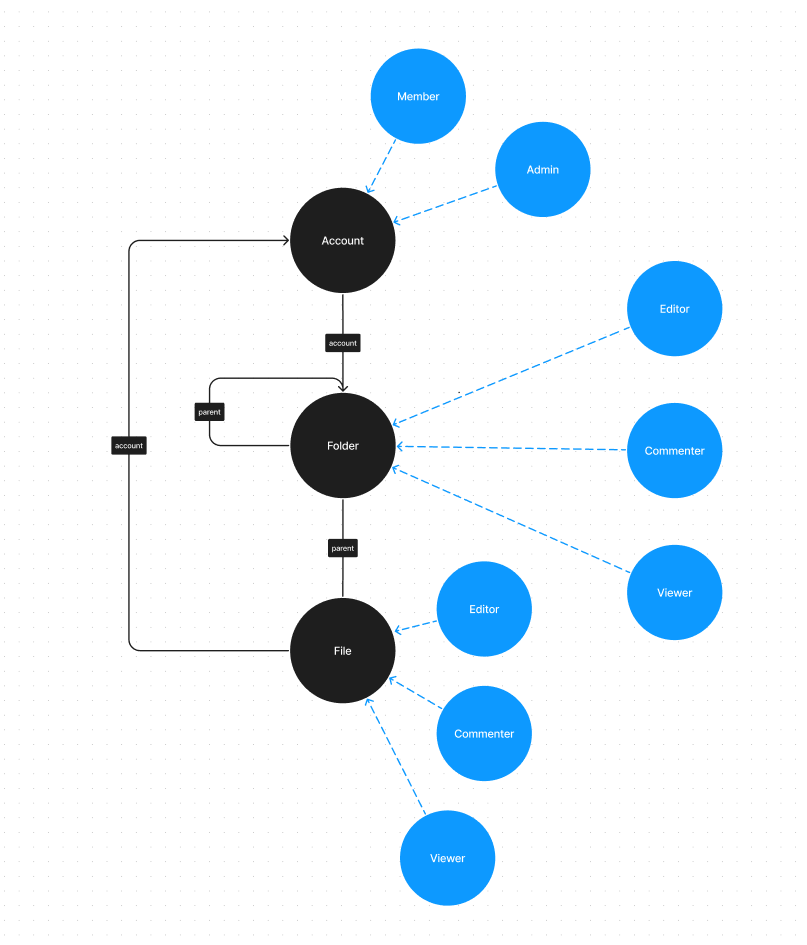
The model so far
The diagram shows the schema after you create the resources and relations:
- Resources are black circles.
- Resource roles are blue circles.
- Relations are black arrows.
Add users, instances, and role derivations
Each numbered section below implements one requirement from What you build.
1. Direct file access
To grant direct file access, create the user and the file instance, then assign a role on the file.
Create the user John
Create the user john@acme.com:
- cURL
- Python
- Node.js
curl https://api.permit.io/v2/facts/$permit_project/$permit_env/users \
  -X POST \
  -H "Authorization: Bearer $permit_sdk_api_key" \
  -H "Content-Type: application/json" \
  -d '{
    "key": "john@acme.com"
  }'
await permit.api.users.sync(
    {
        "key": "john@acme.com",
    }
)
await permit.api.users.sync({
  key: "john@acme.com",
});
Create the file instance
Create the 2023_report file instance in the default tenant:
- cURL
- Python
- Node.js
curl https://api.permit.io/v2/facts/$permit_project/$permit_env/resource_instances \
  -X POST \
  -H "Authorization: Bearer $permit_sdk_api_key" \
  -H "Content-Type: application/json" \
  -d '{
    "resource": "file",
    "key": "2023_report",
    "tenant": "default"
  }'
await permit.api.resource_instances.create(
    {
        "resource": "file",
        "key": "2023_report",
        "tenant": "default"
    }
)
await permit.api.resourceInstances.create({
  resource: "file",
  key: "2023_report",
  tenant: "default",
});
Every resource instance belongs to a tenant. A tenant represents a separate end-customer account in your system, and keeping each instance in a tenant keeps end-customer data separated.
Assign John the viewer role on the file
A role assignment grants a user a role on a resource instance. Assign John the viewer role on file:2023_report:
- cURL
- Python
- Node.js
curl https://api.permit.io/v2/facts/$permit_project/$permit_env/role_assignments \
  -X POST \
  -H "Authorization: Bearer $permit_sdk_api_key" \
  -H "Content-Type: application/json" \
  -d '{
    "user": "john@acme.com",
    "role": "viewer",
    "resource_instance": "file:2023_report"
  }'
await permit.api.role_assignments.assign(
    {
        "user": "john@acme.com",
        "role": "viewer",
        "resource_instance": "file:2023_report",
    }
)
await permit.api.roleAssignments.assign({
  user: "john@acme.com",
  role: "viewer",
  resource_instance: "file:2023_report",
});
Alternative: create the file instance implicitly
You can skip the call that creates the file instance. When you assign a role on an instance key that doesn't exist, Permit creates the resource instance. This request assigns John the viewer role and creates file:2023_report:
- cURL
- Python
- Node.js
curl https://api.permit.io/v2/facts/$permit_project/$permit_env/role_assignments \
  -X POST \
  -H "Authorization: Bearer $permit_sdk_api_key" \
  -H "Content-Type: application/json" \
  -d '{
    "user": "john@acme.com",
    "role": "viewer",
    "resource_instance": "file:2023_report",
    "tenant": "default"
  }'
await permit.api.role_assignments.assign(
    {
        "user": "john@acme.com",
        "role": "viewer",
        "resource_instance": "file:2023_report",
        "tenant": "default",
    }
)
await permit.api.roleAssignments.assign({
  user: "john@acme.com",
  role: "viewer",
  resource_instance: "file:2023_report",
  tenant: "default",
});
The tenant field is required when Permit creates the resource instance implicitly.
2. Folder-level access
Grant Jane the editor role on the finance folder. The steps match direct file access.
Create the user jane@acme.com:
- cURL
- Python
- Node.js
curl https://api.permit.io/v2/facts/$permit_project/$permit_env/users \
  -X POST \
  -H "Authorization: Bearer $permit_sdk_api_key" \
  -H "Content-Type: application/json" \
  -d '{
    "key": "jane@acme.com"
  }'
await permit.api.users.sync(
    {
        "key": "jane@acme.com",
    }
)
await permit.api.users.sync({
  key: "jane@acme.com",
});
Create the finance folder instance:
- cURL
- Python
- Node.js
curl https://api.permit.io/v2/facts/$permit_project/$permit_env/resource_instances \
  -X POST \
  -H "Authorization: Bearer $permit_sdk_api_key" \
  -H "Content-Type: application/json" \
  -d '{
    "resource": "folder",
    "key": "finance",
    "tenant": "default"
  }'
await permit.api.resource_instances.create(
    {
        "resource": "folder",
        "key": "finance",
        "tenant": "default"
    }
)
await permit.api.resourceInstances.create({
  resource: "folder",
  key: "finance",
  tenant: "default",
});
Assign Jane the editor role on folder:finance:
- cURL
- Python
- Node.js
curl https://api.permit.io/v2/facts/$permit_project/$permit_env/role_assignments \
  -X POST \
  -H "Authorization: Bearer $permit_sdk_api_key" \
  -H "Content-Type: application/json" \
  -d '{
    "user": "jane@acme.com",
    "role": "editor",
    "resource_instance": "folder:finance"
  }'
await permit.api.role_assignments.assign(
    {
        "user": "jane@acme.com",
        "role": "editor",
        "resource_instance": "folder:finance",
    }
)
await permit.api.roleAssignments.assign({
  user: "jane@acme.com",
  role: "editor",
  resource_instance: "folder:finance",
});
3. Propagate folder permissions to files
Jane can list-files, create-file, and rename on the finance folder. She has no access to files in the folder yet, because no file is linked to the folder and no rule passes folder roles down to files.
Link the file to the folder
Create a parent relationship tuple with folder:finance as the subject and file:2023_report as the object:
- cURL
- Python
- Node.js
curl https://api.permit.io/v2/facts/$permit_project/$permit_env/relationship_tuples \
  -X POST \
  -H "Authorization: Bearer $permit_sdk_api_key" \
  -H "Content-Type: application/json" \
  -d '{
    "subject": "folder:finance",
    "relation": "parent",
    "object": "file:2023_report"
  }'
await permit.api.relationship_tuples.create(
    {
        "subject": "folder:finance",
        "relation": "parent",
        "object": "file:2023_report",
    }
)
await permit.api.relationshipTuples.create({
  subject: "folder:finance",
  relation: "parent",
  object: "file:2023_report",
});
- A role assignment creates a role relationship between a user and a resource instance.
- A relationship tuple creates a relationship between two resource instances.
A role assignment is a relationship tuple where the subject is a user and the relation is a role.
Derive file roles from folder roles
A role derivation is a schema rule: a role on one resource instance grants another role on a related resource instance.
The rule in general form:
If a user has role `A` on a folder `X`, it implies that the same user
should be automatically granted a role `B` on all files where
the file `parent` is the `X` folder.
In this model, a user with the editor role on a folder gets the editor role on every file whose parent is that folder. The request updates the file#editor role:
folder#editor -> file#editor (via parent)
- cURL
- Python
- Node.js
curl https://api.permit.io/v2/schema/$permit_project/$permit_env/resources/file/roles/editor \
  -X PATCH \
  -H "Authorization: Bearer $permit_sdk_api_key" \
  -H "Content-Type: application/json" \
  -d '{
    "granted_to": {
        "users_with_role": [
            {
                "linked_by_relation": "parent",
                "on_resource": "folder",
                "role": "editor"
            }
        ]
	}
  }'
await permit.api.resource_roles.update(
    "file",
    "editor",
    {
        "granted_to": {
            "users_with_role": [
                {
                    "linked_by_relation": "parent",
                    "on_resource": "folder",
                    "role": "editor",
                },
            ],
        },
    }
)
await permit.api.resourceRoles.update("file", "editor", {
  granted_to: {
    users_with_role: [
      {
        linked_by_relation: "parent",
        on_resource: "folder",
        role: "editor",
      },
    ],
  },
});
The URL names the granted role (file#editor). The granted_to body grants the role to users with folder#editor on a folder linked by parent.
Add the same derivation for the commenter and viewer roles.
folder#commenter -> file#commenter (via parent)
- cURL
- Python
- Node.js
curl https://api.permit.io/v2/schema/$permit_project/$permit_env/resources/file/roles/commenter \
  -X PATCH \
  -H "Authorization: Bearer $permit_sdk_api_key" \
  -H "Content-Type: application/json" \
  -d '{
    "granted_to": {
        "users_with_role": [
            {
                "linked_by_relation": "parent",
                "on_resource": "folder",
                "role": "commenter"
            }
        ]
	}
  }'
await permit.api.resource_roles.update(
    "file",
    "commenter",
    {
        "granted_to": {
            "users_with_role": [
                {
                    "linked_by_relation": "parent",
                    "on_resource": "folder",
                    "role": "commenter",
                }
            ]
        }
    }
)
await permit.api.resourceRoles.update("file", "commenter", {
  granted_to: {
    users_with_role: [
      {
        linked_by_relation: "parent",
        on_resource: "folder",
        role: "commenter",
      },
    ],
  },
});
folder#viewer -> file#viewer (via parent)
- cURL
- Python
- Node.js
curl https://api.permit.io/v2/schema/$permit_project/$permit_env/resources/file/roles/viewer \
  -X PATCH \
  -H "Authorization: Bearer $permit_sdk_api_key" \
  -H "Content-Type: application/json" \
  -d '{
    "granted_to": {
        "users_with_role": [
            {
                "linked_by_relation": "parent",
                "on_resource": "folder",
                "role": "viewer"
            }
        ]
	}
  }'
await permit.api.resource_roles.update(
    "file",
    "viewer",
    {
        "granted_to": {
            "users_with_role": [
                {
                    "linked_by_relation": "parent",
                    "on_resource": "folder",
                    "role": "viewer",
                }
            ]
        }
    }
)
await permit.api.resourceRoles.update("file", "viewer", {
  granted_to: {
    users_with_role: [
      {
        linked_by_relation: "parent",
        on_resource: "folder",
        role: "viewer",
      },
    ],
  },
});
The folder#commenter and folder#viewer roles now differ, because each one grants a different role on files.
4. Account admin permissions
A user with the admin role on an account gets the editor role on every folder and file in the account. To implement this rule, create the acme account instance, link the folder and the file to it, and add role derivations.
Create the account:acme instance
- cURL
- Python
- Node.js
curl https://api.permit.io/v2/facts/$permit_project/$permit_env/resource_instances \
  -X POST \
  -H "Authorization: Bearer $permit_sdk_api_key" \
  -H "Content-Type: application/json" \
  -d '{
    "resource": "account",
    "key": "acme",
    "tenant": "default"
  }'
await permit.api.resource_instances.create(
    {
        "resource": "account",
        "key": "acme",
        "tenant": "default",
    }
)
await permit.api.resourceInstances.create({
  resource: "account",
  key: "acme",
  tenant: "default",
});
Link folder:finance to account:acme
- cURL
- Python
- Node.js
curl https://api.permit.io/v2/facts/$permit_project/$permit_env/relationship_tuples \
  -X POST \
  -H "Authorization: Bearer $permit_sdk_api_key" \
  -H "Content-Type: application/json" \
  -d '{
    "subject": "account:acme",
    "relation": "account",
    "object": "folder:finance"
  }'
await permit.api.relationship_tuples.create(
    {
        "subject": "account:acme",
        "relation": "account",
        "object": "folder:finance",
    }
)
await permit.api.relationshipTuples.create({
  subject: "account:acme",
  relation: "account",
  object: "folder:finance",
});
Link file:2023_report to account:acme
- cURL
- Python
- Node.js
curl https://api.permit.io/v2/facts/$permit_project/$permit_env/relationship_tuples \
  -X POST \
  -H "Authorization: Bearer $permit_sdk_api_key" \
  -H "Content-Type: application/json" \
  -d '{
    "subject": "account:acme",
    "relation": "account",
    "object": "file:2023_report"
  }'
await permit.api.relationship_tuples.create(
    {
        "subject": "account:acme",
        "relation": "account",
        "object": "file:2023_report",
    }
)
await permit.api.relationshipTuples.create({
  subject: "account:acme",
  relation: "account",
  object: "file:2023_report",
});
Derive editor roles from account admin
Role derivations chain. When account#admin grants folder#editor, the folder#editor role then grants file#editor on files in that folder.
Grant folder#editor to users with account#admin on the folder's account. The request also grants folder#editor to users with folder#editor on a parent folder, so editor access flows into nested folders:
- cURL
- Python
- Node.js
curl https://api.permit.io/v2/schema/$permit_project/$permit_env/resources/folder/roles/editor \
  -X PATCH \
  -H "Authorization: Bearer $permit_sdk_api_key" \
  -H "Content-Type: application/json" \
  -d '{
    "granted_to": {
        "users_with_role": [
            {
                "linked_by_relation": "account",
                "on_resource": "account",
                "role": "admin"
            },
            {
                "linked_by_relation": "parent",
                "on_resource": "folder",
                "role": "editor"
            }
        ]
	}
  }'
await permit.api.resource_roles.update(
    "folder",
    "editor",
    {
        "granted_to": {
            "users_with_role": [
                {
                    "linked_by_relation": "account",
                    "on_resource": "account",
                    "role": "admin",
                },
                {
                    "linked_by_relation": "parent",
                    "on_resource": "folder",
                    "role": "editor",
                },
            ]
        }
    }
)
await permit.api.resourceRoles.update("folder", "editor", {
  granted_to: {
    users_with_role: [
      {
        linked_by_relation: "account",
        on_resource: "account",
        role: "admin",
      },
      {
        linked_by_relation: "parent",
        on_resource: "folder",
        role: "editor",
      },
    ],
  },
});
Grant file#editor to users with account#admin on the file's account. A PATCH request replaces the granted_to list, so the request repeats the existing folder#editor derivation:
- cURL
- Python
- Node.js
curl https://api.permit.io/v2/schema/$permit_project/$permit_env/resources/file/roles/editor \
  -X PATCH \
  -H "Authorization: Bearer $permit_sdk_api_key" \
  -H "Content-Type: application/json" \
  -d '{
    "granted_to": {
        "users_with_role": [
            {
                "linked_by_relation": "account",
                "on_resource": "account",
                "role": "admin"
            },
            {
                "linked_by_relation": "parent",
                "on_resource": "folder",
                "role": "editor"
            }
        ]
	}
  }'
await permit.api.resource_roles.update(
    "file",
    "editor",
    {
        "granted_to": {
            "users_with_role": [
                {
                    "linked_by_relation": "account",
                    "on_resource": "account",
                    "role": "admin",
                },
                {
                    "linked_by_relation": "parent",
                    "on_resource": "folder",
                    "role": "editor",
                },
            ]
        }
    }
)
await permit.api.resourceRoles.update("file", "editor", {
  granted_to: {
    users_with_role: [
      {
        linked_by_relation: "account",
        on_resource: "account",
        role: "admin",
      },
      {
        linked_by_relation: "parent",
        on_resource: "folder",
        role: "editor",
      },
    ],
  },
});
5. Share a file with everyone in the account
To give every member of an account the editor role on a specific file, add a relation from files to accounts called account_global. Then add a role derivation that grants file#editor to users with account#member on an account linked by account_global. To share a file, create an account_global relationship tuple with the account as the subject and the file as the object.
Create the account_global relation:
- cURL
- Python
- Node.js
curl https://api.permit.io/v2/schema/$permit_project/$permit_env/resources/file/relations \
  -X POST \
  -H "Authorization: Bearer $permit_sdk_api_key" \
  -H "Content-Type: application/json" \
  -d '{
    "key": "account_global",
    "name": "Account Global",
    "subject_resource": "account"
  }'
await permit.api.resource_relations.create(
    "file",
    {
        "key": "account_global",
        "name": "Account Global",
        "subject_resource": "account",
    }
)
await permit.api.resourceRelations.create("file", {
  key: "account_global",
  name: "Account Global",
  subject_resource: "account",
});
Add the derivation to file#editor. A PATCH request replaces the granted_to list, so include every existing derivation for the role:
- cURL
- Python
- Node.js
curl https://api.permit.io/v2/schema/$permit_project/$permit_env/resources/file/roles/editor \
  -X PATCH \
  -H "Authorization: Bearer $permit_sdk_api_key" \
  -H "Content-Type: application/json" \
  -d '{
    "granted_to": {
        "users_with_role": [
            {
                "linked_by_relation": "account_global",
                "on_resource": "account",
                "role": "member"
            },
            {
                "linked_by_relation": "account",
                "on_resource": "account",
                "role": "admin"
            },
            {
                "linked_by_relation": "parent",
                "on_resource": "folder",
                "role": "editor"
            }
        ]
	}
  }'
await permit.api.resource_roles.update(
    "file",
    "editor",
    {
        "granted_to": {
            "users_with_role": [
                {
                    "linked_by_relation": "parent",
                    "on_resource": "folder",
                    "role": "editor",
                },
                {
                    "linked_by_relation": "account",
                    "on_resource": "account",
                    "role": "admin",
                },
                {
                    "linked_by_relation": "account_global",
                    "on_resource": "account",
                    "role": "member",
                },
            ]
        }
    }
)
await permit.api.resourceRoles.update("file", "editor", {
  granted_to: {
    users_with_role: [
      {
        linked_by_relation: "parent",
        on_resource: "folder",
        role: "editor",
      },
      {
        linked_by_relation: "account",
        on_resource: "account",
        role: "admin",
      },
      {
        linked_by_relation: "account_global",
        on_resource: "account",
        role: "member",
      },
    ],
  },
});
Check permissions
Check what John and Jane can do on file:2023_report.
Run a PDP container
The PDP is a container that fetches the policy and data from the Permit control plane and answers permission checks locally. Run it with your environment API key. For other ways to run a PDP, see Run the PDP.
The PDP connects to https://api.permit.io by default. If your workspace is hosted in the EU region, set PDP_CONTROL_PLANE=https://api.eu.permit.io. See PDP configuration.
docker run -it \
    -e PDP_API_KEY=$permit_sdk_api_key \
    -p 7766:7000 \
    permitio/pdp-v2:latest
The -p 7766:7000 mapping serves permission checks at http://localhost:7766.
The Python and Node.js checks below don't pass a tenant, so the SDK uses the default tenant. The SDK client must point at the PDP, for example pdp="http://localhost:7766" in Python or pdp: "http://localhost:7766" in Node.js.
Check John's access
Check whether John can read the file:
- cURL
- Python
- Node.js
curl http://localhost:7766/allowed \
  -X POST \
  -H "Authorization: Bearer $permit_sdk_api_key" \
  -H "Content-Type: application/json" \
  -d '{
        "user": {
            "key": "john@acme.com"
        },
        "resource": {
            "tenant": "default",
            "type": "file",
            "key": "2023_report"
        },
        "action": "read"
  }'
await permit.check(
    # user
    "john@acme.com",
    # action
    "read",
    # resource
    {
        "type": "file",
        "key": "2023_report",
    },
)
await permit.check(
  // user
  "john@acme.com",
  // action
  "read",
  // resource
  {
    type: "file",
    key: "2023_report",
  }
);
The check returns true (the cURL response contains "allow": true). John can read the file through his direct file#viewer role.
Check whether John can update the file:
- cURL
- Python
- Node.js
curl http://localhost:7766/allowed \
  -X POST \
  -H "Authorization: Bearer $permit_sdk_api_key" \
  -H "Content-Type: application/json" \
  -d '{
        "user": {
            "key": "john@acme.com"
        },
        "resource": {
            "tenant": "default",
            "type": "file",
            "key": "2023_report"
        },
        "action": "update"
  }'
await permit.check(
    # user
    "john@acme.com",
    # action
    "update",
    # resource
    {
        "type": "file",
        "key": "2023_report",
    },
)
await permit.check(
  // user
  "john@acme.com",
  // action
  "update",
  // resource
  {
    type: "file",
    key: "2023_report",
  }
);
The check returns false, because the viewer role doesn't include update.
Check Jane's access
Check whether Jane can update the file:
- cURL
- Python
- Node.js
curl http://localhost:7766/allowed \
  -X POST \
  -H "Authorization: Bearer $permit_sdk_api_key" \
  -H "Content-Type: application/json" \
  -d '{
        "user": {
            "key": "jane@acme.com"
        },
        "resource": {
            "tenant": "default",
            "type": "file",
            "key": "2023_report"
        },
        "action": "update"
  }'
await permit.check(
    # user
    "jane@acme.com",
    # action
    "update",
    # resource
    {
        "type": "file",
        "key": "2023_report",
    },
)
await permit.check(
  // user
  "jane@acme.com",
  // action
  "update",
  // resource
  {
    type: "file",
    key: "2023_report",
  }
);
The check returns true. Jane has folder#editor on folder:finance, and the role derivation grants her file#editor on file:2023_report through the parent relationship.
Next steps
- Learn the ReBAC terms in What is ReBAC?.
- Build ReBAC policies in the Permit dashboard with Build ReBAC policies.
- See a banking model that combines RBAC, ABAC, and ReBAC in Banking app example: Mesa Verde.
- Run a PDP for your application with Run the PDP.