Check permissions with the Go SDK
Connect a Go application to Permit.io and call the Permit client's Check() method to allow or deny a request. This quickstart is for backend developers who have a Permit.io policy and want to enforce the policy from Go code.
Prerequisites
- A Permit.io account with at least one policy. If you don't have a policy yet, complete the Quickstart.
- Docker, if you run the policy decision point (PDP) as a container. See Install Docker.
1. Get your environment API key
The SDK and the PDP authenticate with Permit using an environment API key. Each API key belongs to one environment.
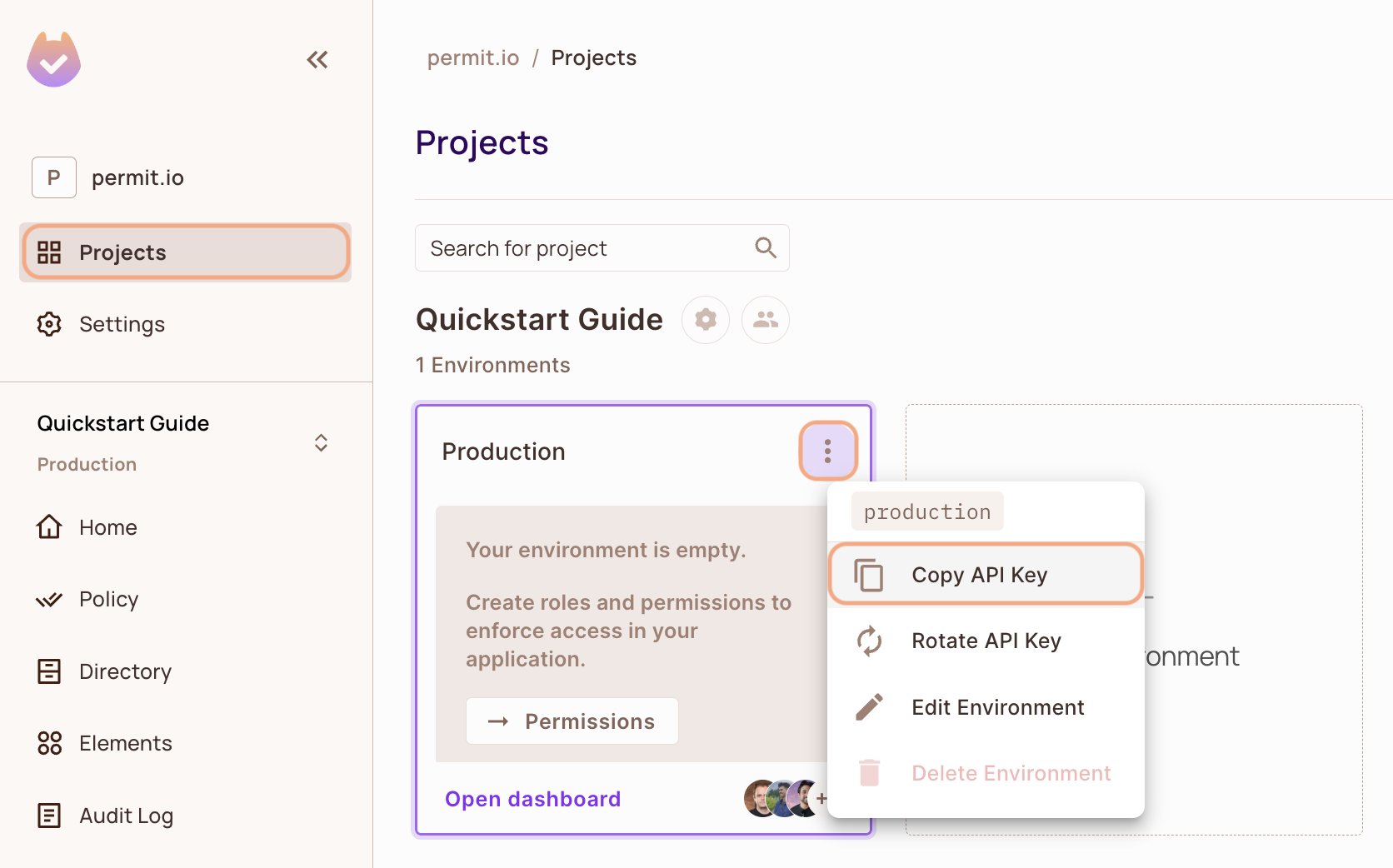
- In the Permit dashboard, open the Projects screen.
- Find the project and the environment you want to connect to.
- On the environment card, click the
 icon in the top-right corner.
 - Click Copy API Key.
You can also copy the API key of the active environment from User Menu > Copy Environment Key.
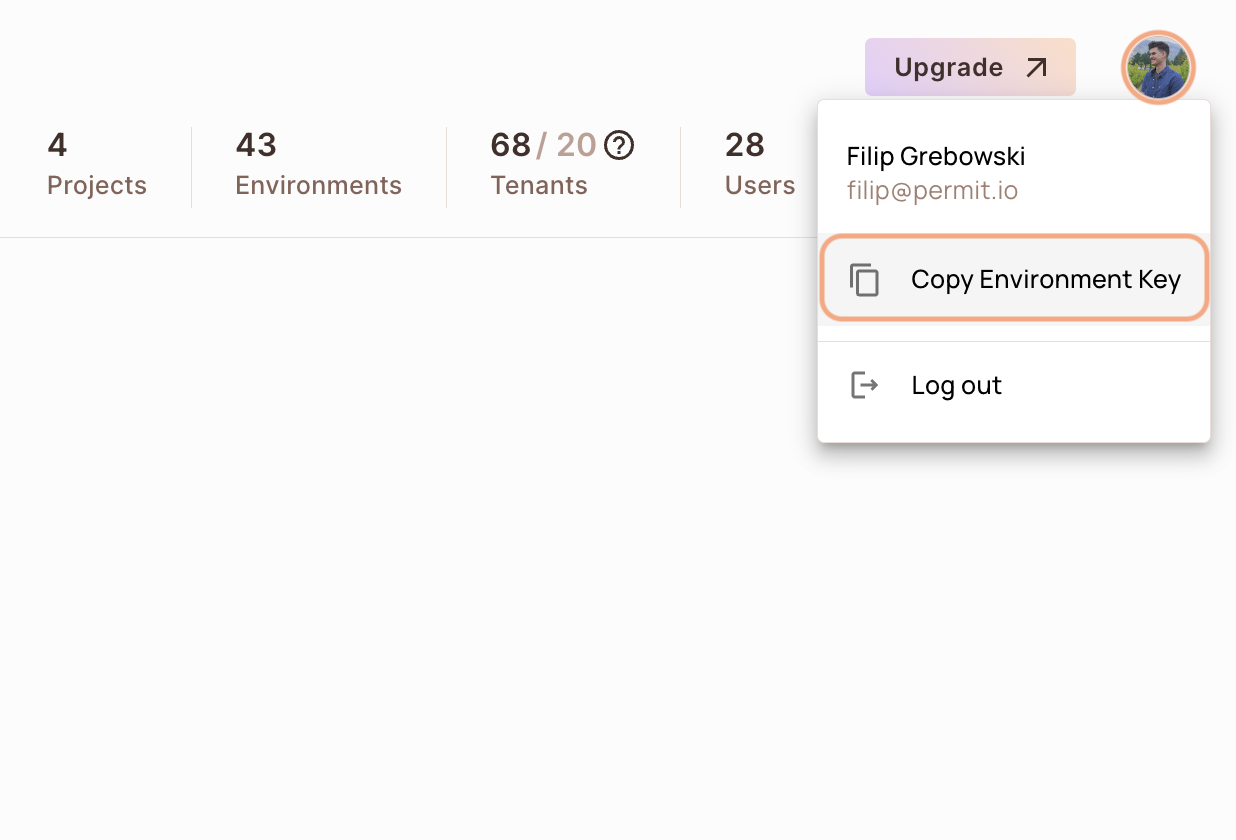
The API key you copy from the user menu belongs to the active environment in the sidebar. If you switch the active environment and click Copy Environment Key again, you copy a different API key: the key of the newly active environment.
Anyone with your environment API key can change that environment's policy and data through the Permit API. Load the API key from an environment variable or a secret store, and don't commit the API key to your repository.
2. Set up your policy decision point (PDP)
Your application sends each permission check to a policy decision point (PDP), the service that evaluates the check against your policy. Use the managed Cloud PDP that Permit.io runs, or run the PDP as a Docker container on your machine.
The SDK examples on this page connect to a container PDP at http://localhost:7766. To use the Cloud PDP, set the SDK's PDP URL to https://cloudpdp.api.permit.io instead.
- Cloud PDP
- Container PDP
The Cloud PDP needs no installation. Pass the Cloud PDP URL when you initialize the Permit SDK. The following Node.js example shows the shape. The SDK install step further down shows the same setting in this page's language. Replace [YOUR_API_KEY] with your environment API key:
// This line initializes the SDK and connects your app
// to the Permit.io Cloud PDP.

const permit = new Permit({
  pdp: "https://cloudpdp.api.permit.io",
  // your API Key
  token: "[YOUR_API_KEY]",
});
The Cloud PDP is a managed service that Permit.io runs. The Cloud PDP supports RBAC (role-based access control) and ReBAC (relationship-based access control) policies. The Cloud PDP does not support ABAC (attribute-based access control) policies, so the ABAC examples on this page need a container PDP.
For capabilities, limits, and when to choose each PDP type, see Cloud PDP capabilities.
Pull and run the permitio/pdp-v2 container image. Docker must be installed and running.
1. Pull the PDP container from Docker Hub
docker pull permitio/pdp-v2:latest
2. Run the PDP container
Replace <YOUR_API_KEY> with the environment API key you copied in 1. Get your environment API key, then run:
docker run -it -p 7766:7000 --env PDP_DEBUG=True --env PDP_API_KEY=<YOUR_API_KEY> permitio/pdp-v2:latest
| Option | Meaning |
|---|---|
-p 7766:7000 | Maps port 7766 on your machine to port 7000 inside the container. The SDK sends checks to http://localhost:7766. |
PDP_API_KEY | The environment API key. The PDP uses the API key to load that environment's policy and data from Permit. |
PDP_DEBUG=True | Turns on debug logging in the container output. |
To confirm the PDP container is running, run docker ps in a second terminal. The output lists a container from the permitio/pdp-v2:latest image with 0.0.0.0:7766->7000/tcp in the PORTS column.
For more PDP options, see Run the PDP.
3. Install the Go SDK and check permissions
Install and initialize the Go SDK
Install the permit-golang module, import the permit and config packages, and create a Permit client that connects to your PDP.
- Install the Permit.io Go SDK:
go get github.com/permitio/permit-golang
- Import the
permitpackage:
import "github.com/permitio/permit-golang/pkg/permit"
- Create a Permit client from a config that
config.NewConfigBuilder()builds. Replace<YOUR_API_TOKEN>with your environment API key, and set the PDP URL withWithPdpUrl().
package main

import "github.com/permitio/permit-golang/pkg/permit"
import "github.com/permitio/permit-golang/pkg/config"

func main() {
	permitConfig := config.NewConfigBuilder("<YOUR_API_TOKEN>").
		WithPdpUrl("http://localhost:7766").
		Build()
	permitClient := permit.NewPermit(permitConfig)
	_ = permitClient
}
Check permissions with the Go SDK
Call Check() on the Permit client with three arguments. Check() returns true when the policy allows the action, false otherwise, and an error if the check fails.
| Argument | Description |
|---|---|
user | An enforcement.User. Build one with enforcement.UserBuilder("<user key>").Build(). The user key is typically the user ID from your authentication provider. |
action | The action key, for example "create". |
resource | An enforcement.Resource. Build one with enforcement.ResourceBuilder("<resource key>").Build(). |
This example checks whether a user can create a document:
package main

import "github.com/permitio/permit-golang/pkg/permit"
import "github.com/permitio/permit-golang/pkg/config"
import "github.com/permitio/permit-golang/pkg/enforcement"

func main() {
	PermitConfig := config.NewConfigBuilder("<YOUR_API_TOKEN>").Build()
	Permit := permit.NewPermit(PermitConfig)

	user := enforcement.UserBuilder("john@doe.com").Build()
	resource := enforcement.ResourceBuilder("document").Build()
	permitted, err := Permit.Check(user, "create", resource)
	if err != nil {
		return
	}
	if permitted {
		// Let the user read the resource
	} else {
		// Deny access
	}
}
permitted is true if john@doe.com exists in your environment and has a role that grants create on document. To add users and assign roles, see Sync users.
Check a permission in a specific tenant
In a multi-tenant application, set the tenant key on the resource with WithTenant(). To look up the keys of your tenants, call the list tenants API.
resource := enforcement.ResourceBuilder("document").WithTenant("tenant").Build()
permitted, err := permitClient.Check(user, "create", resource)
Check() sends each check to the PDP URL you configure. A container PDP evaluates checks on your machine, using policy and data that the PDP loads from Permit. Users, roles, and attributes that you create in the dashboard or sync through the Permit API are stored in the Permit control plane.
Check ABAC permissions with the Go SDK
An attribute-based access control (ABAC) policy grants permissions based on user and resource attributes, grouped into user sets and resource sets. See ABAC policy components. ABAC checks need a container PDP.
To check an ABAC policy, set just-in-time attributes on the user or the resource with WithAttributes(). In this example, replace userKey and resourceKey with a user key and a resource key from your environment:
userCheck := enforcement.UserBuilder("userKey").Build()
attributes := map[string]interface{}{
	"hasApproval": "true",
}
resourceCheck := enforcement.ResourceBuilder("resourceKey").WithTenant("default").WithAttributes(attributes).Build()
allowed, _ := permitClient.Check(userCheck, "create", resourceCheck)
For more check options, see Check permissions with permit.check().
Run a full Go example app
This single-file Go app runs a permission check on each request to http://localhost:4000. The app logs with go.uber.org/zap.
- In a Go module, add the dependencies with
go get github.com/permitio/permit-golang go.uber.org/zap. - Save the following code as
main.go. - Replace
<YOUR_API_KEY>with your environment API key, anduser_idwith the key of a user in your environment.
package main

import (
	"fmt"
	"go.uber.org/zap"
	"net/http"

	"github.com/permitio/permit-golang/pkg/config"
	"github.com/permitio/permit-golang/pkg/enforcement"
	"github.com/permitio/permit-golang/pkg/permit"
)

const (
	port = 4000
)

func main() {
	// Connect the SDK to the PDP that evaluates permission checks.
	permitClient := permit.NewPermit(
		// Building new config for Permit client
		config.NewConfigBuilder(
			// your api key
			"<YOUR_API_KEY>").
			// Set the PDP URL
			WithLogger(zap.NewExample()).
			WithPdpUrl("http://localhost:7766").
			Build(),
	)

	// You can open http://localhost:4000 to invoke this http
	// endpoint, and see the outcome of the permission check.
	http.HandleFunc("/", func(w http.ResponseWriter, r *http.Request) {
		// The user must exist in your environment and have a role that grants the action.
		// Create users with permitClient.SyncUser(ctx, models.UserCreate{Key: "user_id"}).
		// A user key can be any string (an email, a database id) that is unique for each user.
		user := enforcement.UserBuilder("user_id").
			WithFirstName("john").
			WithLastName("doe").
			WithEmail("john@doe.com").
			Build()

		// The document resource and its read action must exist in your policy.
		resource := enforcement.ResourceBuilder("document").Build()

		permitted, err := permitClient.Check(user, "read", resource)
		if err != nil {
			fmt.Println(err)
			return
		}
		if permitted {
			w.WriteHeader(http.StatusOK)
			_, err = w.Write([]byte(user.FirstName + " " + user.LastName + " is PERMITTED to read document!"))
		} else {
			w.WriteHeader(http.StatusForbidden)
			_, err = w.Write([]byte(fmt.Sprintf(user.FirstName + " " + user.LastName + " is NOT PERMITTED to read document!")))
		}
	})
	fmt.Printf("Listening on http://localhost:%d", port)
	http.ListenAndServe(fmt.Sprintf(":%d", port), nil)
}
- Run
go run main.go. The terminal printsListening on http://localhost:4000. - Open
http://localhost:4000in a browser.
If the user's role grants read on document, the page returns HTTP 200 with john doe is PERMITTED to read document!. Otherwise, the page returns HTTP 403 with john doe is NOT PERMITTED to read document!.
Explore the Go example repository
The permit-go-example repository contains a Go app and a Terraform configuration that creates the app's policy in Permit.
4. Confirm the check in the audit log
Open the Audit Log screen in the Permit dashboard. Each permission check from your application appears as an entry with the user, the action, the resource, and the decision.
If the check doesn't appear in the audit log, see Troubleshoot audit logs.
Next steps
- Sync users and assign roles so checks evaluate your real users.
- Check permissions with permit.check() with tenants, attributes, and relationships.
- Deploy the PDP to production.
- Compare SDK features by language.