Use the Permit API and SDK
Connect your application to Permit.io: install and initialize the Permit SDK, find your project and environment IDs, and create a role with your first API call. This tutorial is for developers new to Permit and uses the Node.js SDK (permitio).
Prerequisites
- A Permit.io account. Sign in at app.permit.io.
- Node.js and npm or Yarn installed. For other languages, see the SDKs overview.
Permit API and SDK reference
The Permit API reference documents every endpoint, with request and response schemas. The SDK calls the same API.
Get your environment API key
The SDK authenticates with Permit using an environment API key. Each API key belongs to one environment. Copy the key from the Permit dashboard with the steps in Get your API key.
Install the Permit SDK
In your project directory, install the permitio package:
Import the Permit SDK
Import the Permit class. The Permit class wraps the Permit API and the permission check calls.
Initialize the Permit object
Create a Permit object, your interface to the Permit API and the policy decision point (PDP). Replace [YOUR_API_KEY] with the API key you copied. The pdp option points at the managed Cloud PDP. To use a PDP container instead, see Run the PDP.
To make the SDK emit debug logs, add this log option to the object you pass to new Permit():
log: {
  level: "debug",
},
By default, permit.check() returns false on a timeout or network error. To make the SDK throw an error instead, add this option:
throwOnError: true,
Get the project and environment IDs
Permit API endpoints include your project ID and environment ID in the URL. To get both IDs, request the scope of your API key. Replace [YOUR_ENV_API_KEY] with your API key:
The response contains the organization, project, and environment IDs:
The SDK reads the scope of the API key for you, so SDK calls don't need these IDs.
Create a role with your first API call
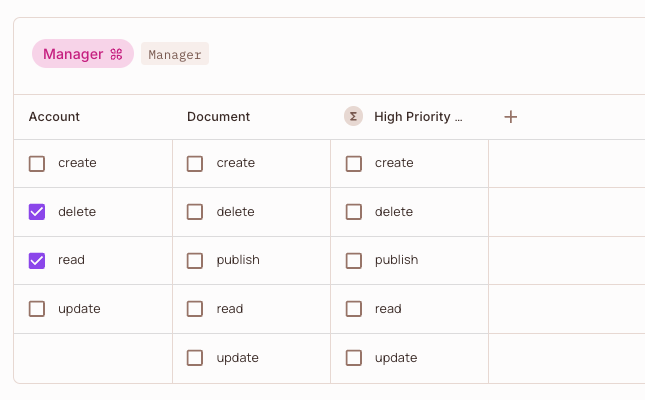
Create a Manager role that can read and delete the account resource. Each entry in permissions is a resource_key:action_key pair, so the environment needs an account resource with read and delete actions before you run the call. To create a resource, see Configure your first RBAC policy.
In the cURL request, replace {proj_id} and {env_id} with the project and environment IDs from the previous step, and YOUR_API_KEY with your environment API key. The SDK call needs neither, because the SDK reads them from the API key.
- cURL
- Node.js
curl 'https://api.permit.io/v2/schema/{proj_id}/{env_id}/roles' \
  --request POST \
  --header 'Authorization: Bearer YOUR_API_KEY' \
  --header 'Content-Type: application/json' \
  --data '{
  "key": "manager",
  "name": "Manager",
  "permissions": ["account:read", "account:delete"]
}'
const role = await permit.api.roles.create({
  key: "manager",
  name: "Manager",
  permissions: ["account:read", "account:delete"],
});
console.log(role.key, role.permissions);
Verify the Manager role
The API returns HTTP 200 with the created role as JSON, including its id, key, and permissions. The Node.js sample prints manager [ 'account:read', 'account:delete' ].
In the Permit dashboard, open Policy > Policy Editor. The Manager role appears, with delete and read selected for Account.