The Four-Perimeter Framework
Learn the Four-Perimeter Framework: the four points in an AI agent's request flow where you check permissions with Permit.io, and which guide implements each check. This page is for AI agent builders who decide where authorization belongs in an agent before they write code.
AI agents read your data and take actions on behalf of users. Without a permission check at each step, an agent can read data and perform actions that the user behind the agent isn't allowed to.
Fine-grained authorization for AI agents
Fine-grained authorization (FGA) checks each access against a policy, using the user, the action, the resource, and their attributes and relationships. An AI agent that acts for a user gets the same checks as the user. The checks limit what a prompt injection, a misused agent, or an overreaching tool call can reach.
The Four-Perimeter Framework applies FGA at four points, from the prompt to the final response. At each point, your application sends a permission check to the Permit policy decision point (PDP) and acts on the decision.
| Perimeter | When the check runs | What the check controls | Implementation guides |
|---|---|---|---|
| Prompt filtering | Before the prompt reaches the large language model (LLM) | Which requests a user can make | OpenAI prompt filtering, PydanticAI, Langflow |
| RAG data protection | When the agent retrieves documents or records | Which data the model sees | MongoDB RAG, LangChain |
| Secure external access | Before the agent calls a tool, API, or external service | Which actions the agent performs, and which need human approval | Access Request MCP, Permit MCP Gateway, PydanticAI, Langflow |
| Response enforcement | After the LLM responds and before the user sees the response | Which content the user receives | PydanticAI, LangChain, Langflow |
The LangChain and PydanticAI guides each build one application that applies all four perimeters. The Langflow guide builds three flows that apply prompt filtering, secure external access, and response enforcement.
Prompt filtering
Prompt filtering checks a user's prompt before the prompt reaches the LLM. The application classifies the prompt into a resource and an action, then asks the PDP whether the user may perform that action. The PDP denies prompts the user isn't allowed to make, so a prompt injection or an out-of-scope request stops before the model runs.
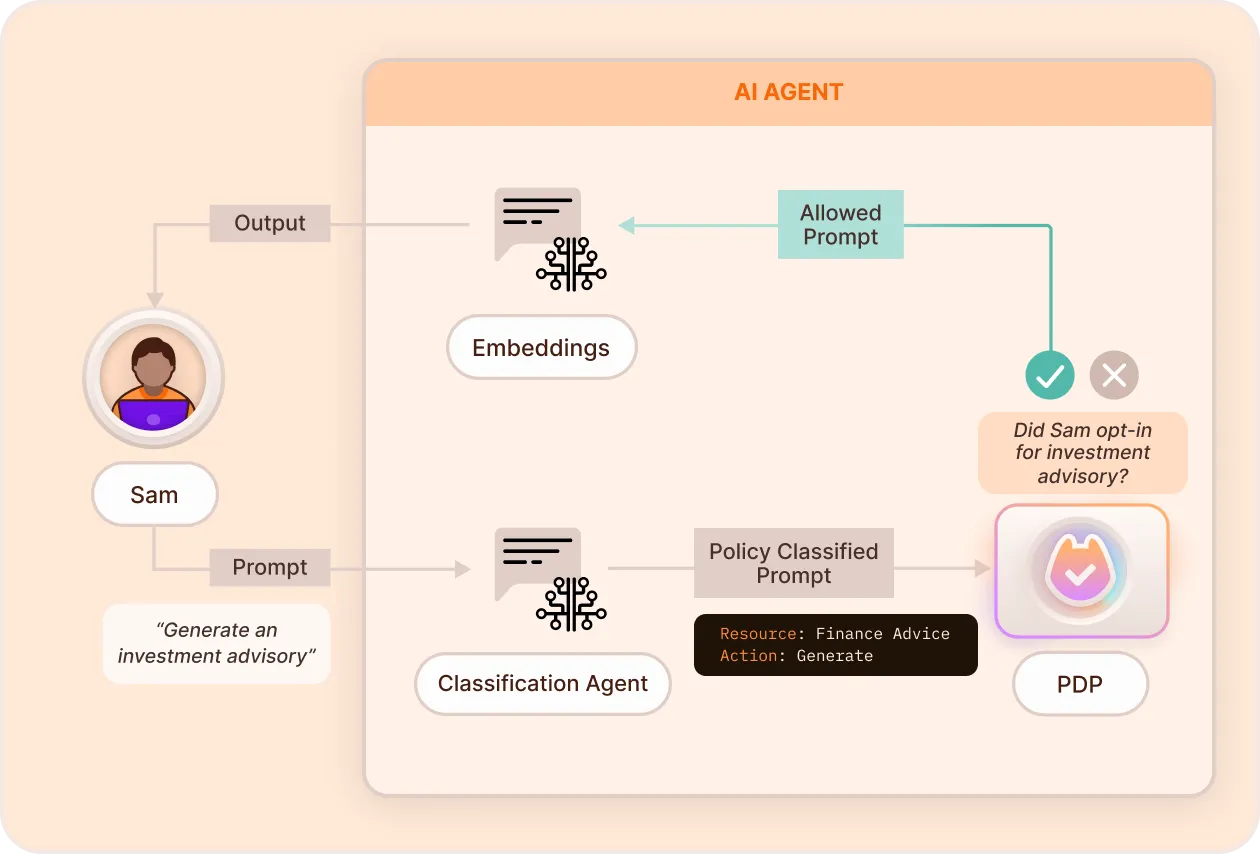
At this perimeter, you:
- Classify the intent of a natural-language prompt, for example with an OpenAI model, into a resource and an action.
- Check the classified request against the user's roles and attributes before the prompt reaches the model.
- Change who can make which requests in the policy, without changing the classification code.
Implement prompt filtering
- OpenAI prompt filtering: classify prompts with OpenAI and check them with Permit.
- PydanticAI: the prompt filtering section checks prompts in a PydanticAI agent.
- Langflow: the Flight Search flow checks a prompt in the Langflow visual editor before the agent runs.
- Blog post: Prompt Filtering with OpenAI: Using GPT for GPT Access Control
- Source code: permitio/permit-prompt-filtering
RAG data protection
RAG data protection filters what the retrieval-augmented generation (RAG) layer retrieves from knowledge bases, documents, and vector stores. The application checks which documents the user may read, so the model sees only data the user is authorized to access.
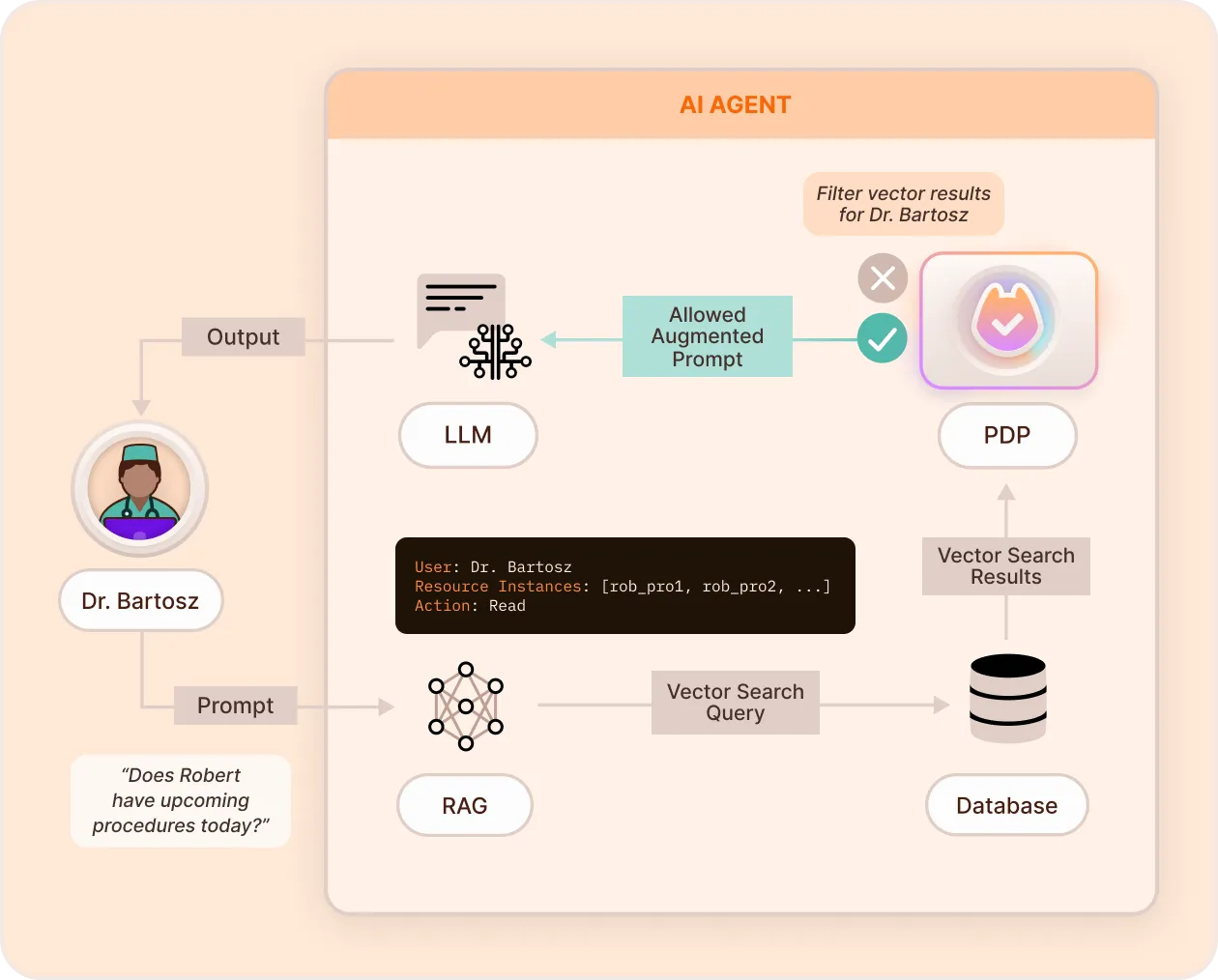
At this perimeter, you:
- Define which users can read which documents or collections in the vector database or knowledge base.
- Use attribute-based access control (ABAC) conditions, such as a document classification, in RAG queries.
- Filter before retrieval, by limiting the query to permitted documents, or after retrieval, by removing documents the user can't read from the results.
Implement RAG data protection
- MongoDB RAG: build a RAG API on MongoDB Atlas that returns only permitted documents.
- LangChain: the secure document retrieval section filters documents in a LangChain application.
- Blog post: Building AI Applications Using RAG and FGA
- Source code: permitio/permit-mongodb-secure-rag
Secure external access
Secure external access checks an action before the agent performs the action through a tool call, an API call, or an external service. Each action is tied to an identity, and the policy limits the agent to what that identity may do. Sensitive actions can wait for a human to approve them.
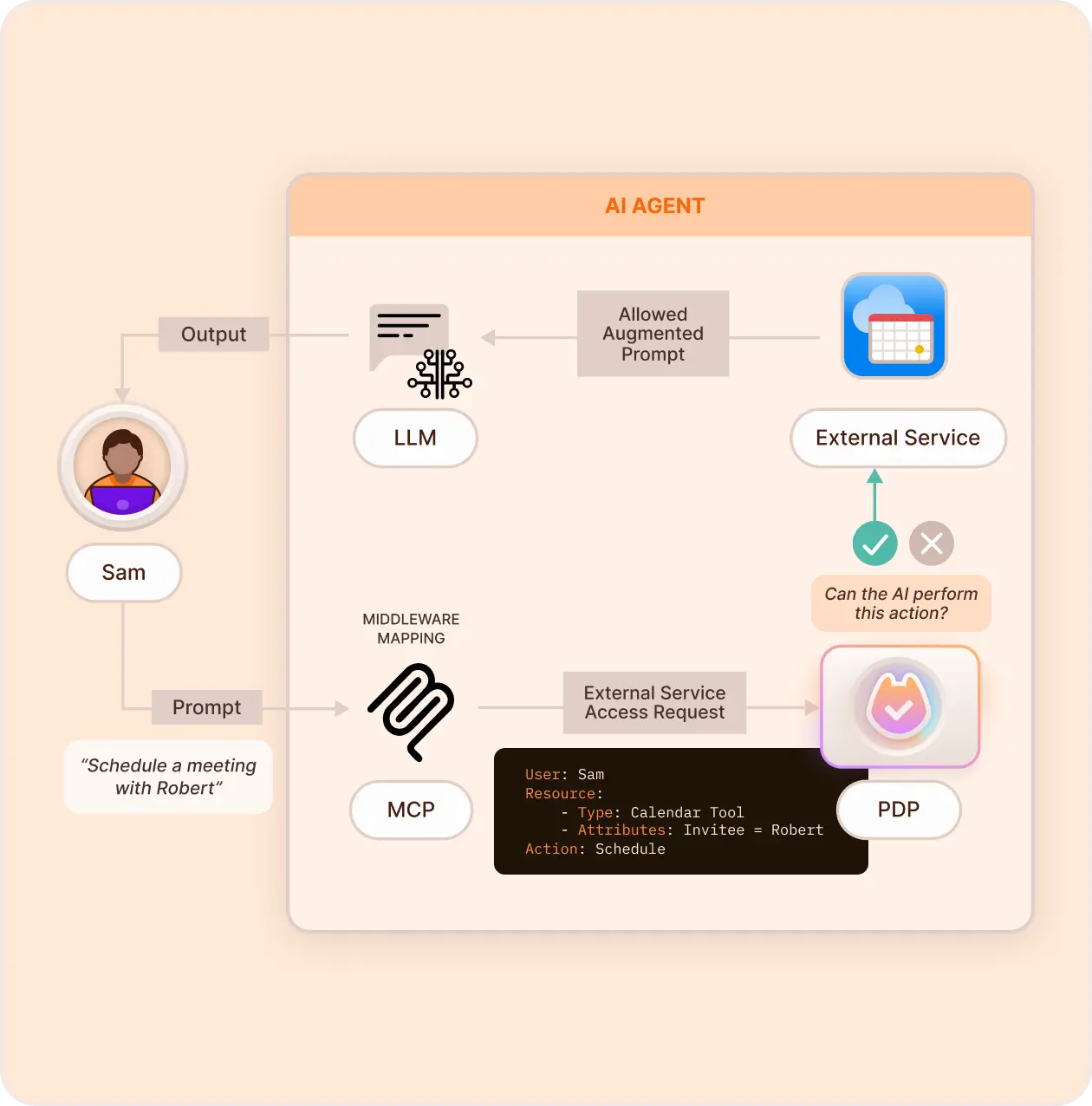
At this perimeter, you:
- Give the agent an identity, and check its tool and API calls against policy.
- Define which operations the agent may perform on which resources.
- Require human approval for sensitive actions, such as purchases or account changes, with access requests and operation approvals.
- Review each permission decision, with the identity it was made for, in the Permit audit log.
Implement secure external access
- Access Request MCP overview: let an agent request access and approvals that a human reviews.
- Permit MCP Gateway: authorize every tool call between MCP clients and MCP servers without changing the servers.
- PydanticAI: the secure external access section checks actions in a PydanticAI agent.
- Langflow: the Flight Booking flow checks the
createaction before the flow calls the booking API. - Blog post: Delegating AI Permissions to Human Users with Access Request MCP
- Source code: permitio/permit-mcp
Response enforcement
Response enforcement checks the LLM's output before the user sees it. The application removes or blocks content the user isn't allowed to receive, so a response doesn't expose data that the earlier perimeters missed.
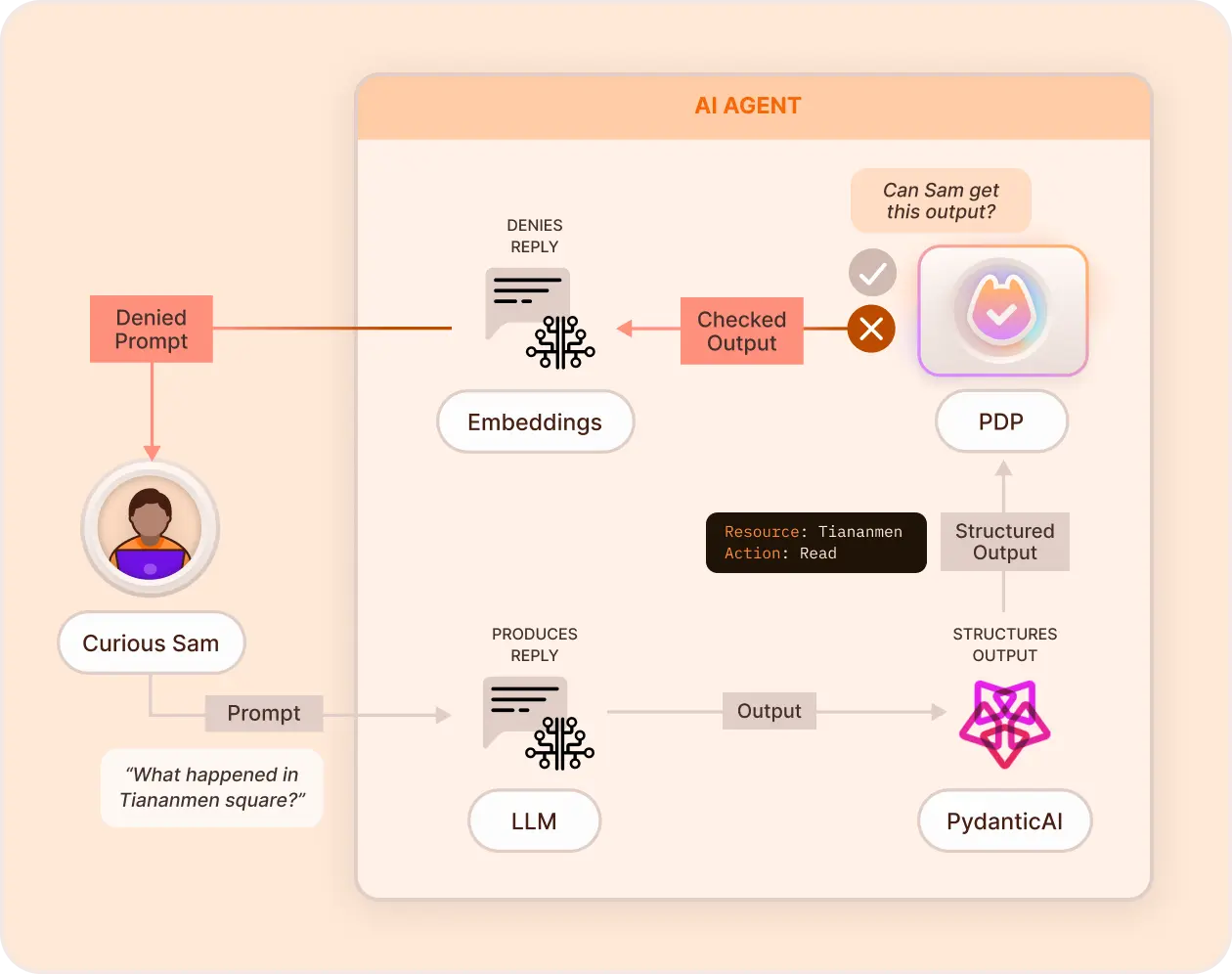
At this perimeter, you:
- Classify the response and remove sensitive content before delivery.
- Check the classified response against policy, so each role receives only the content it may see.
Implement response enforcement
- PydanticAI: the response enforcement section checks agent output.
- LangChain: the response enforcement section sanitizes output with a custom output parser.
- Langflow: the Flight Booking flow limits the booking data in the response to the records the user can access.
- Blog post: Response Enforcement with PydanticAI
- Source code: permitio/Permit-PydanticAI