Secure a PydanticAI agent with Permit.io
Add Permit.io permission checks to the tools of a PydanticAI financial advisor agent. This tutorial is for AI agent builders who use PydanticAI and want each tool call to respect the user's permissions. It applies all four perimeters of the Four-Perimeter Framework, and the source is in permitio/Permit-PydanticAI.
| Perimeter | Agent tool | Permit call |
|---|---|---|
| Prompt filtering | validate_financial_query | permit.check() for receive on financial_advice |
| RAG data protection | access_financial_knowledge | permit.filter_objects() for read on financial_document |
| Secure external access | check_action_permissions | permit.check() for update on portfolio |
| Response enforcement | validate_financial_response | permit.check() for requires_disclaimer on financial_response |
Prerequisites and tech stack
| Tool or service | Purpose |
|---|---|
| PydanticAI | Agent framework with typed tools and results |
| Permit.io account and an environment API key (Get your API key) | Stores the policy |
| An Anthropic API key | PydanticAI reads the key from ANTHROPIC_API_KEY. Set the model string in example/main.py to a model that is Active on the Claude model deprecations page, such as anthropic:claude-sonnet-4-6. See step 5 of Run the agent and verify the perimeters. To use OpenAI instead, set the model string to an OpenAI model. |
| Docker | Runs the Edge policy decision point (PDP). The policy uses attribute-based access control (ABAC), which the Cloud PDP doesn't evaluate. See Cloud PDP capabilities. |
| Python 3.11 or later | Runs the agent. pyproject.toml declares requires-python = ">=3.9", but example/config.py imports typing.NotRequired, which Python added in 3.11, so the script fails to import on 3.9 and 3.10. The repository's .python-version pins 3.13. |
| uv | Installs the example's dependencies |
The example requires pydantic-ai>=0.0.20 and uses the result_type argument and result.data. Later PydanticAI releases renamed some of these APIs. If the agent fails to start, check the PydanticAI changelog against the installed version.
Required environment variables
The example reads the Permit settings from these variables. It uses PERMIT_KEY, not PERMIT_API_KEY:
PERMIT_KEY=<your-permit-api-key>
PDP_URL=http://localhost:7766
ANTHROPIC_API_KEY=<your-anthropic-api-key>
| Variable | Value |
|---|---|
PERMIT_KEY | Your environment API key |
PDP_URL | Your Edge PDP. example/main.py falls back to http://localhost:7766 when PDP_URL isn't set. |
ANTHROPIC_API_KEY | Your Anthropic API key, for the agent model |
The example loads a .env file with python-dotenv:
from dotenv import load_dotenv
load_dotenv()
Plan the access model
The financial advisor agent aims for four rules:
| Perimeter | Rule |
|---|---|
| Prompt filtering | Give AI-generated advice only to users who opted in |
| RAG data protection | Show confidential documents only to users with high clearance |
| Secure external access | Allow portfolio actions only for premium users |
| Response enforcement | Add a disclaimer to responses that contain advice |
The policy that example/config.py creates does not reach the first two rules for a premium_user, because the role grants financial_advice:receive and financial_document:read on the whole resource type. See The premium_user role overrides the attribute rules.
Resources
example/config.py creates these resources:
| Resource | Actions | Attributes |
|---|---|---|
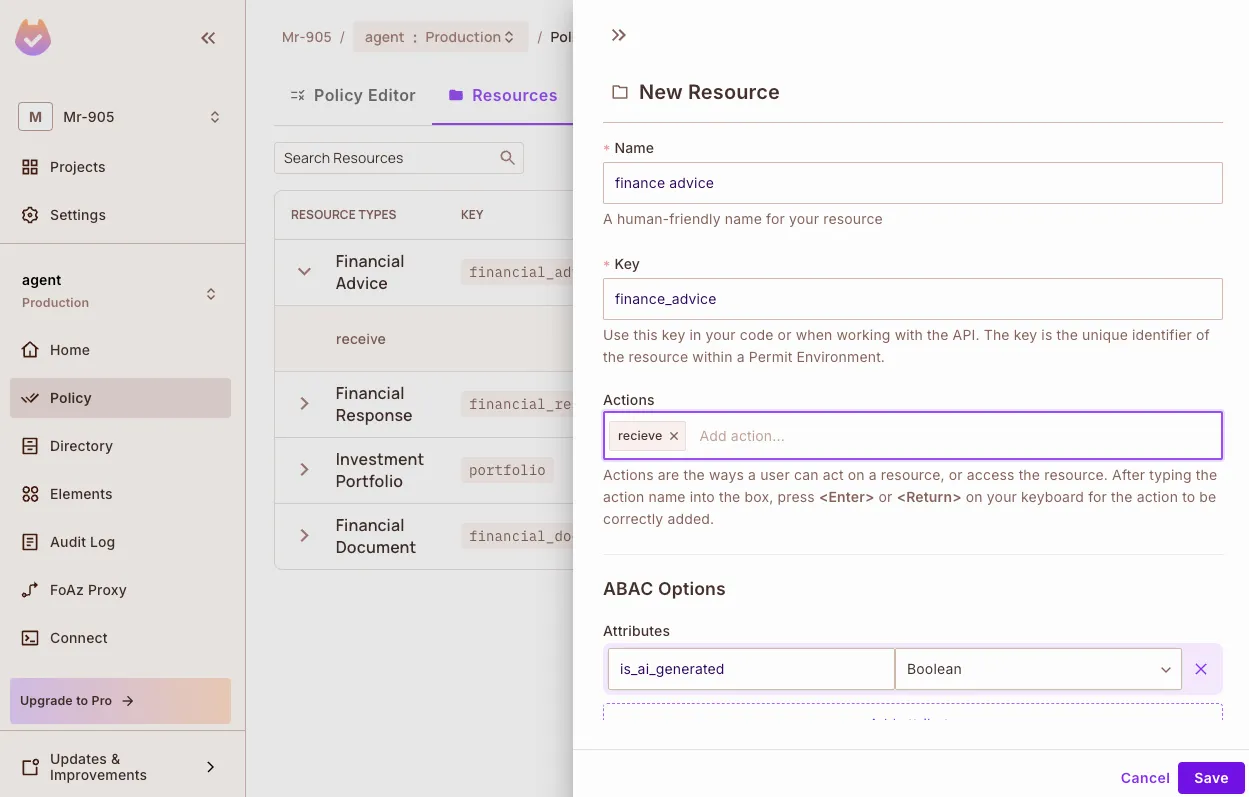
financial_advice | receive | is_ai_generated (bool), risk_level (string) |
financial_document | read | doc_type, classification (public, restricted, confidential), clearance_required |
portfolio | update, read, analyze | owner_id, value_tier |
financial_response | requires_disclaimer | contains_advice (bool), risk_level (string) |
User attributes
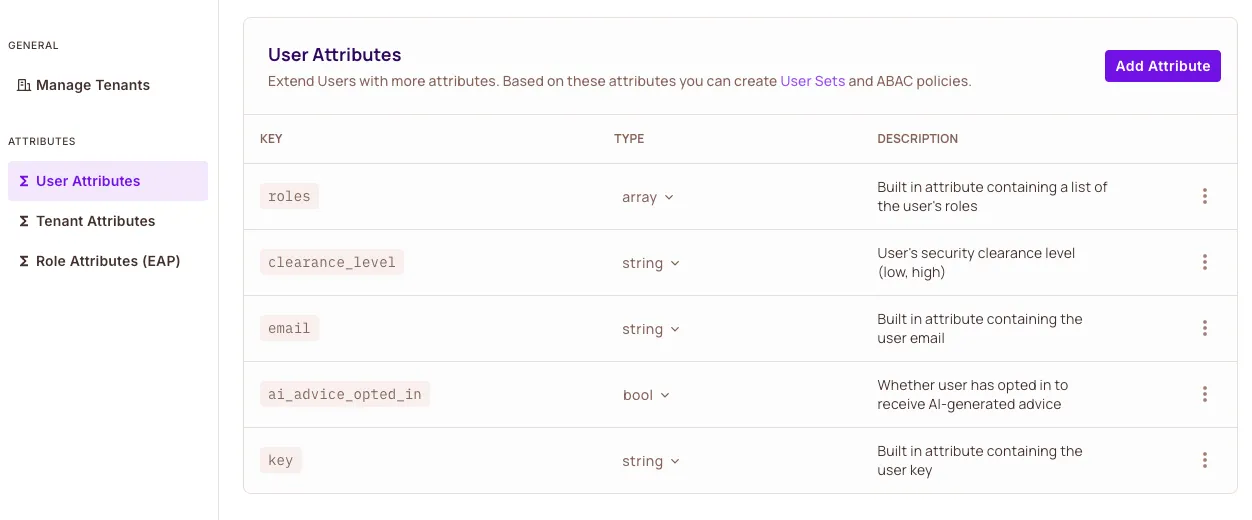
| Attribute | Type | Description |
|---|---|---|
clearance_level | string | The user's clearance: low or high |
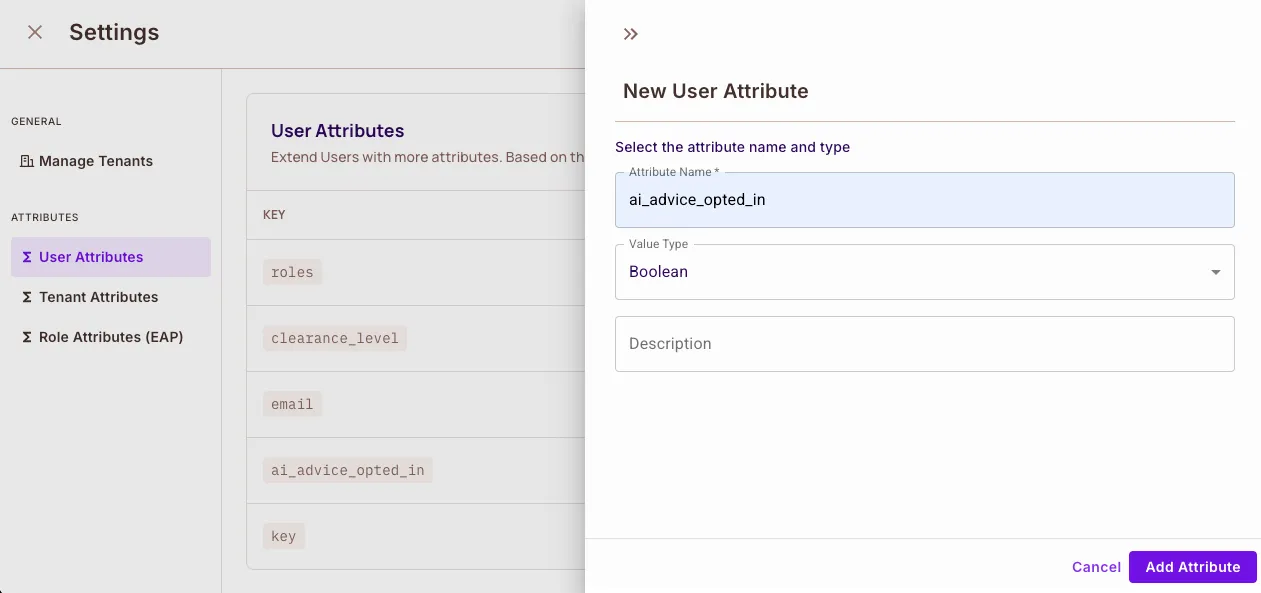
ai_advice_opted_in | bool | Whether the user accepted AI-generated financial advice |
Condition sets
example/config.py creates two user sets and two resource sets:
| Set | Type | Condition |
|---|---|---|
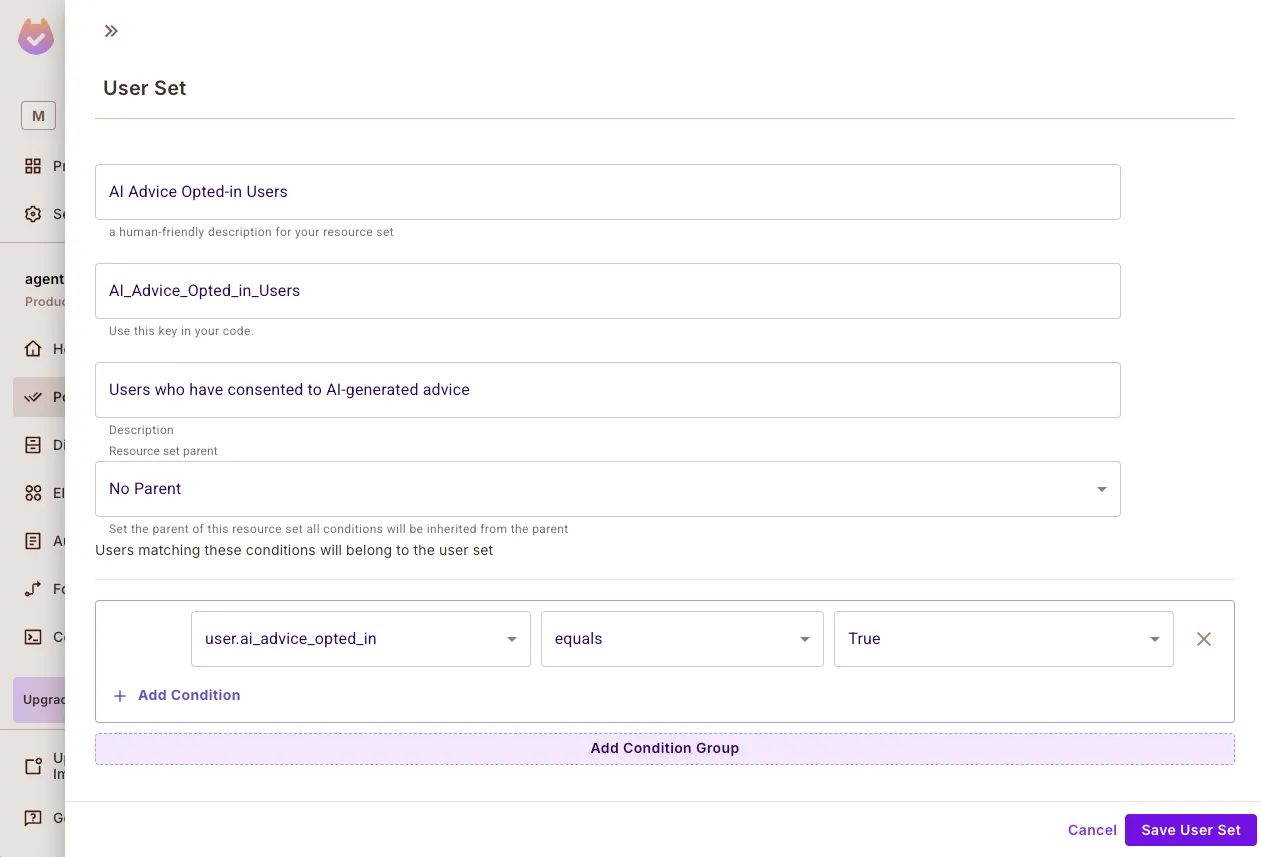
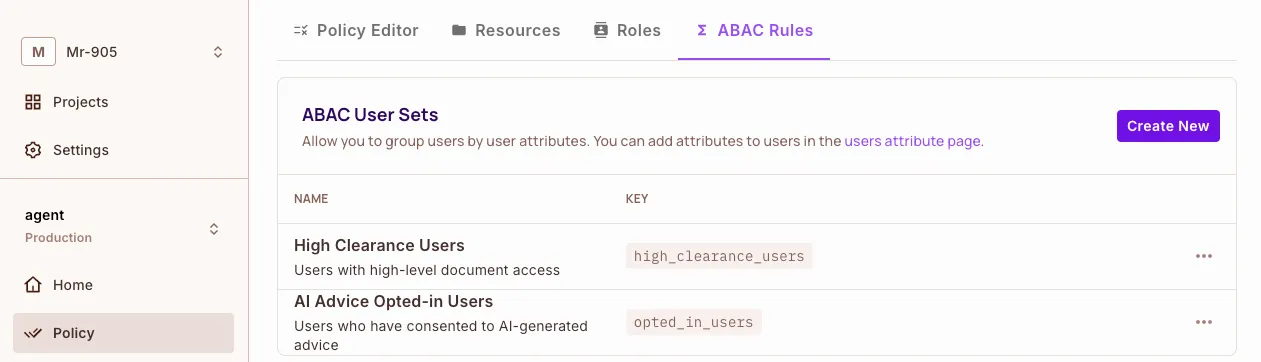
opted_in_users | User set | user.ai_advice_opted_in equals true |
high_clearance_users | User set | user.clearance_level equals "high" |
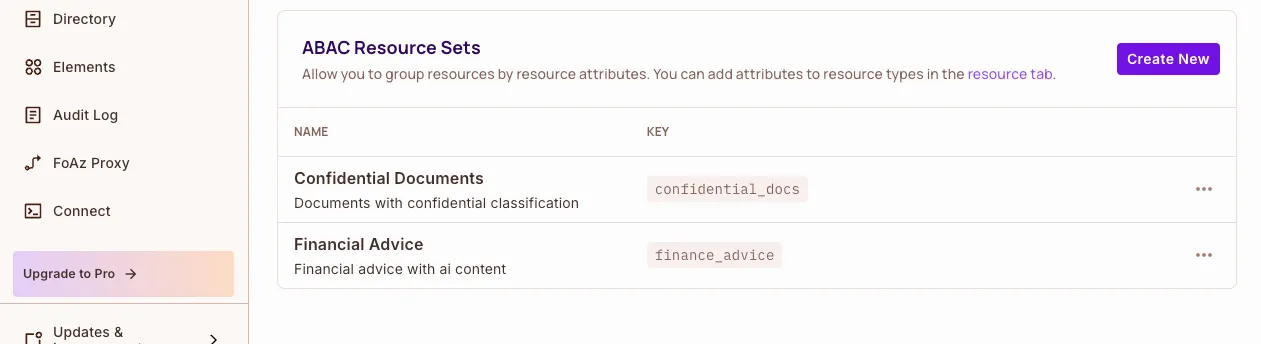
confidential_docs | Resource set on financial_document | resource.classification equals "confidential" |
finance_advice | Resource set on financial_advice | resource.is_ai_generated equals true |
Roles and rules
| Role | Permissions created by config.py |
|---|---|
premium_user | financial_advice:receive, financial_document:read, portfolio:update, portfolio:read, portfolio:analyze |
restricted_user | None |
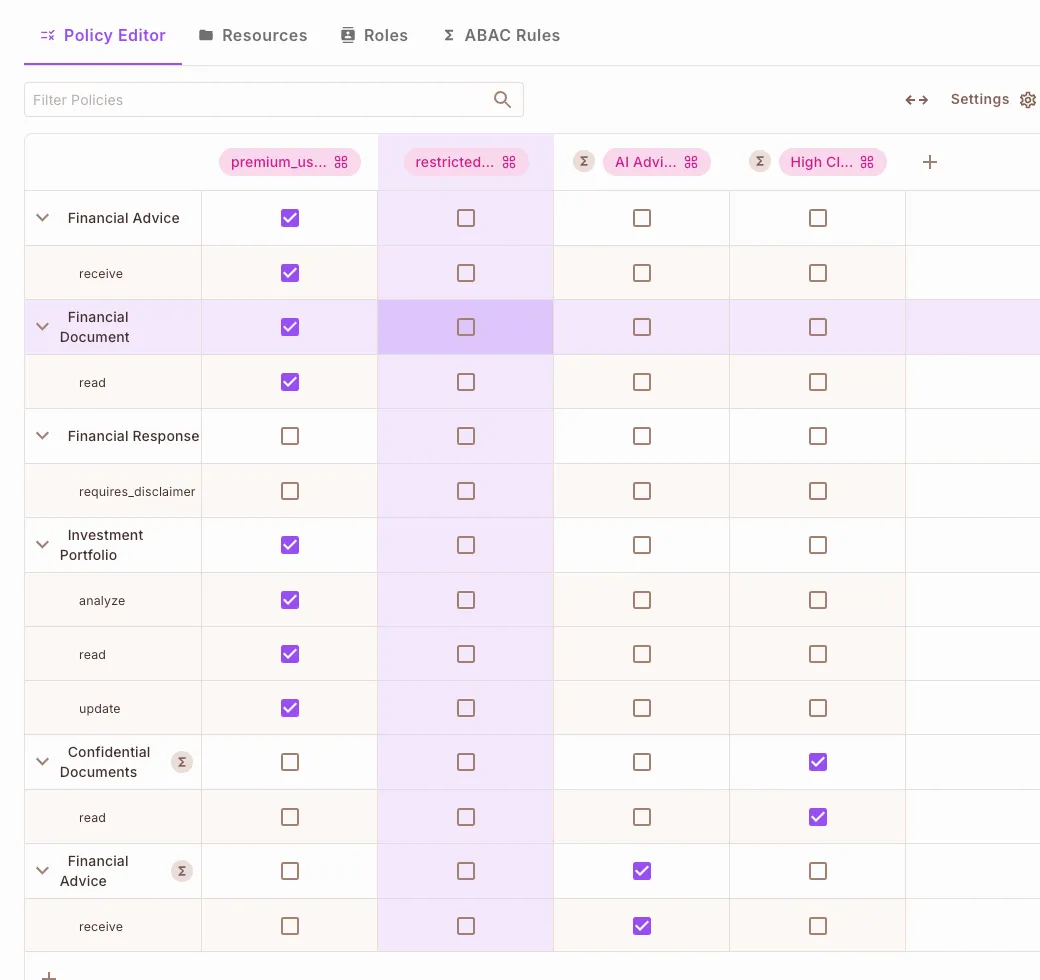
The example defines two condition set rules: opted_in_users can receive on finance_advice, and high_clearance_users can read on confidential_docs. config.py lists these rules but doesn't create them, so grant them in the Policy Editor.
No role or rule in config.py grants requires_disclaimer on financial_response. The response enforcement tool adds a disclaimer only when that check is allowed, so grant requires_disclaimer to premium_user in the Policy Editor.
premium_user role overrides the attribute rulesconfig.py builds premium_user from a flat permission list, so the role grants financial_advice:receive and financial_document:read on the whole resource type. Policy Editor rules are allow rules, and a check is allowed when any rule allows it (see Mix and Match Policies). Those two role grants therefore allow every advice check and every document check for a premium_user, whatever ai_advice_opted_in and clearance_level hold on the user and whatever classification the document carries.
Two consequences follow:
- The
opted_in_usersandhigh_clearance_usersrules change no decision foruser@example.com. Settingai_advice_opted_intofalseorclearance_leveltolowon that user leaves every result in this tutorial the same. restricted@example.comis denied everything becauserestricted_userhas no permissions, not because of its attribute values.
To let the attributes decide, clear receive on financial_advice and read on financial_document for premium_user in the Policy Editor and keep the two condition set rules. Each permission then comes only from a condition set rule: receive needs ai_advice_opted_in to be true and is_ai_generated to be true, and read needs clearance_level to be high and classification to be confidential. Requests outside those two sets, such as a question that isn't advice or a public document, then have no rule that allows them. Add the resource sets and rules you want for those cases before you remove the role grants. See Build ABAC policies.
Run the Edge PDP
Pull and start the PDP. Replace <YOUR_API_KEY> with your environment API key:
docker pull permitio/pdp-v2:latest

docker run -it -p 7766:7000 \
  --env PDP_API_KEY=<YOUR_API_KEY> \
  --env PDP_DEBUG=True \
  permitio/pdp-v2:latest
The PDP listens on http://localhost:7766.
Configure the policy in Permit
Create the policy with the setup script, or by hand in the Permit dashboard.
Create the policy with the setup script
example/config.py creates the resources, the user attributes, the premium_user and restricted_user roles, and the four condition sets. The script doesn't create users, role assignments, or the condition set rules. Run it from the repository root:
uv run python example/config.py
The script reads PERMIT_KEY from the environment.
Create the policy in the dashboard
-
Open Policy > Resources and create the four resources with the actions and attributes listed in Resources.
-
Open Directory > Users > Settings and add the two user attributes listed in User attributes.
-
Open Policy > ABAC Rules and create the user sets from Condition sets: opted-in users who can receive AI advice, and high-clearance users.
-
On the same tab, create the
confidential_docsandfinance_adviceresource sets from Condition sets.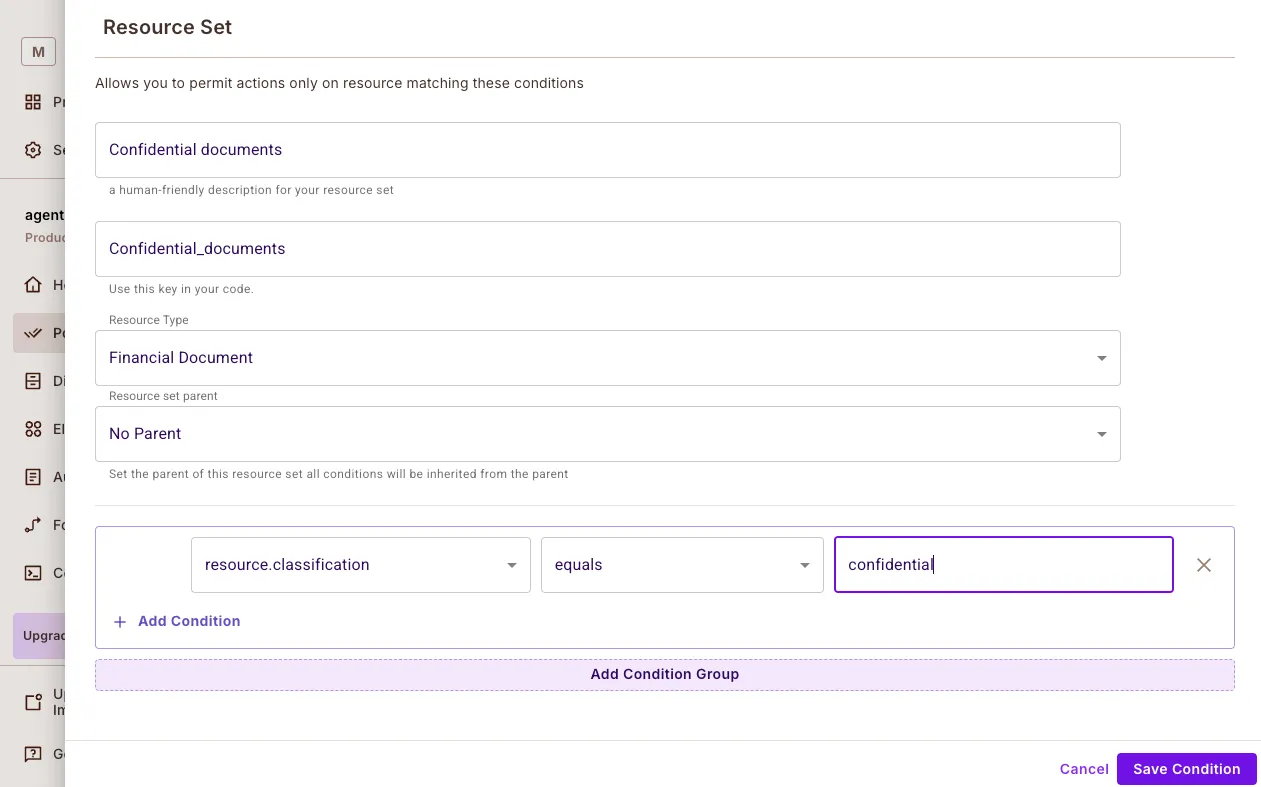
-
In the Policy Editor, grant the role permissions and the condition set rules from Roles and rules.
-
Confirm the policy in the Policy Editor: the
premium_userrow hasreceive,read,update, andanalyzechecked across the four resources, therestricted_userrow has nothing checked, and theopted_in_usersandhigh_clearance_usersrows each have one action checked on their resource set.
Create the test users
In the Directory screen, create the users that config.py describes but doesn't create, and assign each role in the default tenant. See Sync users.
| User key | Role | clearance_level | ai_advice_opted_in |
|---|---|---|---|
user@example.com | premium_user | high | true |
restricted@example.com | restricted_user | low | false |
example/main.py runs the agent as user@example.com. A user key that doesn't exist in Permit gets denied on every check, so create both users before you run the agent.
Perimeter 1: Filter prompts
Prompt filtering rejects a request before the agent acts on it. The validate_financial_query tool classifies whether the question asks for advice, then checks receive on financial_advice with is_ai_generated set to the classification result.
How prompt filtering works
classify_prompt_for_advicedetects whether the question asks for financial advice.permit.check()asks the PDP whether the user canreceivefinancial_advicewith thatis_ai_generatedvalue. Two rules can allow it: thepremium_userrole grant onfinancial_advice:receive, and theopted_in_usersrule on thefinance_adviceresource set.- When the PDP denies the check, the tool returns a denial string to the agent, which the agent relays in its answer. When the PDP allows the check, the tool returns
Trueand the agent continues.
@financial_agent.tool
async def validate_financial_query(
    ctx: RunContext[PermitDeps],
    query: FinancialQuery,
) -> bool | str:
    """SECURITY PERIMETER 1: Prompt Filtering.

    Validates whether users have explicitly consented to receive AI-generated financial advice.
    """
    try:
        # Classify the user's intent.
        is_seeking_advice = classify_prompt_for_advice(query.question)

        # Ask the PDP whether this user may receive this kind of advice.
        permitted = await ctx.deps.permit.check(
            user=ctx.deps.user_id,
            action='receive',
            resource={
                'type': 'financial_advice',
                'attributes': {'is_ai_generated': is_seeking_advice},
            },
        )

        if not permitted:
            if is_seeking_advice:
                return 'User has not opted in to receive AI-generated financial advice'
            else:
                return 'User does not have permission to access this information'

        return True

    except PermitApiError as e:
        raise SecurityError(f'Permission check failed: {str(e)}')
Classify financial prompts
The example classifies prompts with a keyword list:
def classify_prompt_for_advice(question: str) -> bool:
    advice_keywords = [
        'should i',
        'recommend',
        'advice',
        'suggest',
        'help me',
        "what's best",
        'what is best',
        'better option',
    ]
    question_lower = question.lower()
    return any(keyword in question_lower for keyword in advice_keywords)
Expected prompt filtering results
| User | Prompt | Result | Rule that decides |
|---|---|---|---|
user@example.com (premium_user, opted in) | "Can you recommend a bond fund?" | Allowed | The premium_user role grant on financial_advice:receive, not the opt-in rule |
restricted@example.com (restricted_user, not opted in) | "Can you recommend a bond fund?" | Denied. The tool returns the string User has not opted in to receive AI-generated financial advice. | restricted_user has no permissions |
The opt-in rule only changes the outcome after you clear the premium_user role grant on financial_advice. See The premium_user role overrides the attribute rules.
Perimeter 2: Filter documents
Retrieval-augmented generation (RAG) data protection limits the documents the agent can use to the ones the user can read. The access_financial_knowledge tool sends every candidate document, with its classification and doc_type attributes, to permit.filter_objects(), and returns the allowed documents only.
How document filtering works
- The agent passes a list of candidate documents to the tool.
access_financial_knowledgebuilds one resource dictionary per document, with the document ID inkeyand the document attributes inattributes.permit.filter_objects()readskey,type,attributes,context, andtenantfrom each dictionary, so the ID goes inkey.filter_objectsruns one bulk check forreadonfinancial_document, one entry per document.filter_objectsreturns the resource dictionaries the PDP allowed, and the tool maps theirkeyvalues back to the documents it hands the agent.
@financial_agent.tool
async def access_financial_knowledge(
    ctx: RunContext[PermitDeps],
    usr: UserContext,
    documents: list[FinancialDocument],
) -> list[FinancialDocument]:
    """SECURITY PERIMETER 2: Data Protection.

    Filters knowledge base access based on document classification and user clearance.
    """
    try:
        # One resource dictionary per candidate document.
        resources = [
            {
                'key': doc.id,
                'type': 'financial_document',
                'attributes': {
                    'doc_type': doc.type,
                    'classification': doc.classification,
                },
            }
            for doc in documents
        ]

        # filter_objects runs one check per resource and returns the allowed ones.
        allowed_docs = await ctx.deps.permit.filter_objects(
            user=ctx.deps.user_id,
            action='read',
            context={},
            resources=resources,
        )

        allowed_ids = {doc['key'] for doc in allowed_docs}
        return [doc for doc in documents if doc.id in allowed_ids]

    except PermitApiError as e:
        raise SecurityError(f'Failed to filter documents: {str(e)}')
Document model and classifications
Each document has a classification:
class FinancialDocument(BaseModel):
    """Model for financial documents with classification levels."""

    id: str
    type: str = Field(..., description="Document type (e.g., 'investment', 'tax', 'retirement')")
    content: str
    classification: str = Field(
        ...,
        description='Document classification level (public, restricted, confidential)',
    )
access_financial_knowledge sends classification as a resource attribute on every check, which is what the confidential_docs resource set matches on.
Expected document filtering results
| User | Document classification | Result | Rule that decides |
|---|---|---|---|
user@example.com (premium_user, clearance_level: high) | confidential | Allowed | The premium_user role grant on financial_document, not the clearance rule |
user@example.com (premium_user, clearance_level: high) | public | Allowed | The premium_user role grant on financial_document |
restricted@example.com (restricted_user, clearance_level: low) | confidential | Denied | restricted_user has no permissions |
restricted@example.com (restricted_user, clearance_level: low) | public | Denied | restricted_user has no permissions |
The clearance rule only changes the outcome after you clear the premium_user role grant on financial_document. See The premium_user role overrides the attribute rules.
Perimeter 3: Authorize external actions
Secure external access checks permission before the agent changes data in another system, such as updating a portfolio, moving money, or calling a webhook. The check_action_permissions tool checks the requested action on portfolio:
@financial_agent.tool
async def check_action_permissions(
    ctx: RunContext[PermitDeps],
    action: str,
    context: UserContext,
    portfolio_id: str,
) -> bool:
    """SECURITY PERIMETER 3: Secure External Access.

    Controls permissions for sensitive financial operations, such as modifying a portfolio.
    """
    try:
        return await ctx.deps.permit.check(
            user=ctx.deps.user_id,
            action=action,
            resource={'type': 'portfolio', 'key': portfolio_id},
        )
    except PermitApiError as e:
        raise SecurityError(f'Failed to check portfolio permission: {str(e)}')
The check runs before the agent calls the external system, so a denial stops the call instead of reverting it afterwards. The portfolio_id goes in the resource key, which puts the portfolio ID in the audit log entry for the check.
The version of check_action_permissions in the example repository takes the same arguments but ignores action and always checks update. Pass action through, as the block above does, if you want the agent to ask about read and analyze as well.
Expected portfolio results
| User | Action | Result |
|---|---|---|
user@example.com (premium_user) | update on portfolio | Allowed |
restricted@example.com (restricted_user) | update on portfolio | Denied |
Call an external API after the check
Call the external API only when the check returns True:
import httpx
from permit import Permit


async def update_portfolio(
    permit: Permit,
    user_id: str,
    portfolio_id: str,
    payload: dict[str, str],
) -> dict[str, str]:
    """Update a portfolio through an external API, but only if Permit allows it."""
    permitted = await permit.check(
        user=user_id,
        action='update',
        resource={'type': 'portfolio', 'key': portfolio_id},
    )

    if not permitted:
        raise SecurityError(f'{user_id} is not allowed to update portfolio {portfolio_id}')

    async with httpx.AsyncClient(base_url='https://api.example.com') as client:
        response = await client.put(f'/portfolios/{portfolio_id}', json=payload)
        response.raise_for_status()
        return response.json()
Perimeter 4: Enforce the response
Response enforcement checks the final answer before the user sees it. The validate_financial_response tool classifies whether the answer contains advice, checks requires_disclaimer on financial_response, and appends a disclaimer when the answer contains advice and the check allows it.
contains_advice is declared as a bool attribute in example/config.py, so pass the Python bool rather than a string. No role in config.py grants requires_disclaimer, so this check is denied and no disclaimer is added until you grant requires_disclaimer on financial_response to premium_user in the Policy Editor.
@financial_agent.tool
async def validate_financial_response(
    ctx: RunContext[PermitDeps],
    response: FinancialResponse,
) -> FinancialResponse:
    """SECURITY PERIMETER 4: Response Enforcement.

    Ensures all financial advice responses meet regulatory requirements
    and include necessary disclaimers.
    """
    try:
        contains_advice = classify_response_for_advice(response.answer)

        permitted = await ctx.deps.permit.check(
            user=ctx.deps.user_id,
            action='requires_disclaimer',
            resource={
                'type': 'financial_response',
                'attributes': {'contains_advice': contains_advice},
            },
        )

        if contains_advice and permitted:
            disclaimer = (
                '\n\nIMPORTANT DISCLAIMER: This is AI-generated financial advice. '
                'This information is for educational purposes only and should not be '
                'considered as professional financial advice. Always consult with a '
                'qualified financial advisor before making investment decisions.'
            )
            response.answer += disclaimer
            response.disclaimer_added = True
            response.includes_advice = True

        return response

    except PermitApiError as e:
        raise SecurityError(f'Failed to check response content: {str(e)}')
Classify responses
The example detects advice in a response with a keyword list:
def classify_response_for_advice(response_text: str) -> bool:
    advice_indicators = [
        'recommend',
        'should',
        'consider',
        'advise',
        'suggest',
        'better to',
        'optimal',
        'best option',
        'strategy',
        'allocation',
    ]
    response_lower = response_text.lower()
    return any(indicator in response_lower for indicator in advice_indicators)
A keyword list matches substrings, so it flags an answer that contains the word "should" in a sentence that gives no advice. Replace it with an intent classifier or a moderation API before you rely on it in production.
Run the agent and verify the perimeters
-
Start the Edge PDP. Replace
<YOUR_API_KEY>with your environment API key:docker pull permitio/pdp-v2:latestdocker run -it -p 7766:7000 \--env PDP_DEBUG=True \--env PDP_API_KEY=<YOUR_API_KEY> \permitio/pdp-v2:latest -
Verify the PDP answers its health check:
curl -s -o /dev/null -w '%{http_code}\n' http://localhost:7766/healthyA healthy PDP prints
200. See Verify the PDP is healthy. -
Clone the example and install its dependencies:
git clone https://github.com/permitio/Permit-PydanticAI.gitcd Permit-PydanticAIuv sync --all-extras -
Set the environment variables before you run the agent. Put them in a
.envfile in the repository root, whichexample/main.pyloads withpython-dotenv, or export them in the shell:PERMIT_KEY=your-permit-api-keyPDP_URL=http://localhost:7766ANTHROPIC_API_KEY=your-anthropic-api-keyexample/main.pyraisesValueError: PERMIT_KEY environment variable not setand exits ifPERMIT_KEYis missing. -
Replace the model string in
example/main.py.example/main.pybuilds the agent withAgent[PermitDeps, FinancialResponse]('anthropic:claude-3-5-sonnet-latest', ...). Anthropic retired the Claude Sonnet 3.5 models on October 28, 2025, and a request to a retired model fails, so the agent returns an error instead of an answer until you change the string. Set it to a model listed as Active on the Claude model deprecations page, which namesclaude-sonnet-4-6as the replacement for Claude Sonnet 3.5:agent = Agent[PermitDeps, FinancialResponse]('anthropic:claude-sonnet-4-6', ...)Check the deprecations page for the current Active models before you run the agent.
-
Run the agent from the repository root:
uv run python example/main.pyThe script runs two queries as
user@example.comand prints theFinancialResponsefor each one:Secure response: answer='...' includes_advice=True disclaimer_added=True metadata=NoneProtected document access: answer='...' includes_advice=False disclaimer_added=False metadata=NoneThe
answertext comes from the model, so it differs between runs. Theincludes_adviceanddisclaimer_addedflags come from the permission checks:disclaimer_added=Trueon the first response meansvalidate_financial_responseclassified the answer as advice and the PDP allowedrequires_disclaimeronfinancial_response. -
Run the agent as the restricted user. Change
user_idin thePermitDeps(...)call inexample/main.pyfromuser@example.comtorestricted@example.com, then runuv run python example/main.pyagain.validate_financial_queryreturns its denial string to the agent instead ofTrue, so the first answer reports that the user has not opted in, anddisclaimer_addedstaysFalse. -
Open audit logs in the Permit dashboard. Each run adds one entry per check, so you can see which tool ran which check and whether the PDP allowed it. Try these prompts and compare the entries between the two users:
- "What's the best investment strategy in a recession?"
- "Can I get a breakdown of my current portfolio?"
- "What documents do I need to file taxes as a freelancer?"
Expected results
| Request | user@example.com (premium_user) | restricted@example.com (restricted_user) |
|---|---|---|
| Ask for financial advice | Allowed. The answer includes the disclaimer once you grant requires_disclaimer on financial_response. | Denied. validate_financial_query returns User has not opted in to receive AI-generated financial advice. |
| Read confidential documents | Allowed, through the premium_user role grant on financial_document | Denied. restricted_user has no permissions. |
| Read public documents | Allowed | Denied |
| Update a portfolio | Allowed | Denied |
| Ask a question that isn't advice | Allowed, through the premium_user grant on financial_advice:receive | Denied. validate_financial_query returns User does not have permission to access this information. |
Next steps
- Read how the four perimeters fit together in the Four-Perimeter Framework.
- Learn how user sets and resource sets work in Build ABAC policies.
- Read the agent documentation in the Permit-PydanticAI repository.
- Read the PydanticAI access control post on the Permit blog.
- Ask questions in the Permit Slack community.