Secure a LangChain app with Permit.io
Build a Python healthcare assistant with LangChain that checks Permit.io policies at each of the four perimeters of the Four-Perimeter Framework. This tutorial is for AI agent builders who already use LangChain and want to add authorization to a chain. It uses the langchain-permit package for JSON Web Token (JWT) validation and permission checks, and the Permit Python SDK filter_objects method for document filtering.
The finished app does four things in order:
| Perimeter | What the app enforces | Component |
|---|---|---|
| Prompt filtering | Only users who are 18 or older, opted in to AI, and have daily quota left can send a prompt | LangchainJWTValidationTool, LangchainPermissionsCheckTool |
| Retrieval-augmented generation (RAG) data protection | The large language model (LLM) only receives documents the user can view | Permit.filter_objects |
| Secure external access | Only users who are 18 or older with can_schedule set can book an appointment | LangchainPermissionsCheckTool |
| Response enforcement | The phrase "high blood pressure" is redacted from the answer | A custom LangChain output parser |
Prerequisites and tech stack
- A Permit.io account and your environment API key. See Get your API key.
- A running Edge policy decision point (PDP). The policies in this tutorial use attribute-based access control (ABAC) user sets, and the Cloud PDP doesn't evaluate ABAC. See Run an Edge PDP with Docker and Cloud PDP capabilities.
- A JSON Web Key Set (JWKS) endpoint and a signed test JWT whose claims include
keyand anattributesobject. Create a test JWKS and signed JWT shows how to generate both locally. - An OpenAI API key for the chat model and embeddings.
- Python 3.9 or later and Poetry.
Tools and services
| Tool | Role in this tutorial |
|---|---|
| LangChain | Chains the prompt, the retrieved context, and the LLM |
| Permit.io | Stores the policy and evaluates checks on the PDP |
| OpenAI | Chat model and embeddings |
| FAISS | In-memory vector store for the sample documents |
| langchain-permit | LangChain tools that validate JWTs and call permit.check() |
| Poetry | Python dependency management |
Python dependencies
Add these dependencies to your pyproject.toml:
[tool.poetry.dependencies]
python = "^3.9"
langchain = "^0.3.18"
langchain-community = "^0.3.17"
langchain-openai = "^0.3.5"
langchain-permit = "^0.1.4"
permit = "^2.7.2"
pydantic-settings = "^2.7.1"
faiss-cpu = "^1.8.0"
pyjwt = { version = "^2.10.1", extras = ["crypto"] }
This tutorial was written for langchain-permit 0.1.4, which requires langchain, langchain-community, and langchain-openai 0.3.x. Check the current requirements on the langchain-permit PyPI page before you install.
Required environment variables
Add these variables to a .env file in your project root:
PERMIT_API_KEY=your_api_key
PERMIT_PDP_URL=http://localhost:7766  # Your Edge PDP
JWKS_URL=http://localhost:3458/.well-known/jwks.json  # For JWT validation
JWT_ISSUER=your_jwt_issuer
JWT_AUDIENCE=your_jwt_audience
TEST_JWT_TOKEN=your_signed_test_jwt
VECTOR_STORE_PATH=./data/vectorstore
OPENAI_API_KEY=sk-...  # From OpenAI
| Variable | Value |
|---|---|
PERMIT_API_KEY | Your environment API key from Get your API key |
PERMIT_PDP_URL | The URL of your Edge PDP, for example http://localhost:7766 |
JWKS_URL | The JWKS endpoint that holds the public key for your test JWT |
JWT_ISSUER | Any string. Settings requires the variable, and LangchainJWTValidationTool doesn't check the issuer. |
JWT_AUDIENCE | Any string. Settings requires the variable, and LangchainJWTValidationTool doesn't check the audience. |
TEST_JWT_TOKEN | Your signed test JWT |
VECTOR_STORE_PATH | The folder for the FAISS vector store |
OPENAI_API_KEY | Your OpenAI API key |
The Settings class in Configuration settings requires all of these variables. If one is missing, Settings() raises a validation error when the app starts.
Create a test JWKS and signed JWT
LangchainJWTValidationTool reads the kid header of the token, fetches the matching public key from JWKS_URL, and verifies an RS256 signature. The tool doesn't validate aud: PyJWT rejects a token that has an aud claim when no audience is passed, so leave aud out of the test token.
Create scripts/make_test_jwt.py in three parts. The finished script creates an RSA key pair on the first run, writes the public key to jwks/public/.well-known/jwks.json, and prints a signed token for the eligible (user-123) or ineligible (user-456) test user.
Start the file with the imports, the key paths, and the claims of the two test users. The attributes object of each user carries the values that the Eligible AI Users and Scheduling Eligible Users sets evaluate:
# scripts/make_test_jwt.py
import json
import sys
from pathlib import Path

import jwt
from cryptography.hazmat.primitives import serialization
from cryptography.hazmat.primitives.asymmetric import rsa
from jwt.algorithms import RSAAlgorithm

KEY_ID = "test-key"
PRIVATE_KEY_PATH = Path("jwks/private_key.pem")
JWKS_PATH = Path("jwks/public/.well-known/jwks.json")

USERS = {
    "eligible": {
        "key": "user-123",
        "attributes": {"age": 25, "ai_opt_in": True, "daily_quota_remaining": 10, "can_schedule": True},
    },
    "ineligible": {
        "key": "user-456",
        "attributes": {"age": 16, "ai_opt_in": False, "daily_quota_remaining": 0, "can_schedule": False},
    },
}
Append load_or_create_key. The function reuses jwks/private_key.pem when the file exists, so reruns keep signing with the key that the published JWKS holds, and writes a new 2048-bit key when the file is missing:
def load_or_create_key():
    if PRIVATE_KEY_PATH.exists():
        return serialization.load_pem_private_key(PRIVATE_KEY_PATH.read_bytes(), password=None)
    private_key = rsa.generate_private_key(public_exponent=65537, key_size=2048)
    PRIVATE_KEY_PATH.parent.mkdir(parents=True, exist_ok=True)
    PRIVATE_KEY_PATH.write_bytes(
        private_key.private_bytes(
            encoding=serialization.Encoding.PEM,
            format=serialization.PrivateFormat.PKCS8,
            encryption_algorithm=serialization.NoEncryption(),
        )
    )
    return private_key
End the file with main and the entry point. main reads the user name from the first command-line argument and defaults to eligible, writes the public key as a JWKS with the kid that the token header carries, and prints the signed token:
def main():
    user = USERS[sys.argv[1] if len(sys.argv) > 1 else "eligible"]
    private_key = load_or_create_key()

    public_jwk = json.loads(RSAAlgorithm.to_jwk(private_key.public_key()))
    public_jwk.update({"kid": KEY_ID, "alg": "RS256", "use": "sig"})
    JWKS_PATH.parent.mkdir(parents=True, exist_ok=True)
    JWKS_PATH.write_text(json.dumps({"keys": [public_jwk]}, indent=2))

    token = jwt.encode(user, private_key, algorithm="RS256", headers={"kid": KEY_ID})
    print(token)


if __name__ == "__main__":
    main()
Generate a token for the eligible user, then serve the JWKS on port 3458 in a second terminal:
poetry run python scripts/make_test_jwt.py eligible
python3 -m http.server 3458 --directory jwks/public
Set TEST_JWT_TOKEN in .env to the printed token. To check the JWKS endpoint, open http://localhost:3458/.well-known/jwks.json. The response is a JSON object with a keys array that holds one RSA key with "kid": "test-key". Keep jwks/private_key.pem out of version control.
Plan the access model
The healthcare assistant lets users ask health questions, retrieves medical documents as context, and books appointments. Each perimeter maps to one rule:
| Perimeter | Rule |
|---|---|
| Prompt filtering | A user can prompt the assistant only if they are at least 18, opted in to AI use, and have daily quota left. |
| RAG data protection | Users who can prompt the assistant can view public documents. |
| Secure external access | A user can schedule an appointment only if they are at least 18 and can_schedule is true. |
| Response enforcement | The app redacts "high blood pressure" from every answer. |
Policy model: resources, attributes, and sets
| Resource | Action | Represents |
|---|---|---|
healthcare_prompt | ask | Sending a prompt to the assistant |
healthcare_document | view | A medical document in the knowledge base |
healthcare_appointment | schedule | Booking an appointment in an external system |
| Attribute | Type | Used by |
|---|---|---|
user.age | Number | Eligible AI Users, Scheduling Eligible Users |
user.ai_opt_in | Boolean | Eligible AI Users |
user.daily_quota_remaining | Number | Eligible AI Users |
user.can_schedule | Boolean | Scheduling Eligible Users |
resource.public | Boolean | PublicDocs |
| Set | Type | Condition |
|---|---|---|
| Eligible AI Users | ABAC user set | user.age >= 18, user.ai_opt_in == true, user.daily_quota_remaining > 0 |
| Scheduling Eligible Users | ABAC user set | user.age >= 18, user.can_schedule == true |
| PublicDocs | ABAC resource set on healthcare_document | resource.public == true |
Configure the policy in Permit
Create the resources, sets, and rules in the Policy screen of the Permit dashboard.
1. Create the resources
-
Create a resource named
healthcare_promptwith the actionask. This resource represents submitting a prompt.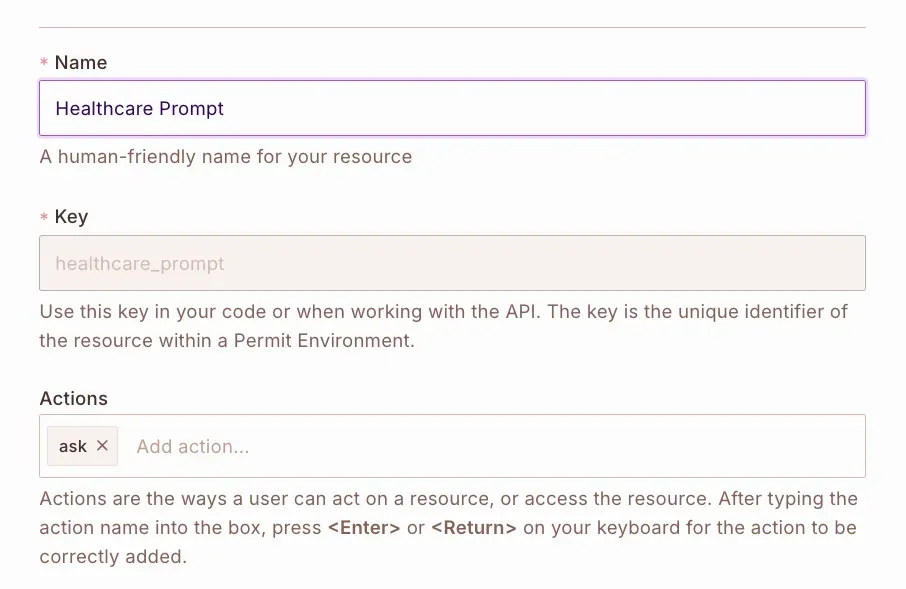
The
healthcare_promptresource appears in the resources list: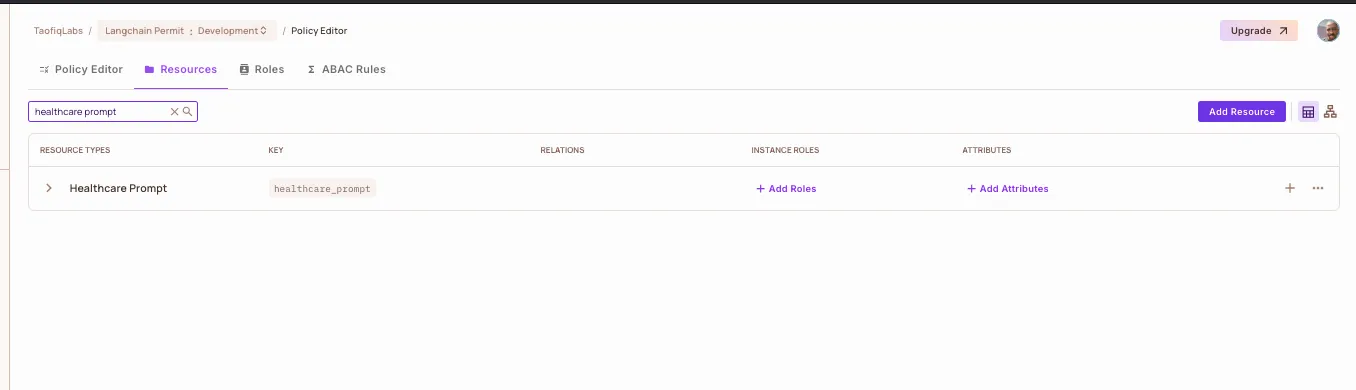
-
Create a resource named
healthcare_documentwith the actionview. This resource represents documents in the knowledge base, such as test results. -
Create a resource named
healthcare_appointmentwith the actionschedule. This resource represents the scheduling system.
2. Create the ABAC user sets and resource set
The conditions use the attributes from Policy model: resources, attributes, and sets. Create the user attributes (age, ai_opt_in, daily_quota_remaining, can_schedule) and the public resource attribute on healthcare_document before you create the sets. See Create user attributes.
-
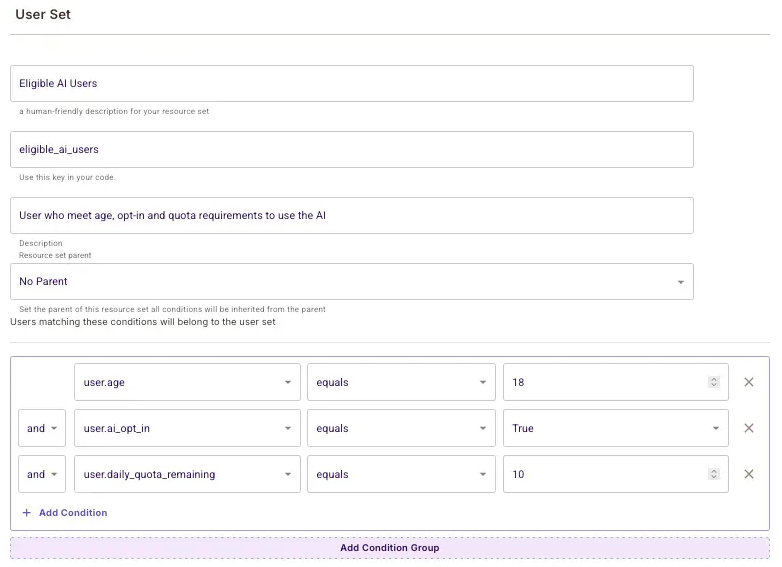
Open ABAC Rules and create an ABAC user set named
Eligible AI Userswith these conditions:user.age >= 18user.ai_opt_in == trueuser.daily_quota_remaining > 0
-
Create an ABAC user set named
Scheduling Eligible Userswith these conditions:user.age >= 18user.can_schedule == true
-
Create an ABAC resource set named
PublicDocsonhealthcare_documentwith the conditionresource.public == true.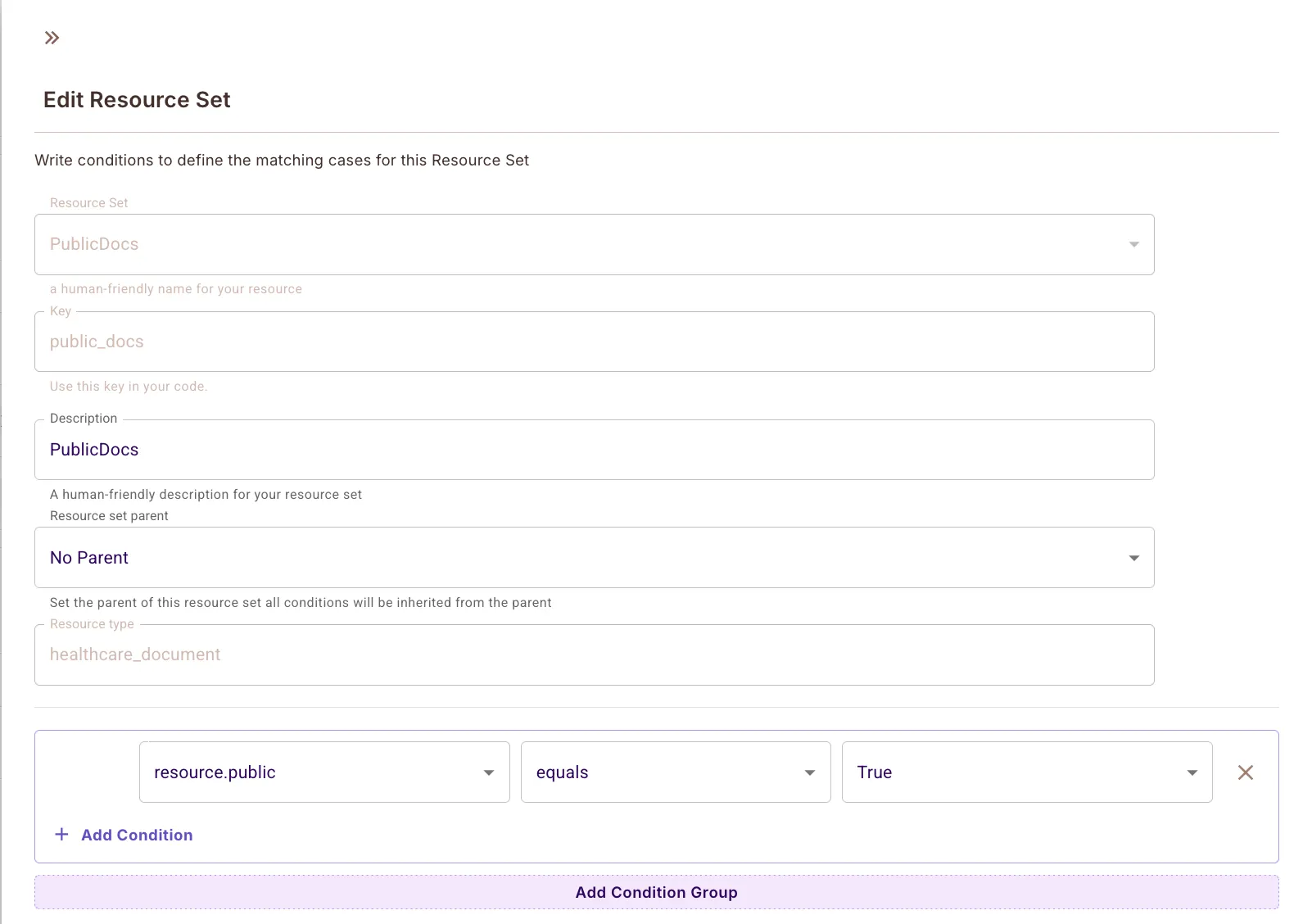
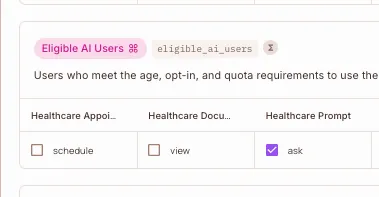
3. Grant access in the Policy Editor
In the Policy Editor, check these boxes and save:
| Who | Action | On |
|---|---|---|
Eligible AI Users | ask | healthcare_prompt |
Eligible AI Users | view | PublicDocs |
Scheduling Eligible Users | schedule | healthcare_appointment |
Add test users
Add two test users in the Directory screen. See Sync users for the steps. The app passes the attributes from the JWT to each check, so the user attributes in the JWT decide the result. The attributes below match the tokens that scripts/make_test_jwt.py signs.
Create example users
Eligible user user-123:
{
  "key": "user-123",
  "attributes": {
    "age": 25,
    "ai_opt_in": true,
    "daily_quota_remaining": 10,
    "can_schedule": true
  }
}
user-123 is 25, opted in to AI, has quota left, and can schedule appointments. The PDP allows user-123 to prompt, view public documents, and schedule.
Ineligible user user-456:
{
  "key": "user-456",
  "attributes": {
    "age": 16,
    "ai_opt_in": false,
    "daily_quota_remaining": 0,
    "can_schedule": false
  }
}
user-456 is under 18, hasn't opted in, and has no quota left. The PDP denies user-456 at prompt filtering, so the app never retrieves documents for user-456.
Perimeter 1: Filter prompts with JWT validation and permission checks
Prompt filtering blocks a user before the LLM receives the prompt. The app validates the user's JWT with LangchainJWTValidationTool, then checks ask on healthcare_prompt with LangchainPermissionsCheckTool.
File structure
Create these modules for prompt filtering:
src/
├── config/
│   └── settings.py          # Load API keys and config
├── core/
│   ├── security.py          # JWT validation
│   └── permissions.py       # Permit policy checks
└── perimeters/
    └── prompt_guard.py      # Combines all checks before LLM access
Configuration settings
Create src/config/settings.py. The Settings class loads the variables from .env with pydantic-settings:
# src/config/settings.py
from pydantic_settings import BaseSettings
from functools import lru_cache

class Settings(BaseSettings):
    openai_api_key: str
    permit_api_key: str
    permit_pdp_url: str
    jwks_url: str
    jwt_issuer: str
    jwt_audience: str
    test_jwt_token: str
    vector_store_path: str
    log_level: str = "INFO"

    class Config:
        env_file = ".env"

@lru_cache()
def get_settings():
    return Settings()
JWT validation
Create src/core/security.py. LangchainJWTValidationTool verifies the token signature against JWKS_URL and returns the claims. SecurityManager raises ValueError when the claims don't include age, ai_opt_in, and daily_quota_remaining in attributes:
# src/core/security.py
from langchain_permit.tools import LangchainJWTValidationTool
from src.config.settings import get_settings

settings = get_settings()

class SecurityManager:
    def __init__(self):
        self.jwt_validator = LangchainJWTValidationTool(jwks_url=settings.jwks_url)

    async def validate_token(self, token: str):
        claims = await self.jwt_validator._arun(token)
        return self._process_user_claims(claims)

    def _process_user_claims(self, claims):
        required = {'age', 'ai_opt_in', 'daily_quota_remaining'}
        attrs = claims.get('attributes', {})
        missing = required - set(attrs.keys())
        if missing:
            raise ValueError(f"Missing required attributes: {missing}")
        return claims

security_manager = SecurityManager()
Prompt permission check
Create src/core/permissions.py. LangchainPermissionsCheckTool calls permit.check() with the user's claims, the ask action, and the healthcare_prompt resource, and returns {"allowed": True} or {"allowed": False}:
# src/core/permissions.py
from permit import Permit
from langchain_permit.tools import LangchainPermissionsCheckTool
from src.config.settings import get_settings

settings = get_settings()

class PermissionsManager:
    def __init__(self):
        self.permit_client = Permit(token=settings.permit_api_key, pdp=settings.permit_pdp_url)
        self.permissions_checker = LangchainPermissionsCheckTool(permit=self.permit_client)

    async def check_prompt_permissions(self, user, prompt_type="general"):
        result = await self.permissions_checker._arun(
            user=user,
            action="ask",
            resource={"type": "healthcare_prompt"}
        )
        return result.get("allowed", False)

permissions_manager = PermissionsManager()
Wrap LLM access in the prompt guard
Create src/perimeters/prompt_guard.py. PromptGuard runs the LLM chain only if the JWT is valid and the permission check returns allowed:
# src/perimeters/prompt_guard.py
from langchain_openai import ChatOpenAI
from langchain.prompts import ChatPromptTemplate
from src.core.security import security_manager
from src.core.permissions import permissions_manager

class PromptGuard:
    def __init__(self):
        self.llm = ChatOpenAI()
        self.prompt = ChatPromptTemplate.from_messages([
            ("system", "You are a helpful medical assistant. Provide general health information only."),
            ("human", "{question}")
        ])

    async def process_medical_query(self, token: str, question: str, prompt_type="general"):
        user = await security_manager.validate_token(token)
        allowed = await permissions_manager.check_prompt_permissions(user=user, prompt_type=prompt_type)
        if not allowed:
            raise ValueError("User does not have permission to use the AI")

        chain = self.prompt | self.llm
        response = await chain.ainvoke({"question": question})
        return response.content

prompt_guard = PromptGuard()
Example entry point
Create src/main.py. The script sends one question with the JWT from TEST_JWT_TOKEN. Call the scheduler from the main script replaces this file with the final version.
# src/main.py
import asyncio
from src.perimeters.prompt_guard import prompt_guard
from src.config.settings import get_settings

async def main():
    settings = get_settings()
    response = await prompt_guard.process_medical_query(
        token=settings.test_jwt_token,
        question="What are common symptoms of a fever?"
    )
    print("Response:", response)

if __name__ == "__main__":
    asyncio.run(main())
Expected prompt filtering results
Run poetry run python -m src.main with each token:
| Test JWT | Result |
|---|---|
Valid signature with age, ai_opt_in, and daily_quota_remaining that match Eligible AI Users | The script prints the LLM response |
attributes is missing age, ai_opt_in, or daily_quota_remaining | ValueError: Missing required attributes before the permission check |
| Under 18, not opted in, or no quota left | ValueError: User does not have permission to use the AI |
Perimeter 2: Filter retrieved documents
Retrieval-augmented generation (RAG) data protection removes documents the user can't view before the documents reach the LLM prompt. The app stores sample documents in FAISS, retrieves candidates with the FAISS retriever, and passes the candidates to filter_objects from the Permit Python SDK. filter_objects sends one bulk check to the PDP with the user's JWT attributes, the view action, and each document's key and attributes, and returns only the documents the PDP allows.
This perimeter uses:
- The
publicattribute on each document - The
PublicDocsresource set - The
viewaction onhealthcare_document
Add sample documents
Create src/perimeters/rag_security.py in two parts. Start with the imports and the RAGSecurityManager constructor, which builds the FAISS index from three sample documents. Each document stores its key (id), its resource type, and its ABAC attributes in its metadata, and only doc1 has public set to true:
# src/perimeters/rag_security.py
from typing import List, Dict, Any
from langchain.schema import Document
from langchain_openai import OpenAIEmbeddings
from langchain_community.vectorstores import FAISS
from src.core.permissions import permissions_manager


class RAGSecurityManager:
    def __init__(self):
        self.embeddings = OpenAIEmbeddings()
        self.sample_docs = [
            Document(
                page_content="Common cold symptoms include runny nose, cough, and sore throat.",
                metadata={"id": "doc1", "type": "healthcare_document", "attributes": {"public": True}}
            ),
            Document(
                page_content="High blood pressure treatment guidelines and medications.",
                metadata={"id": "doc2", "type": "healthcare_document", "attributes": {"public": False}}
            ),
            Document(
                page_content="Patient diagnosis reports and treatment plans for serious conditions.",
                metadata={"id": "doc3", "type": "healthcare_document", "attributes": {"public": False}}
            )
        ]
        self.vectorstore = FAISS.from_documents(self.sample_docs, self.embeddings)
Append get_relevant_documents to the same class body, at one level of indentation, followed by the module-level rag_security_manager instance. The method retrieves the three nearest documents from FAISS, builds one resource dictionary per document, and returns the documents whose keys filter_objects allowed:
    async def get_relevant_documents(self, query: str, user: Dict[str, Any]) -> List[Document]:
        retriever = self.vectorstore.as_retriever(search_kwargs={"k": 3})
        docs = await retriever.ainvoke(query)

        resources = [
            {
                "key": doc.metadata["id"],
                "type": doc.metadata["type"],
                "tenant": "default",
                "attributes": doc.metadata["attributes"],
            }
            for doc in docs
        ]
        allowed = await permissions_manager.permit_client.filter_objects(
            user={"key": user["key"], "attributes": user["attributes"]},
            action="view",
            context={},
            resources=resources,
        )
        allowed_keys = {resource["key"] for resource in allowed}
        return [doc for doc in docs if doc.metadata["id"] in allowed_keys]


rag_security_manager = RAGSecurityManager()
langchain-permit 0.1.4 includes PermitEnsembleRetriever, which also calls filter_objects. The retriever sends the user as a key without attributes and each document as {"id": ..., "type": ...}. The Permit Python SDK reads key, not id, so the PDP receives a check on the resource type with no key and no attributes. The PublicDocs resource set and the Eligible AI Users user set can't match that check, and the retriever returns no documents. See retrievers.py.
Add document filtering to the prompt guard
Replace src/perimeters/prompt_guard.py with the following version. process_medical_query retrieves the allowed documents, prints their keys, and adds their content to the prompt as context:
# src/perimeters/prompt_guard.py
from langchain_openai import ChatOpenAI
from langchain.prompts import ChatPromptTemplate
from src.core.security import security_manager
from src.core.permissions import permissions_manager
from src.perimeters.rag_security import rag_security_manager


class PromptGuard:
    def __init__(self):
        self.llm = ChatOpenAI()
        self.system_prompt = """You are a helpful medical assistant.
        Provide information based on the given context and general health knowledge.
        Do not provide medical advice or diagnosis."""

    async def process_medical_query(self, token: str, question: str, prompt_type="general"):
        user = await security_manager.validate_token(token)
        allowed = await permissions_manager.check_prompt_permissions(user=user, prompt_type=prompt_type)
        if not allowed:
            raise ValueError("User does not have permission to use the AI.")

        context_docs = await rag_security_manager.get_relevant_documents(query=question, user=user)
        print("Documents in context:", [doc.metadata["id"] for doc in context_docs])
        context_text = "\n".join(doc.page_content for doc in context_docs)

        prompt = ChatPromptTemplate.from_messages([
            ("system", self.system_prompt),
            ("system", "Context:\n{context}"),
            ("human", "{question}")
        ])

        chain = prompt | self.llm
        response = await chain.ainvoke({"context": context_text, "question": question})
        return response.content


prompt_guard = PromptGuard()
Expected document filtering behavior
| User | Documents in the LLM context |
|---|---|
Passes prompt filtering (user-123) | Only documents that match PublicDocs (doc1) |
Fails prompt filtering (user-456) | None. process_medical_query raises before retrieval. |
The policy in this tutorial has no rule that grants view on doc2 or doc3. To give some users access to non-public documents, add a user set or role with view on healthcare_document in the Policy Editor.
Run an example query
Run the app with the eligible user's token in TEST_JWT_TOKEN:
poetry run python -m src.main
The output starts with Documents in context: ['doc1']. FAISS returns all three documents, and the PDP allows only doc1, the document with public set to true. The LLM answers without the treatment guidelines from doc2 in its context.
Perimeter 3: Authorize external actions
Secure external access checks permission before the app calls an external system on the user's behalf. In this app, the external action is scheduling an appointment. The PDP allows schedule on healthcare_appointment only for users in Scheduling Eligible Users.
Implement the external access manager
Create src/perimeters/external_access.py. schedule_appointment validates the JWT, checks schedule, and returns a mocked booking confirmation only when the check allows it:
# src/perimeters/external_access.py
from src.core.security import security_manager
from src.core.permissions import permissions_manager

class ExternalAccessManager:
    async def schedule_appointment(self, token: str, appointment_details: dict) -> str:
        try:
            # Step 1: Validate JWT
            user_claims = await security_manager.validate_token(token)

            # Step 2: Check Permit permissions
            check_result = await permissions_manager.permissions_checker._arun(
                user=user_claims,
                action="schedule",
                resource={"type": "healthcare_appointment"}
            )

            if not check_result.get("allowed", False):
                raise ValueError("User does not have permission to schedule an appointment.")

            # Step 3: (Mocked) external call
            date = appointment_details.get("date", "N/A")
            time = appointment_details.get("time", "N/A")
            return f"Appointment successfully booked for {date} at {time}."

        except Exception as e:
            raise ValueError(f"Scheduling failed: {str(e)}")

external_access_manager = ExternalAccessManager()
Call the scheduler from the main script
Replace src/main.py with the following version. After the assistant answers, main() simulates a user who accepts the suggestion to book a follow-up and books an appointment seven days from today:
# src/main.py
import asyncio
from datetime import date, timedelta
from src.perimeters.prompt_guard import prompt_guard
from src.perimeters.external_access import external_access_manager
from src.config.settings import get_settings


async def main():
    settings = get_settings()
    response = await prompt_guard.process_medical_query(
        token=settings.test_jwt_token,
        question="Should I follow up with a doctor about high blood pressure?"
    )
    print("AI Response:", response)

    # Simulate a user who accepts the suggestion to book a follow-up
    user_input = "Yes"
    if user_input.strip().lower() == "yes":
        follow_up = date.today() + timedelta(days=7)
        schedule_response = await external_access_manager.schedule_appointment(
            token=settings.test_jwt_token,
            appointment_details={"date": follow_up.isoformat(), "time": "10:00 AM"}
        )
        print("Scheduling Response:", schedule_response)


if __name__ == "__main__":
    asyncio.run(main())
Expected scheduling results
To test the rows other than the first, edit the attributes in USERS in scripts/make_test_jwt.py and generate a new token.
| User attributes in the JWT | Result |
|---|---|
age=25, can_schedule=true | The script prints the booking confirmation |
age=25, can_schedule=false | ValueError: Scheduling failed: User does not have permission to schedule an appointment. |
age=16, can_schedule=true | ValueError: User does not have permission to use the AI. Prompt filtering fails before scheduling, because Eligible AI Users also requires age >= 18. Called on its own, schedule_appointment raises ValueError: Scheduling failed: ... for this user. |
Every check also appears in the Permit audit logs.
Perimeter 4: Enforce the response
Response enforcement changes the LLM output before the user sees it. The LLM can include sensitive terms in its answer even when the prompt and context passed the earlier perimeters. In this app, a custom LangChain output parser replaces every "high blood pressure" with [REDACTED].
You can extend the parser to detect other content, such as patient names, medical record IDs, or personal data that matches a regular expression.
Create a custom output parser
Create src/perimeters/output_parser.py with a SensitiveDataParser class:
# src/perimeters/output_parser.py
from langchain.schema import BaseOutputParser

class SensitiveDataParser(BaseOutputParser):
    """
    Redacts specific sensitive phrases from LLM output.
    """

    def parse(self, text: str) -> str:
        # Example: redact "high blood pressure"
        return text.replace("high blood pressure", "[REDACTED]")

    def get_format_instructions(self) -> str:
        return "Return the text with any sensitive data redacted."
str.replace is case-sensitive, so the parser doesn't redact "High blood pressure" at the start of a sentence. Use a case-insensitive regular expression if your terms can appear in other cases.
Attach the parser to the LLM chain
Update PromptGuard in src/perimeters/prompt_guard.py to pass the LLM output through SensitiveDataParser:
# src/perimeters/prompt_guard.py
from langchain_openai import ChatOpenAI
from langchain.prompts import ChatPromptTemplate
from src.core.security import security_manager
from src.core.permissions import permissions_manager
from src.perimeters.rag_security import rag_security_manager
from src.perimeters.output_parser import SensitiveDataParser


class PromptGuard:
    def __init__(self):
        self.llm = ChatOpenAI()
        self.sensitive_parser = SensitiveDataParser()
        self.system_prompt = """You are a helpful medical assistant.
        Provide information based on the given context and general health knowledge.
        Do not provide medical advice or diagnosis."""

    async def process_medical_query(self, token: str, question: str, prompt_type="general"):
        user = await security_manager.validate_token(token)
        allowed = await permissions_manager.check_prompt_permissions(user=user, prompt_type=prompt_type)
        if not allowed:
            raise ValueError("User does not have permission to use the AI.")

        context_docs = await rag_security_manager.get_relevant_documents(query=question, user=user)
        print("Documents in context:", [doc.metadata["id"] for doc in context_docs])
        context_text = "\n".join(doc.page_content for doc in context_docs)

        prompt = ChatPromptTemplate.from_messages([
            ("system", self.system_prompt),
            ("system", "Context:\n{context}"),
            ("human", "{question}")
        ])

        chain = prompt | self.llm
        raw_response = await chain.ainvoke({"context": context_text, "question": question})

        # Redact sensitive phrases before returning the answer
        return self.sensitive_parser.parse(raw_response.content)


prompt_guard = PromptGuard()
Redact based on permissions
SensitiveDataParser redacts for every user. To skip redaction for some users, such as doctors, pass the user claims into SensitiveDataParser and call permit.check() on a resource that represents unredacted output. Add that resource and a rule for it in the Policy Editor first.
Run the app and verify each perimeter
Run the app
Check that .env has every variable from Required environment variables and that your Edge PDP is running. Install the dependencies and run the app:
poetry install
poetry run python -m src.main
src/main.py runs these steps:
- Validates the JWT.
- Checks
askonhealthcare_prompt. - Retrieves documents from FAISS and filters them with
filter_objects. - Generates an LLM response from the allowed documents.
- Redacts sensitive terms from the response.
- Checks
scheduleonhealthcare_appointmentand returns a mocked booking.
Example JWT payloads
Pass a token for each test user in TEST_JWT_TOKEN. An environment variable overrides the value in .env. Keep the JWKS server from Create a test JWKS and signed JWT running.
Ineligible user
user-456 is 16, hasn't opted in, and has no quota left:
TEST_JWT_TOKEN=$(poetry run python scripts/make_test_jwt.py ineligible) poetry run python -m src.main
The script exits with a traceback that ends with this line:
ValueError: User does not have permission to use the AI.
Fully eligible user
user-123 is 25, opted in, has quota left, and can schedule:
TEST_JWT_TOKEN=$(poetry run python scripts/make_test_jwt.py eligible) poetry run python -m src.main
Documents in context: ['doc1']
AI Response: ...
Scheduling Response: Appointment successfully booked for <date seven days from today> at 10:00 AM.
The AI Response text depends on the model.
What you should see
- Ineligible users stop at prompt filtering.
- The LLM context includes only documents that
filter_objectsallows. - The answer never contains the lowercase phrase "high blood pressure".
- Scheduling succeeds or fails based on
ageandcan_schedule.
View decisions in the audit logs
Open audit logs in the Permit dashboard to see each check and why the PDP allowed or denied it. When you change a condition in the Policy Editor, the PDP receives the updated policy and the next check uses it.
Next steps
- Read how the four perimeters fit together in the Four-Perimeter Framework.
- Filter data at the database level with data filtering.
- Choose where to run your PDP in the PDP overview.
- Browse the tools and retrievers in the langchain-permit repository.
- Ask questions in the Permit Slack community.