Auth0 Demo Application
Clone and run a Next.js to-do app that signs users in with Auth0 and checks every task request with Permit.io. This page is for developers who want a working example before they add Permit to their own Auth0 app. The app is based on the Auth0 Next.js quickstart. You don't need Next.js experience to run it.
To add the same integration to your own application, follow Auth0 and Permit integration.
Prerequisites
- An Auth0 account with an application configured for the Next.js SDK.
- A Permit.io account and your environment API key. See Get your API key.
- Node.js, installed locally or in a remote development environment.
- Git.
1. Create the policy in Permit
The demo app checks the task resource and passes the lowercase HTTP method of each request as the action. The task list sends GET to load the tasks, POST to add one, PUT to save an edited task, PATCH to tick the completed checkbox, and DELETE to remove a task, so the task resource needs all five actions.
Create this policy in the Permit dashboard, with the Permit API, or with an SDK (Python, Node.js, or another SDK):
- Create a resource with the key
taskand the actionsget,post,put,patch, anddelete. - Create the roles
admin,manager, andviewer. Use lowercase keys. Role keys are case-sensitive and must match the role names in Auth0. - Assign the permissions this page uses:
| Role | get | post | put | patch | delete |
|---|---|---|---|---|---|
admin | Allowed | Allowed | Allowed | Allowed | Allowed |
manager | Allowed | Allowed | Allowed | Allowed | Denied |
viewer | Allowed | Denied | Denied | Denied | Denied |
You can also assign permissions with the assign permissions API.
Leaving an action out of the task resource means no role allows it, so the matching request in the demo returns HTTP 403. Without the put and patch actions, editing a task and ticking its checkbox fail for every role.
2. Add the Auth0 roles claim
Auth0 leaves roles out of the ID token by default, and the demo reads them from the my_app_name/roles claim of the Auth0 session. Add the Auth0 Action that puts them there before the first sign-in: follow Add Auth0 roles to the user's tokens and use my_app_name/roles as the claim name.
Add the Action before you start the app. The demo assigns roles only on a user's first sign-in, so a user who signs in while the claim is missing lands in Permit with no roles, and every task request returns HTTP 403 until you assign a role in the Permit dashboard.
3. Run the demo application
- Clone the repository and check out the
auth0-integrationbranch:
git clone https://github.com/permitio/permit-next-todo-starter
cd permit-next-todo-starter
git checkout auth0-integration
- Create a
.env.localfile in the repository root. The repository includes.env.local.exampleas a template. Add your Auth0 values. Copy the domain, client ID, and client secret from your application's settings in the Auth0 dashboard, and buildAUTH0_ISSUER_BASE_URLfrom the domain ashttps://<your-auth0-domain>. The variable names below are the ones the demo's@auth0/nextjs-auth0version reads; the current Auth0 Next.js quickstart documents a later SDK major with different names, so use the names in this block, not the quickstart's:
AUTH0_SECRET='<auth0_secret>'
AUTH0_BASE_URL='http://localhost:3000'
AUTH0_ISSUER_BASE_URL='<auth0_issuer_base_url>'
AUTH0_CLIENT_ID=<auth0_client_id>
AUTH0_CLIENT_SECRET='<auth0_client_secret>'
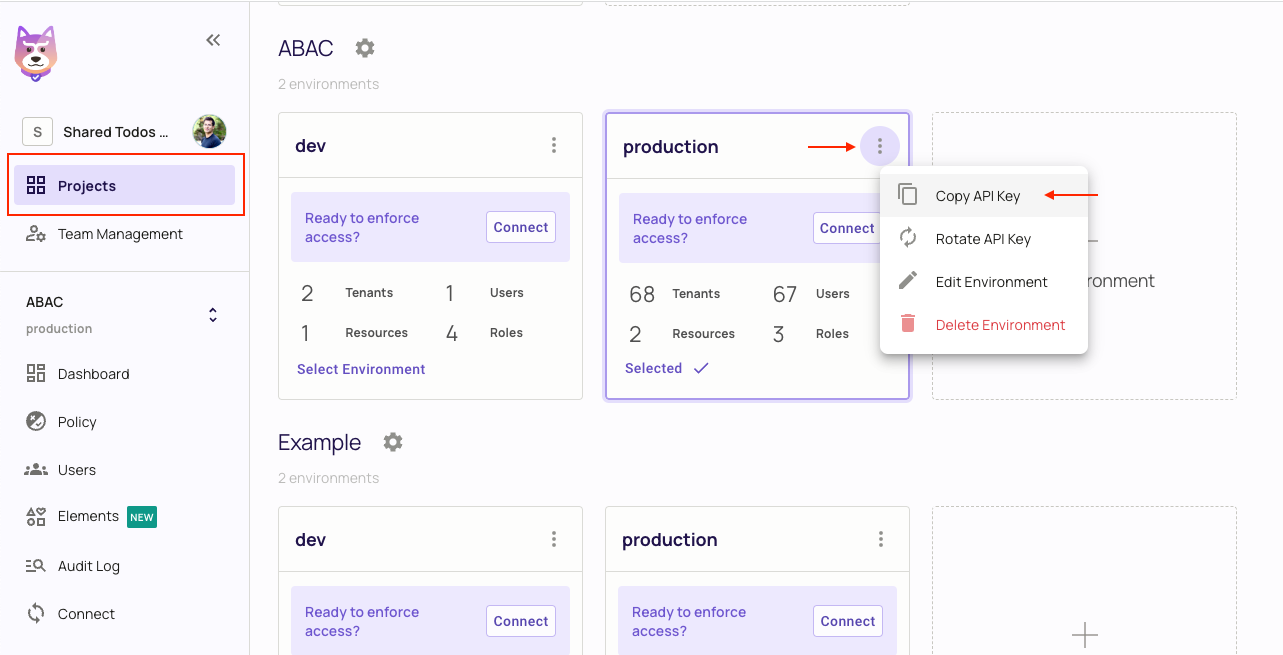
- Add your Permit environment API key to the same file. Copy the key from the Projects page: click the three dots on your environment and select Copy API Key.
PERMIT_SDK_TOKEN=<permit_api_key>
-
Replace the contents of
pages/postLogin/index.tsxwith the version in Sync Auth0 with Permit before you sign in for the first time.The repository version of postLogin throws on a user's first sign-inThe repository's
pages/postLogin/index.tsxcallspermit.api.getUser()with no error handling. For a user who doesn't exist in Permit yet, the Permit API answers404and the SDK rethrows, sogetServerSidePropsthrows, Next.js serves an error page, and the user is never synced. The version in Sync Auth0 with Permit catches that404and continues to the sync, which is what the steps in Verify the demo expect. -
Install the dependencies with
npm install, then start the app withnpm run dev. The app runs athttp://localhost:3000, the value ofAUTH0_BASE_URL.
The demo needs no policy decision point (PDP) of your own. pages/api/tasks.ts creates the Permit client with the Cloud PDP address, https://cloudpdp.api.permit.io, so the checks run against Permit's managed PDP.
4. Verify the demo
- In Auth0, create a user and assign the
managerrole. - Open
http://localhost:3000and sign in with that user. Auth0 sends the user to/postLogin, which syncs the user, then to the task list. - In the Permit dashboard, open Directory. The user appears with the Auth0 user ID (
auth0|...) as its key and themanagerrole in thedefaulttenant. - Add a task. The task appears in the list.
- Delete a task. The request fails, because
managercan'tdeletetasks.DELETE /api/tasksreturns HTTP 403 with this body:
{ "message": "forbidden" }
The task list shows forbidden in a red alert at the top of the page, and the task stays in the list.
- In Directory, assign the
adminrole to the user, and delete the task again. The delete succeeds and the task disappears from the list.
If step 3 shows the user with no role, the my_app_name/roles claim was missing at sign-in. Add the Auth0 Action from 2. Add the Auth0 roles claim, then assign the role in Directory for the user who already signed in.
How the demo app connects Auth0 to Permit
Auth0 answers who the user is, and Permit answers what the user can do. In the demo, pages/api/auth/[...auth0].ts handles the Auth0 routes, and pages/api/tasks.ts reads the Auth0 session with getSession, then calls permit.check() with the Auth0 user ID as the user key, the lowercase HTTP method as the action, and task as the resource. The route returns HTTP 401 when there is no Auth0 session and HTTP 403 when Permit denies the action.
For the code to write in your own app, see Confirm the Auth0 session in your app and Check permissions in your API routes. The rest of this page covers the one part that is specific to the demo: how it syncs users and roles after login.
How the demo app syncs users and roles
Permit can only match a user to roles after the user exists in Permit. The demo app syncs users right after login.
Sync Auth0 with Permit
The Auth0 login handler sends every user to the /postLogin page after login:
// pages/api/auth/[...auth0].ts
import { handleAuth, handleLogin } from "@auth0/nextjs-auth0";

export default handleAuth({
  async login(req, res) {
    await handleLogin(req, res, {
      returnTo: "/postLogin",
    });
  },
});
The /postLogin page syncs the user to Permit in getServerSideProps, with the Auth0 user ID as the user key:
// pages/postLogin/index.tsx
import { getSession } from "@auth0/nextjs-auth0";
import { redirect } from "next/dist/server/api-utils";
import { PermitApiError } from "permitio";
import { permit } from "../api/tasks";

export default function Sync() {
  return <div>Syncing with Permit</div>;
}

export async function getServerSideProps({ req, res }: any) {
  const session = await getSession(req, res);
  const userKey = session?.user?.sub;

  // Skip the sync when the user already exists in Permit.
  try {
    await permit.api.users.get(userKey);
    redirect(res, 302, "/");
    return { props: {} };
  } catch (error) {
    if (!(error instanceof PermitApiError) || error.response?.status !== 404) {
      throw error;
    }
  }

  await permit.api.syncUser({
    key: userKey,
    email: session?.user?.email,
    first_name: session?.user?.name,
  });

  // The Auth0 Action adds the my_app_name/roles claim. Role keys are case-sensitive.
  const roleKeys: string[] = session?.user["my_app_name/roles"] ?? [];
  for (const roleKey of roleKeys) {
    await permit.api.users.assignRole({
      user: userKey,
      role: roleKey,
      tenant: "default",
    });
  }

  redirect(res, 302, "/");
  return { props: {} };
}
The function does four things in order: it reads the Auth0 session, returns early when the user already exists in Permit, syncs the user with the Auth0 user ID (sub) as the user key, and assigns every role in the my_app_name/roles claim in the default tenant. It then redirects the user to the home page.
Role keys must match exactly in Auth0 and Permit, because keys are case-sensitive. The version of pages/postLogin/index.tsx in the repository calls the deprecated permit.api.getUser() and permit.api.assignRole() methods, and runs the role assignments inside a .map() callback that the redirect doesn't wait for. The getServerSideProps block on this page uses the current permit.api.users.get() and permit.api.users.assignRole() methods and awaits each assignment. Compare with pages/postLogin/index.tsx on GitHub.
Next steps
- Auth0 and Permit integration: add the same integration to your own application.
- Sync existing Auth0 users and roles: import users who signed up before the integration.
- Check permissions: learn the full
permit.check()signature.