Add Permit.io permission checks to n8n workflows
Add Permit.io permission checks to n8n workflows with the Permit community node, so a workflow can branch on whether a user is allowed to act, or find the users who are allowed to approve a request. This guide is for developers who build n8n workflows and already have a Permit policy.
n8n is a workflow automation platform. The Permit node sends requests to a Permit policy decision point (PDP) and returns the PDP's response as the node's output, which later nodes in the workflow can read.
Prerequisites
- An n8n instance, on n8n Cloud or self-hosted, where you can install community nodes. See n8n workflows.
- A Permit.io policy with the resources, actions, and roles your workflow checks.
- Your environment API key. See Get your API key.
- For attribute-based access control (ABAC) policies, an Edge PDP that your n8n instance can reach over the network. See Run the PDP.
1. Install the Permit node
- In the n8n workflow editor, click + to add a node.
- Search for Permit and select the Permit node.
- Click Install node and wait for the installation to finish.
The package name is @permitio/n8n-nodes-permitio. For other installation methods, see Install community nodes in the n8n documentation.
2. Add Permit API credentials
- In n8n, open Credentials and create a credential.
- Search for and select Permit API.
- Fill in the fields:
| Field | Value |
|---|---|
| API Key | Your Permit environment API key. The node sends the key as a bearer token to the PDP. |
| PDP URL | The PDP that the node sends requests to. The default is the Cloud PDP, https://cloudpdp.api.permit.io. |
When you save the credential, n8n tests the credential with a permission check request to the PDP URL.
Choose a PDP URL
The Cloud PDP supports role-based access control (RBAC) and relationship-based access control (ReBAC). For ABAC policies, use an Edge PDP. See Cloud PDP capabilities.
For an Edge PDP, set PDP URL to an address that your n8n instance can reach:
| Where the PDP runs | Example PDP URL |
|---|---|
| Same machine as a self-hosted n8n | http://localhost:7766 |
| Another server | http://your-pdp-server:7766 |
| Same Docker network as n8n | http://pdp-container:7766 |
| Kubernetes | http://pdp-service.namespace:7766 |
n8n Cloud can't reach localhost or a private network. To use an Edge PDP with n8n Cloud, expose the PDP at a public HTTPS address, and restrict who can reach that address.
3. Add a permission check to a workflow
Add the Permit node to a workflow, select the Permit API credential, and choose an operation:
| Operation | What the node returns | PDP endpoint |
|---|---|---|
| Check | Whether a user can perform an action on a resource. | /allowed |
| Get User Permissions | The permissions of a user, per tenant and resource instance. | /user-permissions |
| Get Authorized Users | The users who can perform an action on a resource type, with the role that grants the action. | /authorized_users |
Node fields accept n8n expressions, so you can take the user, action, or resource from earlier nodes. For each operation's fields, see Permit node reference.
Verify the check
- Set Operation to Check, and set User, Action, and Resource to a user, action, and resource key from your policy.
- Run the node.
- The output has an
allowfield. For a user whose role allows the action,allowistrue. For a user without such a role,allowisfalse.
If allow is false for a user who should be allowed, check that the user is synced to the environment of your API key, and look up the decision in the audit log.
Check RBAC, ABAC, and ReBAC policies
The Permit node sends the same operations for every policy model. The values you set in the node decide which policy the PDP evaluates. The JSON objects below show the values for each model.
Role-based access control (RBAC)
Set User, Action, and Resource. The PDP allows the action when one of the user's roles has the permission:
{
  "user": "alice@company.com",
  "action": "read",
  "resource": "document"
}
Attribute-based access control (ABAC)
Set User, Action, and Resource, and turn on Enable ABAC. In the Check operation, Enable ABAC sends the body field of the incoming item, such as a webhook payload, as the resource attributes. Every field in the body becomes a resource attribute. The ABAC policy then evaluates conditions on attributes such as expense_amount:
{
  "user": "john.employee",
  "action": "submit",
  "resource": "expense",
  "attributes": {
    "expense_amount": 1500,
    "category": "Travel",
    "department": "Engineering"
  }
}
ABAC checks need an Edge PDP. See Choose a PDP URL.
Relationship-based access control (ReBAC)
Set User, Action, and Resource, and set Resource Key to the key of the resource instance. The PDP evaluates the roles the user has on that instance, including roles derived from relationships:
{
  "user": "manager@company.com",
  "action": "approve",
  "resource": "expense",
  "resource_key": "exp-123"
}
Example: expense approval workflow
This workflow receives expense submissions, checks with an ABAC policy whether the employee can submit the expense, and emails the users who can approve it.
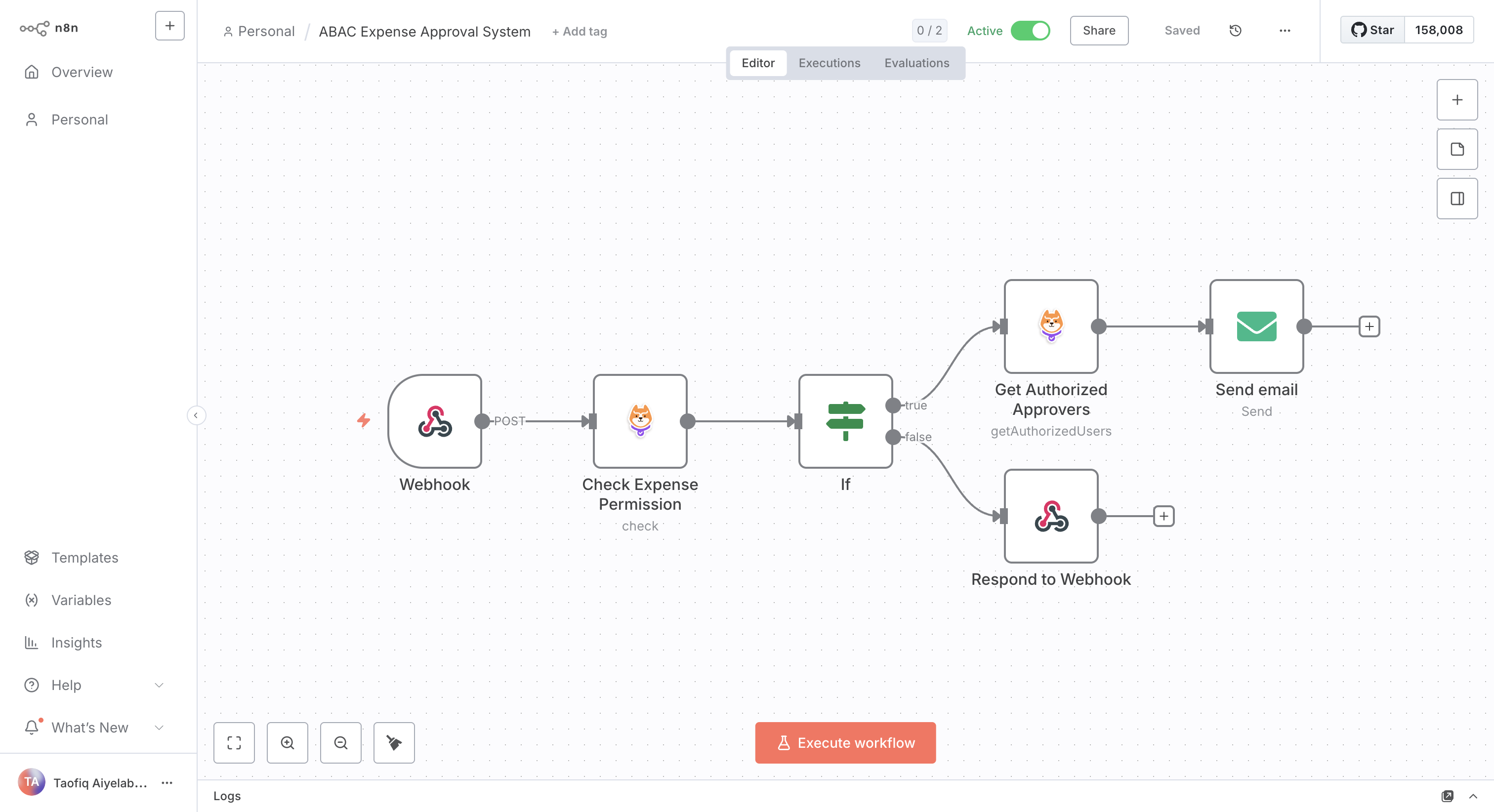
Workflow structure
Node settings
- Webhook node: receives the expense submission as JSON, with the employee and expense details.
- Permit node, Check operation:
- User:
{{$node['Webhook'].json.body.employee_email}} - Action:
submit - Resource:
expense - Enable ABAC: on. The node sends the webhook body, including
expense_amountandcategory, as resource attributes.
- User:
- IF node: routes on the
allowfield of the Permit node output. Whenallowistrue, the item goes to the Get Authorized Users node. Whenallowisfalse, the item goes to a Respond to Webhook node that returns an error response. - Permit node, Get Authorized Users operation:
- Action:
approve - Resource Type:
expense - Resource Attributes (JSON):
{"expense_amount": 1500, "category": "Travel"}
- Action:
- Send Email node: emails the users in the Get Authorized Users output about the pending expense.
The workflow depends on an ABAC policy in Permit that allows submit on expense only below an amount limit, and a role that allows approve on expense. See Build ABAC policies.
Test the workflow with example payloads
Send this payload to the webhook. When your policy allows the amount, the Check returns allow: true, and the workflow emails the authorized approvers:
{
  "employee_email": "john.employee",
  "expense_amount": 1500,
  "category": "Travel",
  "description": "Client meeting"
}
Send this payload with an amount above your policy's limit. The Check returns allow: false, and the workflow returns the error response you configured on the denied branch:
{
  "employee_email": "john.employee",
  "expense_amount": 2500,
  "category": "Travel"
}
Permit node reference
Each operation sends a POST request to the PDP URL of the credential and returns the PDP response as the node output.
Check
Checks whether a user can perform an action on a resource.
| Field | Description |
|---|---|
| User | The user key. Supports expressions. |
| Action | The action key, such as read or submit. |
| Tenant | The tenant key. The default is default. |
| Resource | The resource type key, such as document or expense. |
| Enable ABAC | Sends the body field of the incoming item as resource attributes. Off by default. |
| Resource Key | The resource instance key, for ReBAC checks. Optional. |
The output has an allow field with the decision, true or false. The PDP can also return query and debug fields with details of the evaluation.
{
  "allow": true
}
Get User Permissions
Returns the permissions of a user. See Get user permissions.
| Field | Description |
|---|---|
| User | The user key. |
| Resource Types | A comma-separated list of resource types to include, such as expense,document. Optional. |
| Enable ABAC | Includes permissions granted by ABAC policies. Off by default. |
The PDP returns an object with one entry per tenant or resource instance. Each entry lists the permissions of the user there, as resource:action strings, and can include the roles that grant them:
{
  "__tenant:default": {
    "tenant": { "key": "default", "attributes": {} },
    "permissions": ["expense:submit"],
    "roles": ["employee"]
  }
}
Get Authorized Users
Returns the users who can perform an action on a resource type, and the role assignment that grants each user the action. See Get authorized users.
| Field | Description |
|---|---|
| Action | The action key, such as approve. |
| Resource Type | The resource type key, such as expense. |
| Tenant | The tenant key. The default is default. |
| Resource Attributes (JSON) | A JSON object of resource attributes. The default is {}. |
| Enable ABAC | Includes users authorized by ABAC policies. Off by default. |
Example output:
{
  "resource": "expense:*",
  "tenant": "default",
  "users": {
    "finance.admin@company.com": [
      {
        "user": "finance.admin@company.com",
        "tenant": "default",
        "resource": "__tenant:default",
        "role": "finance_approver"
      }
    ]
  }
}
In the output, users maps each user key to the role assignments that allow the action.
Get help
- For bugs in the Permit node, open an issue in the n8n-nodes-permitio repository.
- For n8n questions, use the n8n community forum.
- For Permit questions, ask in the Permit Slack community.